Kite
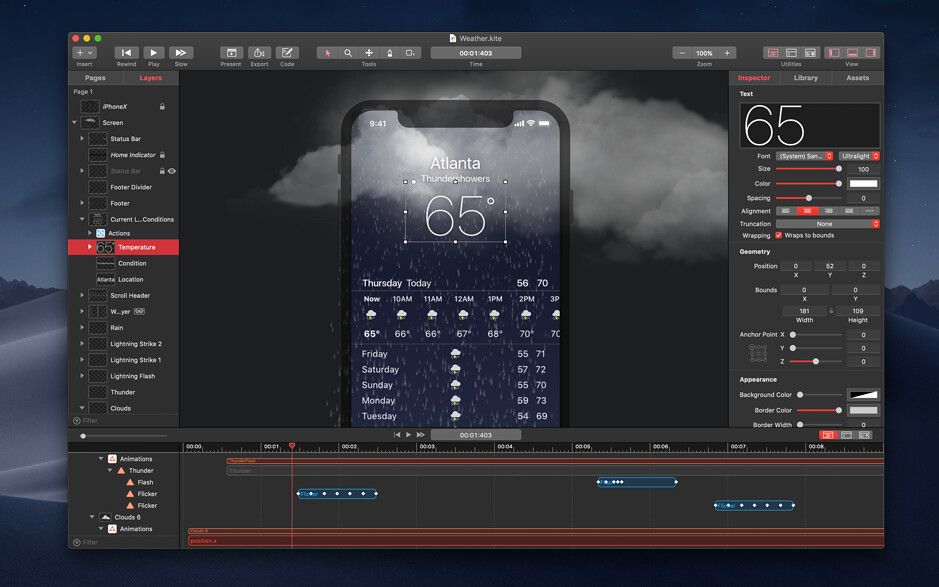
Kite Compositor lets you visually drag-and-drop layers to build complex interfaces on a WYSIWYG canvas. Add animations and tune...
Description
Kite Compositor lets you visually drag-and-drop layers to build complex interfaces on a WYSIWYG canvas. Add animations and tune them with the integrated timeline. Use the built-in JavaScript scripting environment to enhance the detail of each interaction. Incorporate custom logic and behavior to achieve exactly what you need.
Features
• Timeline – The integrated smart timeline allows you to drag and edit animation durations and keyframes. Snap animation start and end times together for a precise, hand-tuned feel.
• Inspector – A robust and powerful object inspector allows you to edit all of your layers’ properties in just a few clicks. Set colors, ajust animation curves, add CoreImage filters – all at the click of a mouse.
• Library – Drag-and-drop layers and animations from the library to build your interface visually. Save reuseable layer hierarchies into your library for easy component reuse.
• Design on Mac, View on iOS – Are you ready to get a sense of how your designs feel on an actual iOS device? Download the native companion app, Kite Compositor for iOS.
• Import from Sketch – Easily import your designs from Sketch with Kite’s native import feature. Preserve editable bezier paths and text by importing your Sketch layers as native Kite layers.
• Export – Share your designs by exporting a movie or gif recording of your animation.
• Scriptable – Add sophisticated logic to your animations and interactions via the built-in JavaScript scripting engine. Query and make live edits to your running animation from the built-in JavaScript console. Fire animations, add new layers, change properties and much more.
• Built on CoreAnimation – Kite was built from the ground up for Mac using macOS’s native CoreAnimation technology. CoreAnimation is one of the key underpinning graphics technologies on Mac and iOS that produces stunning animations at high framerates.
WHAT’S NEW
Version 2.1.2:
• Fixes an issue that could lead to a crash when importing images or disclosing t
Editor-checked details
Recommended for product designers and prototype engineers creating iOS/macOS microinteractions, transitions, onboarding and concept UI. Workflow: define device size, frame rate and states; name Sketch/XD layers; audit after import; save repeated hierarchies to Library; build primary timeline/easing; add Actions; use trusted JavaScript only when needed; review loop ranges; test touch timing on device; export video/GIF for approval; generate code and list unsupported behaviour; complete state/accessibility in Xcode; compare pixels/timing; archive Kite, scripts, assets, manifest and SHA-256. Use Hype for web interaction, After Effects for complex compositing, and Figma/Sketch for UI-only prototypes.
Pros
- It combines WYSIWYG layers, Core Animation properties, a keyframe timeline and Actions in one native Mac tool: designers work visually and developers can extend with JavaScript. Timeline snapping, loop ranges and Bezier motion paths support precise tuning; Library items preserve reusable hierarchies. Sketch/XD import reduces rebuilding, GIF/video supports review, and Swift/Objective-C plus asset export helps iOS/macOS handoff. An open document format, KiteKit and live console aid technical integration.
Cons
- It is an interaction/motion prototype and Core Animation design tool, not full video post, 3D animation or a production application runtime. Generated code omits JavaScript and maps only limited Actions, so engineers must implement interaction, state, data, accessibility and error handling. Sketch/XD import cannot preserve every effect. GIF limits colour/frame rate and video is flattened. Its Apple Core Animation focus weakens Web/Android reuse; old projects, fonts and media need disciplined archiving. Validate the actual Apple silicon architecture path on target hardware.
Installation steps
- Kite Compositor 2.1.2 officially requires macOS 11 or later. Intel is supported; on Apple silicon, use a small project to determine whether Rosetta 2 is required. Back up Kite documents, custom Library components, media, fonts and JavaScript. Build a short interaction with text, Bezier paths, image, video and nested layers; verify canvas scaling, layer disclosure, timeline snapping, keyframes, easing, loop ranges, Core Image filters and actions. After Sketch/XD import, compare fonts, paths, masks, dimensions and hierarchy layer by layer. Load only trusted scripts and test setup, property changes and animation firing in the console. Export GIF/video and Swift/Objective-C code separately; confirm assets are copied, scripts are not generated, and only supported Play Animations actions become IBAction methods.
Uninstallation steps
- Before uninstalling, archive source Kite documents, custom Library items, media, fonts, Sketch/XD sources and JavaScript. Export a reference movie/GIF, native code and the complete asset directory. Create a manifest for document version, canvas/frame rate, layer tree, timeline range, keyframes, easing, actions, script entry points, fonts and licences; calculate SHA-256 for project, scripts, media and deliverables. Reopen offline, play through, run a representative script, regenerate code, and compile/compare a key animation in a minimal Xcode project before removing the app. Generated code does not replace the Kite master containing scripts and full interaction logic.
Common errors and fixes
- Image import or layer-list disclosure crashes are explicit 2.1.2 fixes. If they recur, isolate with simple PNG/JPEG and shallow hierarchy, then record a minimal reproduction. After Sketch/XD import, text wrapping, fonts, Bezier paths, masks or dimensions can change because of missing fonts, scaling, clipping or unsupported properties. Desynchronisation usually comes from keyframe timing, parent transforms, snapping or loop range. If generated code differs from preview, remember that JavaScript is not exported and Action code support is limited; inspect asset paths and platform Core Animation differences. Use video instead of GIF for banding/frame loss and a suitable codec for alpha. For script errors, check layer names, lifecycle and console, and never run untrusted code.
What changed in this version
- Kite Compositor 2.1.2 is a macOS Sonoma fix release. It explicitly fixes a possible crash while importing images or disclosing the layer-list outline. The WYSIWYG canvas, timeline, keyframes/easing, Library components, Sketch/XD import, JavaScript, Core Image, iOS preview, GIF/video and Swift/Objective-C export are established capabilities, not new 2.1.2 claims. Regression should focus on image import, deep layer trees, reopen, playback and export.






Alternatives



Screenshots