Sketch
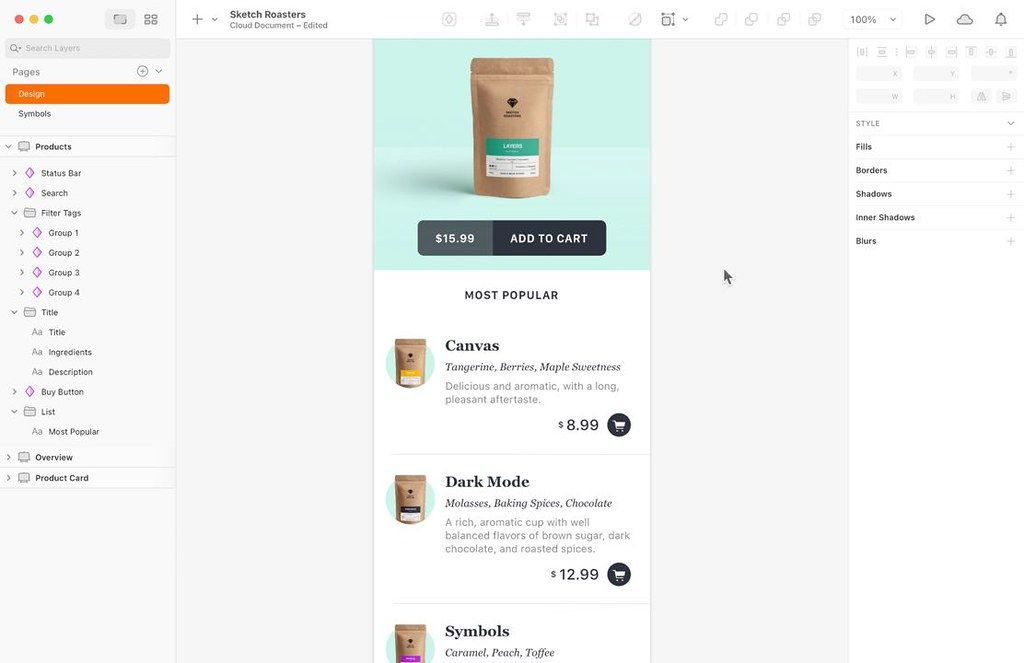
Sketch is an innovative and fresh look at vector drawing for the Mac. Its intentionally minimalist design is based upon a drawing space of...
- Intel, 64-bit processor
- macOS 15.0 or later
Description
Sketch is an innovative and fresh look at vector drawing for the Mac. Its intentionally minimalist design is based upon a drawing space of unlimited
size
and layers, free of palettes, panels, menus, windows, and controls. Though simple to use, it offers powerful vector drawing and text tools like perfect Boolean operations, Symbols, and powerful Rulers, Guides, and Grids.
Design without distractions
Focused tools, an intuitive interface, and an infinite Canvas. Zero distractions. We made our macOS editor for you and your ideas. Not for PMs, developers or clients.
Test your ideas faster
Nothing beats trying your ideas out to see if they work. So we made doing that as easy as possible. Create realistic prototypes in no time at all.
Take your work further
When it’s time to team up, our collaboration tools keep your designs at the heart of the process. Whether you’re pairing with a single developer, or part of a growing team.
WHAT’S NEW
Version 2026.3.1:
Changes
• Document windows now use the system corner radius, matching the rest of macOS.
Fixes
• Fixes a bug that caused toolbar tooltips to appear muddy and clip near the edge of the screen in macOS Golden Gate.
• Fixes a bug that caused text in the Match field of the Rename Selected Layers sheet to appear to far to the left in macOS Golden Gate.
• Fixes a bug that caused the canvas and other document content to appear blank while using Writing Tools in macOS Golden Gate, until you exited text edit mode.
• Fixes a bug that meant a stack ignored the minimum width of a text layer inside it, which meant it shrunk to the width of the text itself until you refreshed the layout.
REQUIREMENTS
• Intel, 64-bit processor
• macOS 15.0 or later
ScreenShots
If you are using Adblocker!! Please support this website by adding us to your whitelist. Ads are what helps us bring you premium content! Or read this to know how you can support us. Thank you!
•
Size
– 105.4MB
Previous Versions
Editor-checked details
Recommended for Mac-centered product designers and design-system teams with browser-based developer/product collaborators, especially iOS/macOS/web interfaces, component libraries, prototypes and assets. Use: project/page/frame naming; Variable/token source; Stack/Frame responsive rules; Symbol/Library ownership; states/accessibility annotations; branch/copy Library upgrades; real-time review; iOS Mirror/web prototype; Inspect/export; engineering component mapping; screenshot regression and independent archive for every release. Record code mapping, version, replacement and design-QA owner per component. Publish migration notes before major Library changes and prohibit blind global updates. Scan fractional pixels, missing images/fonts, unused styles and wrong slices before export; test SVG in target browsers. Consider Framer/web tools for cross-platform editing, Affinity Designer/Amadine/Boxy SVG for deep vectors, and Axure RP for complex interaction specifications. A design file is not code: accept on real components, content, dynamic type, keyboard/VoiceOver, narrow screens and performance.
Pros
- Sketch combines interface design, design systems, prototypes and developer handoff in a native Mac app, while the web app lets Windows/Linux developers, product managers and clients view, Inspect and comment without a Mac. Symbols, Libraries, Variables, Shared Styles, Stacks and Frames turn color, spacing, type, components and responsive rules into systems rather than copied artboards. Real-time collaboration, Workspace versions and comments shorten review, and iOS mirroring validates safe areas, touch and prototypes on-device. Multi-paste/Paste and Replace speed bulk updates across frames, while Stack/Symbol/Library performance helps large systems. Slices, SVG/PDF exports and Inspect connect implementation, and plugins/API/sketchtool extend automation. Native Mac interaction, pixel-focused UI tools and a mature component ecosystem fit Apple product teams particularly well. Solo designers can keep local files and use Workspace collaboration only as needed.
Cons
- Editing is Mac-only, this release requires macOS 14 and explicitly does not support VMs. Older Intel Macs, frozen enterprise OS deployments and Windows designers need older builds or web viewing, which can split versions/Libraries. Full collaboration, Editor roles and administration depend on accounts, Workspace/subscription, network, SSO and permissions. Sketch documents/Libraries remain a proprietary collaboration ecosystem; round-trips to Figma/Affinity/Adobe lose Stacks, overrides, Variables, prototypes and comments. Large design systems require governance for Library releases, deprecation, dependencies and override migration; one-click updates can break many screens. Plugins introduce compatibility, security, abandonment and data-access risks and need upgrade audits. Prototypes model common flows, not production code, complex state, real data, accessibility or performance. Inspect/export specs do not replace engineering tokens, component tests or design QA. Fonts, images and local links can be missing, and cloud history does not replace independent archives and ownership transfer when leaving a team.
Installation steps
- Sketch 2026.2.1 requires macOS Sonoma 14.0+ and is unsupported in virtual machines; it runs on supported Intel and Apple-silicon Macs. Sign in to the production Workspace and confirm Editor/Viewer role, subscription, SSO and Library permissions. Non-Mac collaborators can view, inspect and comment in the web app. Before design, define page/frame naming, pixel grid, color/text/layer variables, spacing, Stacks, Symbols and Library publication rules. Build a fixture with CJK/Latin fonts, a missing image, nested Symbols, external Libraries, a wrapping Stack, gradients, masks, prototype flows, slices and SVG quadratic curves. Preview Library updates in a branch/copy and review “Outdated components” instead of mass updating; assign component-source ownership. Audit 1x/2x/3x, alpha, integer frame coordinates, Slice “Export group contents only,” SVG viewBox/text policy and asset naming. Test prototypes in Mac Preview, web and real iPhone/iPad mirroring for safe areas, scrolling, Back, keyboard and dynamic content.
Uninstallation steps
- Before uninstalling, identify Workspace-only versus local documents. Download editable Sketch files for every critical project and separately retain PDF, PNG/SVG assets, prototype flow notes, developer specifications and published Library versions; cloud version history is not the only archive. A Library manifest should list component/variable/style IDs, release, dependent Libraries, deprecation mappings, font names/versions/licenses, plug-in versions, external images, Workspace URL, last sync and SHA-256. Export important comments, decisions and Inspect annotations to project records before membership/account changes remove context. Open local files offline or under a test account, check missing images/fonts/Libraries, exercise Symbol overrides, Stacks, Variables and prototypes, and compare regenerated PNG/SVG to references. Before leaving a team, transfer Workspace/Admin, Library ownership, SSO and billing responsibility, then revoke personal access. Clean plug-in data/preferences only after backup. Removing the Mac app does not delete Workspace documents or replace account deletion/retention procedures.
Common errors and fixes
- External-Library Symbols with broken Stack layout or an undismissable “Outdated components” notice are fixed in 2026.2.1. Still duplicate the document, sync the Library and inspect overrides/layout one component at a time; Detach is not a first fix. The high-resolution Keynote image paste crash is fixed, but resize/normalize huge images and paste in batches while retaining sources. A 1px oversized export often means fractional frame coordinates/dimensions; this release fixes a cross-page paste case, but audit legacy files. The SVG quadratic-curve export crash is fixed; downstream differences still require checking viewBox, transforms, masks, strokes and text in real browsers. Preview’s stale frame size is fixed; reopen and verify. A missing image no longer should crash Preview, but relink/replace it rather than accepting absence. Font substitution requires identical versions or a licensed Workspace font process plus CJK fallback, line-height and variable-axis checks. For Library override breakage, publish migration/deprecation notes and batch update a copy with screenshot diffs. Avoid simultaneous refactors of the same Symbol/Library in real-time collaboration and record decisions in versions/comments.
What changed in this version
- Sketch 2026.2.1 includes Edinburgh (2026.2) plus a point update. It adds “Export group contents only” to a Slice inside any group, including frames. Eight official fixes cover external-Library Stack Symbols/layout and stuck Outdated components; crashes pasting some high-resolution Keynote images; Preview using an old frame size; pasted frames landing between pixels and exporting 1px too large; crashes transforming a layer extremely small; SVG export crashes with Quadratic curves; Preview crashes with missing images; and incorrect sidebar documents after relaunch with multiple untitled files. Edinburgh also brings multi-paste and more predictable Paste/Paste Over/Paste and Replace, perceptual/vibrant gradients, Symbol/Library-replacement performance improvements and prototype-player options. The official requirement is macOS Sonoma 14.0+, the Mac app is unsupported in VMs, and the web app supports cross-platform viewing, Inspect and comments.






Alternatives





Screenshots