Hype
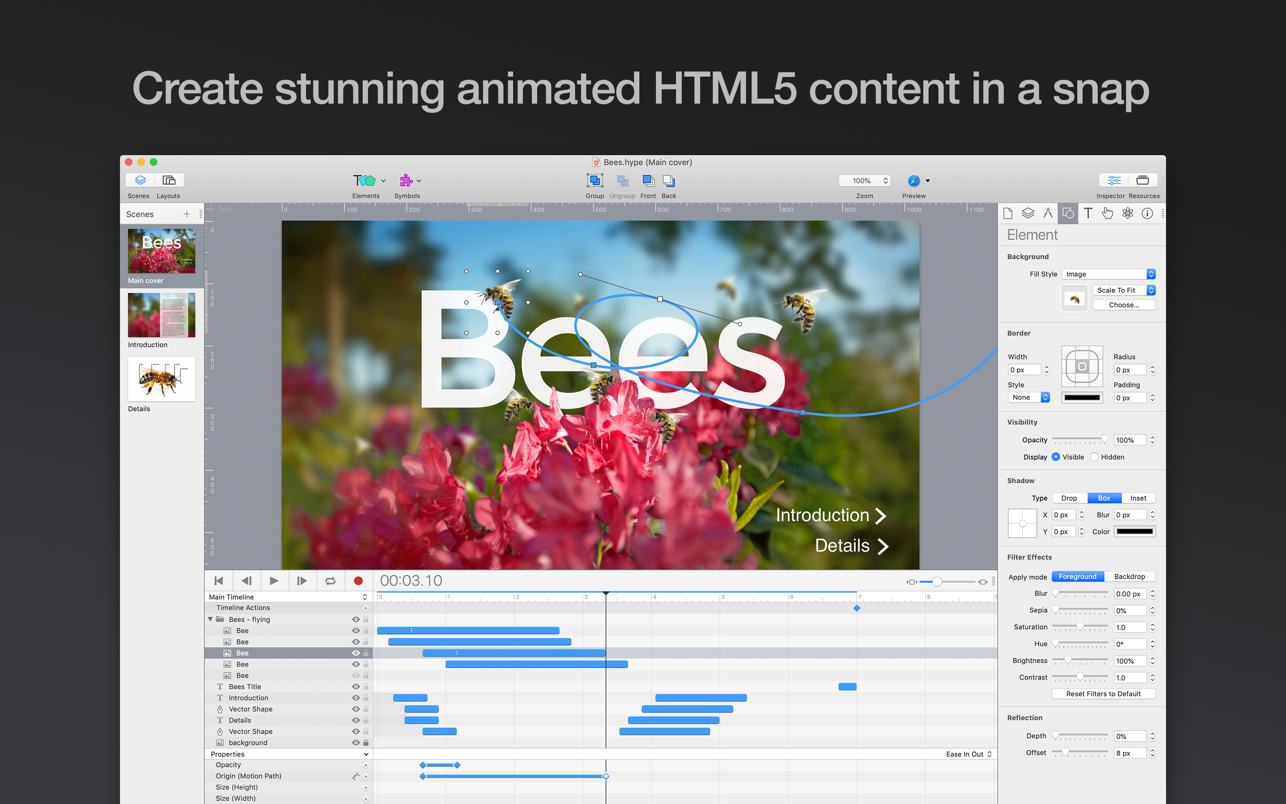
Hype lets you create stunning animated and interactive web content. Hype's HTML5 output works on all modern browsers and mobile...
- Intel, 64-bit processor
- OS X 10.10 or later
Description
Hype lets you create stunning animated and interactive web content.
Hype’s HTML5 output works on all modern browsers and mobile devices like iPhones and iPads. No coding required.
Hype Professional In-App Purchase upgrade now available!
Hype is used by leading designers to create animations which add a “wow” factor to web pages, infographics, presentations, digital magazines, ads, iBooks, educational content, app prototypes, portfolios, animated GIFs, videos, entire websites, and much more. Hype won the 2011 Macworld Editors’ Choice Award.
From prototype to production, anyone can create rich interactive media with Hype.
Quickly Animate:
• Easy to use keyframe-based animation system
• Record mode watches your every move, automatically creating keyframes as needed
• Create natural motion curves with bezier paths
• Make scenes for organization and flow
• Use the power of multiple simultaneous timelines to run animations
Add Interactivity:
• Action handlers kick off and control timelines, transition between scenes, or run custom javascript
• Visually build action handlers to respond to taps, clicks, and animation events
Create Stunning Content:
• WebKit-based WYSYWIG “what you see is what you get” scene editing
• Intelligent guidelines, arrangement, and sizing tools
• Easily integrate video and audio for stunning multimedia documents
• Cutting-edge effects: blur, hue shift, brightness, saturation, shadows, reflection, and 3D transforms
• Add Google Fonts to your projects or use your own CSS web fonts
• A flexible layout system resizes your content to fit any screen
• Retina image support
Perfect for Mobile:
• Hype’s HTML5 output works great on mobile devices
• Easily add swipe and touch actions
• Bind drag events to timeline positions for rich interactivity
• Preview your projects on iPhones and iPads with the free Hype Reflect companion iOS app
• Hype Reflect’s Mirror Mode shows edits live as you make them
Extend with Code:
• Edit the Inner HTML
Editor-checked details
Recommended for designers producing HTML5 banners, product hotspots, course interactions, scroll/click infographics and lightweight microsites—especially teams that want a visual timeline and will perform browser/accessibility acceptance. Use: content/interaction script; browser/breakpoint/performance targets; symbol and naming rules; small-screen-first layouts; keyboard/Reduced Motion; real-device profiling; clean-folder export; CSP/HTTPS/cache checks; multi-browser regression; separate source and non-restorable delivery archives. Ad packages must verify byte limits, external calls, click macros and network rules. Compare Principle for interface prototypes, Adobe Animate for traditional timeline animation, Keynote for presentations, Motion/ScreenFlow for video, and use a real CMS for full sites.
Pros
- Timeline/keyframe authoring produces standard HTML5/CSS/JavaScript interaction without turning animation into video or requiring a browser plugin. Scenes, symbols, actions, gestures, relative timelines and visual easing suit ads, teaching interactions, product demos, infographics and microsites. Professional responsive layouts, Flexible Layout, physics, Export Scripts and reusable symbols cover multi-size delivery. Output embeds in ordinary pages, while the JavaScript API integrates site logic; Hype Reflect previews quickly on iOS over the same network. The Universal app serves Apple silicon and Intel across a wide macOS range. Restorable export data offers a last-resort recovery path.
Cons
- It is not a full CMS, application framework, professional video compositor or 3D tool; databases, authentication, SEO content architecture, server logic, large codebases and film post-production need other systems. Professional-only responsive layouts, physics and advanced export create edition dependencies. Visual authoring does not guarantee semantic HTML, keyboard order, screen-reader labels, Reduced Motion, performance budgets or cross-browser consistency; these require manual review. Complex documents can produce substantial DOM, assets and runtime code, while excessive shadows, filters, large images and parallel animation burden mobile devices. JavaScript/Export Scripts introduce supply-chain and injection risk. Restorable export data aids recovery but can expose reconstructable sources in deliverables unless explicitly disabled and checked.
Installation steps
- Hype 4.1.21 supports macOS 10.10 or later and is Universal for Apple silicon and Intel Macs. Match the purchase channel: Tumult Store uses a serial number, while Mac App Store uses an Apple ID; licensing and update routes are not interchangeable. Before authoring, define target browsers, minimum viewport, breakpoints, pixel density, font licences, load budget and accessibility requirements. Build consistent semantics across responsive layouts, then create scenes, symbols, timelines and interactions. Test Safari, Chrome, Firefox and real phones for first load, orientation, touch, keyboard, Reduced Motion, autoplay/audio unlock and slow/offline conditions. Deploy the HTML together with its matching.hyperesources folder without changing relative paths. For embedding, copy the container div and generated-script reference, then verify CSP, caching, HTTPS and third-party fonts. Review and pin JavaScript or Export Scripts and export from a copy.
Uninstallation steps
- Before removal, preserve every .hype source, font/licence record, original asset, JavaScript, Export Script, responsive-breakpoint manifest and final export package; deployed HTML alone is insufficient. Record Standard/Professional dependencies, scene sizes, layouts, symbols, events, external URLs, analytics/CSP requirements and deployment paths. Hype normally includes restorable source data in exports and can reconstruct a document from .hyperesources via Help > Restore Document from Export, but image optimisation only leaves the downsized image, so this is not a backup. If deliverables must not include recoverable project data, disable Create restorable document file and inspect a fresh package. Open exported HTML from an independent folder, test resources offline, hash the archive, and retain purchase/recovery details without plaintext passwords.
Common errors and fixes
- Blank page or 404 after deployment: keep HTML and .hyperesources names, hierarchy and case exact; inspect the generated-script URL, MIME types, CSP, mixed HTTPS content and CDN cache. Wrong responsive layout: use viewport breakpoints rather than device names, compare elements, symbols and flexible-layout settings, and test one pixel either side. Jank: reduce concurrent shadows, blur, filters, large bitmaps and DOM nodes; compress media, favour transform/opacity, and profile on a low-end real device. Font flash/reflow: verify web-font licensing, loading and fallback, and constrain critical text boxes. Autoplay fails because browsers commonly require muted media or a user gesture; provide an explicit play control. For JavaScript errors, inspect Console, avoid duplicate function/scene/timeline names and wait for HypeDocumentLoad before external calls. Missing full-resolution assets after restore means export optimisation discarded them; recover originals from backup.
What changed in this version
- Hype 4.1.21 (build 780) is a general bug-fix update. It fixes a macOS Tahoe issue where thumbnail generation briefly showed a window, changes the default GIF engine to Apple’s built-in encoder, adds Zen, Helium and Dia to the preview menu, and ignores automation-oriented Puppeteer. It supports macOS 10.10 through current systems and is free for existing Hype 4 owners. The 4.1 line is native on Apple silicon and retains HTML5 timelines, Professional responsive layouts, symbols, physics, JavaScript APIs, Export Scripts, web fonts and HTML/CSS/JS delivery.






Alternatives



Screenshots