Iconize
All your app icons. With one click. Customizeable icons? Mac? iOS? Android? Perhaps, a "favicon" for your website? Iconize has got...
- Intel, 64-bit processor
- macOS 11.0 or later
Description
All your app icons. With one click. Customizeable icons? Mac? iOS? Android? Perhaps, a “favicon” for your website? Iconize has got you covered.
Easy-to-use
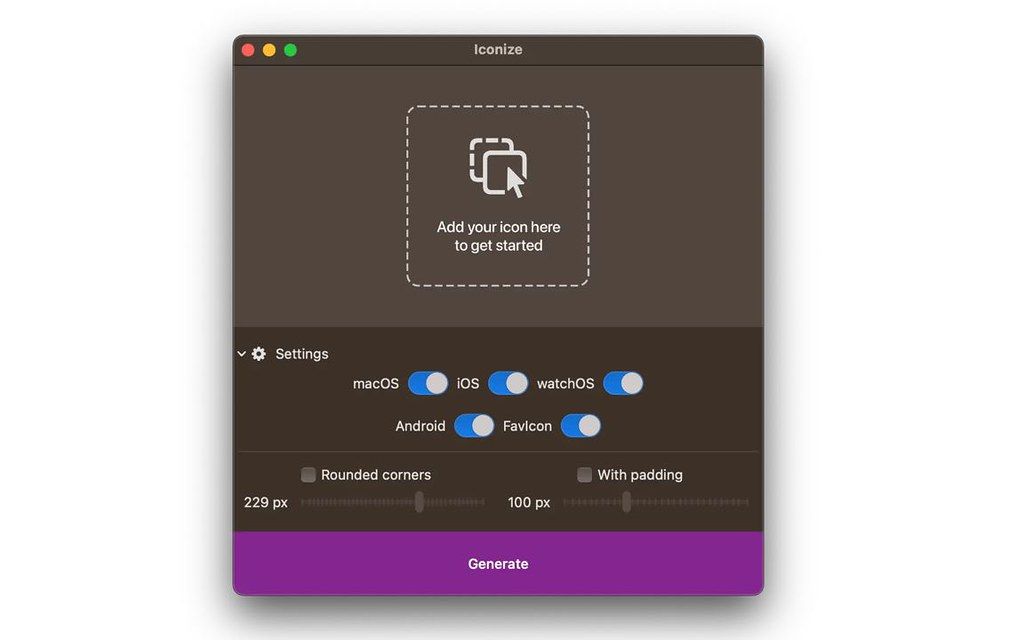
Just drag’n’drop your icon image and Iconize will take care of the rest. You may use any image format your Mac recognizes!
Configurable
Your icon is not yet “ready” and decided you want to add rounded corners and/or padding to conform to the guidelines? Awesome!
Fast
All the speed of the Mac at your fingertips. The whole process will be complete before you even begin to notice!
WHAT’S NEW
Version 1.8.8:
• Release notes were unavailable when this listing was updated.
REQUIREMENTS
• Intel, 64-bit processor
• macOS 11.0 or later
ScreenShots
If you are using Adblocker!! Please support this website by adding us to your whitelist. Ads are what helps us bring you premium content! Or read this to know how you can support us. Thank you!
•
Size
– 3MB
Previous Versions
Editor-checked details
Recommended for independent developers and small teams that already have a mature master and need fast multi-platform sizes. Use: vector master; sRGB 1024 px lossless baseline; monochrome/light/dark/small-size recognition; platform-specific safe zones and masks; generate per platform; file manifest/hashes; Xcode/Android Studio/web integration; simulator and devices; store validation; Git-tag archive. Regenerate and review diffs after SDK changes rather than overwriting the previous pack. Compare IconJar for asset management, Image2icon for richer Mac icon creation, Asset Catalog Creator/App Icon Generator for Xcode-centric output, and Affinity Designer or Sketch for vector-master design. For Android adaptive/monochrome and PWA manifests, confirm the package is complete or supplement it with official toolchains.
Pros
- It compresses repetitive resizing, naming and per-platform export into three steps—add master, select/customise, generate—useful for individual developers and small teams shipping Mac, iPhone/iPad, Watch, Android and web icons. It accepts image formats macOS can read and can add padding/corners when the artwork is not final, reducing omitted-size mistakes. Local processing avoids uploading unreleased brand artwork to a web converter, while fast output makes it practical to generate complete candidate packs for real-device comparison. Apple silicon and Intel support, macOS 11+ coverage, low cost and narrow scope keep the workflow approachable.
Cons
- It is an asset generator, not logo/icon design, vector editing, a brand system or store-compliance review. Poor masters, wrong safe zones, fine detail and weak visual metaphors do not improve through bulk scaling. Platform rules change, and the lack of an itemised 1.8.8 changelog means output cannot be assumed to satisfy current Xcode, Android adaptive/monochrome, PWA or browser rules without checking developer documentation. One rounding/padding treatment may conflict with platform masks. Bitmap reduction still needs optical correction at small sizes. It does not manage approvals, A/B tests, trademark clearance or collaborative sources; teams still need Git/DAM and guidelines. A macOS-readable input does not guarantee identical profiles, HDR or alpha in every target.
Installation steps
- Iconize 1.8.8 requires macOS 11 or later and supports Apple silicon and Intel Macs. Prepare an editable vector master plus a lossless square PNG of at least 1024×1024 in sRGB; avoid JPEG artefacts, hairlines that vanish when reduced, and text near the edge. Select macOS, iOS/iPadOS, watchOS, Android and favicon targets separately. Add rounding/padding only if absent from the source, otherwise platform masking can create double corners or an undersized glyph. Treat Android adaptive foreground/background and safe zone separately; a flat square PNG is not a complete adaptive icon. Inspect every output, not only the largest: 16/32 px favicons, small macOS assets, iPhone/iPad/Watch sizes and Android densities. Verify transparency, pixel alignment, colour, filenames, folders and alpha, then import into Xcode, Android Studio, browser tabs and real home screens and retain a generation manifest.
Uninstallation steps
- Before removal, preserve the vector master, original 1024 px PNG, brand colour values, font licences, padding/corner settings, selected platforms and each complete output folder. For every release keep a manifest with Iconize version, source SHA-256, dimensions/colour space, date, targets, filenames and output hashes, so changed platform rules can be regenerated rather than upscaling small assets. Version-control the Xcode asset catalog, Android mipmap/drawable plus adaptive-icon XML, favicon ICO/PNG, apple-touch-icon and Web/PWA manifest. Remove obsolete sizes, duplicate Contents.json, wrong alpha and test artwork before deleting temporary output. Back up licensing privately, never in a public repository. Confirm a clean checkout builds and shows the correct icons before removing the app and caches.
Common errors and fixes
- Icon appears too small: transparent margins in the source were combined with added padding; return to a tightly cropped master and keep one safe-zone treatment. White/double corners mean rounding was baked into both source and generator; platforms such as iOS apply their own mask. Blurred or broken small lines require simplified detail and pixel-grid correction at 16/32 px, not blind downscaling. Dull/oversaturated colour requires sRGB conversion, removal of incompatible profiles and checks on P3/non-P3 displays. Xcode missing slots or Contents.json mismatch means the wrong target/version or an incomplete asset-catalog replacement; copying PNGs alone is insufficient. Android OEM cropping requires adaptive foreground/background and previews under several masks. Stale favicons usually come from browser/CDN cache or an old HTML link; version the filename and verify MIME. Black transparency means wrong alpha/format; JPEG has no transparency.
What changed in this version
- Iconize 1.8.8 is the current matching official/site version. Its workflow is to drop any image macOS recognises, choose target platforms, optionally add rounding/padding, and generate to disk. The developer lists Mac, iOS/iPadOS, watchOS, Android and website favicon output, with macOS 11+, Apple silicon M1/M2/M3/M4 and Intel compatibility. No itemised public changelog accompanies this build, so fixes are not invented. Treat the generated package as the test subject and validate it against current Xcode, Android and web project requirements—especially asset catalogs, adaptive icons, PWA/favicons, folder structure and metadata.






Alternatives





Screenshots