Iconize
All your app icons. With one click. Customizeable icons? Mac? iOS? Android? Perhaps, a "favicon" for your website? Iconize has got...
- Intel, 64-bit processor
- macOS 11.0 or later
軟體介紹
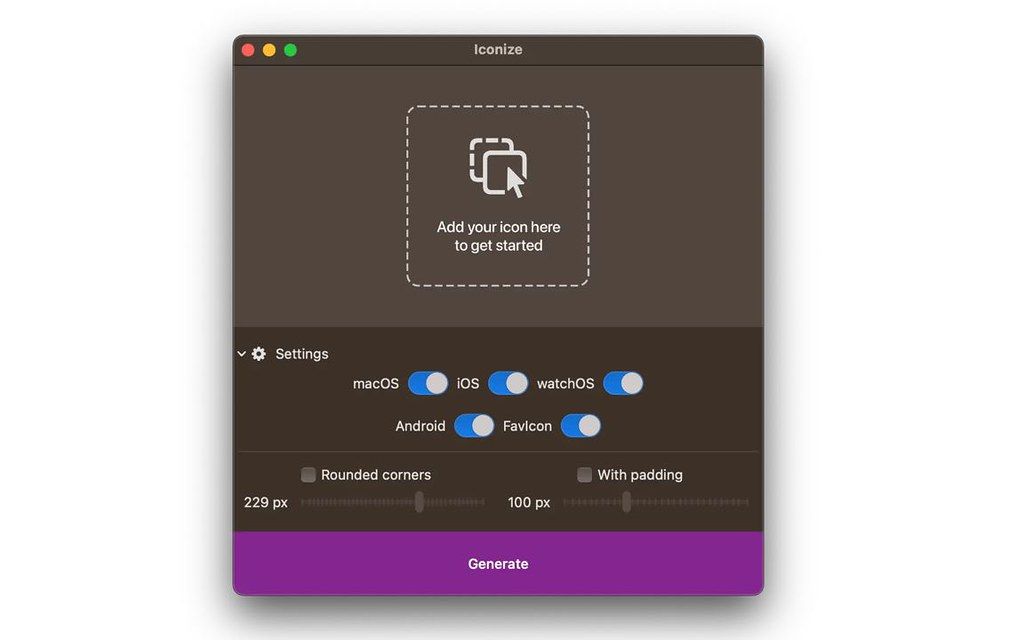
All your app icons. With one click. Customizeable icons? Mac? iOS? Android? Perhaps, a “favicon” for your website? Iconize has got you covered.
Easy-to-use
Just drag’n’drop your icon image and Iconize will take care of the rest. You may use any image format your Mac recognizes!
Configurable
Your icon is not yet “ready” and decided you want to add rounded corners and/or padding to conform to the guidelines? Awesome!
Fast
All the speed of the Mac at your fingertips. The whole process will be complete before you even begin to notice!
WHAT’S NEW
Version 1.8.8:
• Release notes were unavailable when this listing was updated.
REQUIREMENTS
• Intel, 64-bit processor
• macOS 11.0 or later
ScreenShots
If you are using Adblocker!! Please support this website by adding us to your whitelist. Ads are what helps us bring you premium content! Or read this to know how you can support us. Thank you!
•
Size
– 3MB
Previous Versions
編輯核對資料
推薦給已有成熟 master、需快速輸出 multi-platform size 的 developer/small team。流程:「vector master → sRGB 1024 px baseline → monochrome/light/dark/small recognition → platform safe zone/mask → 分 platform generate → manifest/hash → Xcode/Android Studio/Web → simulator/device → store validation → Git tag」。SDK 更新時不要直接 overwrite,應 regenerate+diff review。asset management 比較 IconJar;Mac icon creation 比較 Image2icon;Xcode 導向比較 Asset Catalog Creator/App Icon Generator;vector master 用 Affinity Designer/Sketch。Android adaptive/monochrome/PWA manifest 要確認 package 完整,不足由 official toolchain 補充。
優點
- 將 resize、naming、platform export 集中為 add master→customise→generate 三步,適合輸出 Mac、iPhone/iPad、Watch、Android、Web 的 individual developer/small team。支援 macOS readable format,可加 padding/corner,減少 size 遺漏。local processing 不必把未公開 brand asset upload 至 online converter,亦可快速為每個 candidate 生成 full package 做實機比較。Apple silicon/Intel、macOS 11+、低 cost 與窄 scope 都是優點。
不足
- 它是 asset generator,不是 logo/icon design、vector edit、brand system、store compliance review。poor master、wrong safe zone、fine detail 不會因 bulk scaling 改善。platform rule 會變,而 1.8.8 沒有 itemised changelog,不能自動保證 current Xcode、Android adaptive/monochrome、PWA、browser rule。統一 rounding/padding 可能與 platform mask 衝突。small bitmap 仍需 optical correction。它不管理 approval、A/B、trademark、source collaboration,團隊仍需 Git/DAM。macOS readable input 也不保證 profile、HDR、alpha 在各 target 一致。
安裝步驟
- Iconize 1.8.8 要求 macOS 11 或以上,支援 Apple silicon/Intel。準備 editable vector master 與 sRGB、至少 1024×1024 的 lossless square PNG,避免 JPEG artifact、縮小會消失的 hairline、靠邊 text。分別選 macOS、iOS/iPadOS、watchOS、Android、favicon;只有 source 未包含時才加 rounding/padding,避免 double corner 或 glyph 過小。Android adaptive icon 要分開檢查 foreground/background 與 safe zone,不能只用 flat square PNG。不能只看最大圖,逐一檢查 16/32 px favicon、small macOS、iPhone/iPad/Watch、Android density,以及 transparency、pixel alignment、color、filename、folder、alpha。最後 import 到 Xcode、Android Studio、browser tab、實機 home screen,保存 manifest。
解除安裝步驟
- 移除前保存 vector master、original 1024 px PNG、brand color、font license、padding/corner、platform、完整 output folder。每次 release 保存 Iconize version、source SHA-256、dimension/color space、date、target、filename、output hash manifest,日後重新生成而非放大小圖。將 Xcode asset catalog、Android mipmap/drawable+adaptive XML、favicon ICO/PNG、apple-touch-icon、Web/PWA manifest 納入 version control。清除 obsolete size、duplicate Contents.json、wrong alpha、test icon;license 私密 backup。確認 clean checkout 可 build 並正確顯示後再刪除 App 與 cache。
常見錯誤及解決方法
- icon 過小通常是 source transparent margin 與 padding 重疊,應用 tight master 並只留一層 safe zone。white/double corner 是 source 與 generator 同時 rounding,iOS 等應交給 system mask。small size blur/broken line 要在 16/32 px 簡化 detail、修正 pixel grid。color 偏差檢查 sRGB conversion、profile、P3/non-P3。Xcode slot/Contents.json error 要核對 target/version 並完整替換 asset catalog,不能只複製 PNG。Android OEM crop 要用 adaptive foreground/background 與多種 mask 預覽。favicon 不更新檢查 browser/CDN cache、HTML link、MIME。black transparency 檢查 alpha/format;JPEG 不支援透明。
本次版本更新內容
- 是 official/site 一致的 current version。將 macOS 可識別圖像 drop,選 target platform,按需加 rounding/padding,再生成到 disk。官方列出 Mac、iOS/iPadOS、watchOS、Android、website favicon,並支援 macOS 11+、Apple silicon M1/M2/M3/M4、Intel。此 build 沒有 itemised public changelog,因此不虛構 fix;應把生成 package 對照 current Xcode/Android/Web 要求,特別檢查 asset catalog、adaptive icon、PWA/favicon、folder、metadata。






同類替代軟體





截圖預覽