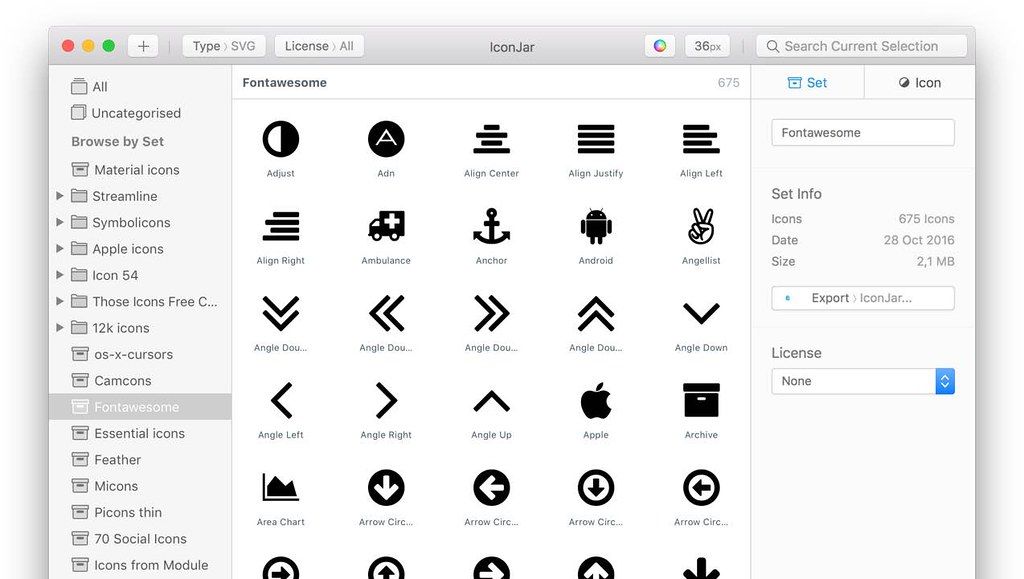
IconJar
Iconjar leaves digging through your design asset folders behind and lets you access your icons without the hassle. Your icon organizer is...
- Intel, 64-bit processor
- macOS 10.14 or later
Description
Iconjar leaves digging through your design asset folders behind and lets you access your icons without the hassle. Your icon organizer is always just one click away. It features incredible support for SVG’s and icon fonts that you can drag-and-drop into any app. It’s no rocket science, we pinky promise.
Browse & preview – With great efficiency
Iconjar’s search has been designed and developed with speed and efficiency in mind. Hit the spacebar and preview the icon at any
size
using our custom designed Quicklook feature.
Drag and drop – Onto any app on your Mac
It even works in combination with apps that don’t natively support SVG’s*. Our goal is to make IconJar part of your workflow without you even noticing.
* When PDF preferences is activated and the PDF doesn’t have masks
Export icons with ease – And optionally use built-in presets
Design hand-off becomes super easy with the help of our export feature. Just select the icons you want, pick the
size
s you prefer, click export and we’ll handle the rest.
WHAT’S NEW
Version 2.11.4:
•
Release notes were unavailable when this listing was updated.
REQUIREMENTS
• Intel, 64-bit processor
• macOS 10.14 or later
ScreenShots
If you are using Adblocker!! Please support this website by adding us to your whitelist. Ads are what helps us bring you premium content! Or read this to know how you can support us. Thank you!
•
Size
– 8.7MB
Previous Versions
Editor-checked details
Recommended for solo designers, Mac/iOS developers and small product teams managing hundreds to tens of thousands of SVG/PNG icons, especially across Figma/Sketch, Xcode/web and presentations. Use: archive vendor source read-only; record name/tags/license/source/version on import; group by product/platform/style/status; Smart Sets for review/deprecated/missing-license; review stroke/viewBox/currentColor; round-trip samples in browser/Figma/target app; bulk export a locked preset; publish hash/manifest through Git; separately back up the library. Enforce a single writer or serialized Git workflow, never bidirectional live cloud sync. For only app-icon generation compare App Icon Generator/Image2Icon/Icon Slate; font icons use RightFont; original path design needs Logoist/Illustrator/Affinity Designer. Keep component versions, visual regression and licensing compliance in repository/CI, not only IconJar metadata.
Pros
- It turns scattered Finder/design/download assets into a searchable library. Sets/groups, tags, Smart Sets, favorites, recents and license URLs support long-term governance. Drag-and-drop outputs SVG/PDF/PNG/WebP without reopening a vector editor. QuickDrag changes size, color, format and quality; bulk presets generate Android/iOS/macOS scales. SVG Cleaner plus stroke/cap/join, gradient and `currentColor` controls shorten design-to-code handoff. Duplicate detection, recursive sorting, QuickLook and optimized grids suit large libraries. `.iconjar` packages distribute metadata-rich sets, with an open-source PHP generator. Native Mac behavior supports Apple silicon and Intel alongside Figma, Sketch, VS Code, Keynote and Photoshop.
Cons
- macOS-only means no native Windows/Linux/browser client. Official support focuses on the latest two macOS majors and does not guarantee betas. Most importantly, there is no native real-time multi-Mac sync; concurrent iCloud/Dropbox/Google Drive writes are discouraged. The Git workaround demands disciplined push/pull and conflict handling, unsuitable for casual live collaboration. Annual Paddle subscriptions auto-renew, so verify library/export access before stopping. Complex SVG filter/mask/gradient/use, external CSS, fonts and animation may render differently from browsers/Figma; optimization can alter paths, precision, metadata or editability. License fields are manual, not proof of commercial rights. It is an icon organizer/converter, not a full vector editor, design-system VCS, package publisher or accessibility auditor; states, RTL, contrast, semantics and npm/package releases remain separate.
Installation steps
- IconJar 2.11.4 is macOS-only and supports Intel and Apple silicon. Official policy targets the two latest major macOS releases; 2.11.4 addresses Tahoe and 2.11.3 added Sequoia compatibility. In Preferences > Library, confirm a location that is backed up but never cloud-synced concurrently by two Macs. Organize by product/platform/style/license/status. Import a sample and inspect name, tags, description, license URL, viewBox, stroke/fill, gradients, alpha and bitmap dimensions. QuickDrag SVG, PDF and PNG/WebP into Figma/Sketch, a code editor, Keynote and Photoshop; use scalable PDF when the target rejects SVG. Before bulk export, lock Android/iOS/macOS or custom scales, naming, suffix/prefix, colors/currentColor and WebP quality. Track outputs with Git or a manifest.
Uninstallation steps
- Before uninstalling, double-click the library breadcrumb in Preferences > Library, quit IconJar and copy the complete library plus `~/Library/Application Support/Iconjar` to a second medium. Export critical sets/groups as `.iconjar` packages and original SVG/PNG/PDF files; create a manifest with filename, hash, tags, license, source URL, version and export preset. Test `.iconjar` import under another account and open source assets without IconJar. Native multi-Mac sync is unsupported; the developer warns that concurrent iCloud/Dropbox/Google Drive writes can corrupt a library. With all clients closed, copy manually or use the recommended Git push/pull workflow for version history. Verify backup and licensing before canceling/removing; do not delete Application Support first.
Common errors and fixes
- Tahoe crashes/hangs or SVG defects: update to 2.11.4, which refreshes IJSVG and fixes Tahoe crashes/hangs. Preserve the source SVG and isolate filter/mask/gradient/use features. If the app cannot launch to update, download the latest build; after backing up the library, `defaults delete com.iconjar.iconjar` can reset preferences. If a fresh library opens but the old one does not, suspect corruption—never delete `~/Library/Application Support/Iconjar` before copying it. After multi-Mac sync conflicts, stop every cloud client and restore a clean backup/Git version; never write concurrently. If Keynote/Photoshop rejects SVG, QuickDrag PDF or PNG. For CSS recoloring, export selected colors as `currentColor` and inspect inline fill/stroke and multicolor assets. WebP quality requires the post-2.11.2 behavior plus correct scale. Library metadata is not legal proof; retain source license text and download date.
What changed in this version
- IconJar 2.11.4 updates the embedded IJSVG engine to fix crashes/rendering issues and improve performance, adopts a Tahoe app icon, and fixes multiple Tahoe crashes and hangs. It builds on 2.11’s IJSVG rewrite, 2.11.1 gradient fixes, 2.11.2 WebP rendering/export and QuickDrag quality fixes, and 2.11.3 IJSVG performance, memory-leak and Sequoia compatibility work. Core capabilities include SVG/PNG/PDF/WebP and icon-font import; sets/groups, tags, descriptions, favorites, recents, licenses and Smart Sets; duplicate detection; QuickLook/QuickDrag; bulk Android/iOS/macOS/custom presets; and SVG Cleaner options for rounded transforms, shape-to-path, curve-to-arc, default/XML removal and selected-color `currentColor` export.






Alternatives





Screenshots