Affinity Designer
The next generation of the award-winning vector graphics software, Affinity Designer 2 is setting the new industry standard in the world...
Description
The next generation of the award-winning vector graphics software, Affinity Designer 2 is setting the new industry standard in the world of design. Packed with tons of new features and hundreds of enhancements to optimise your workflow, you can now create high-quality concept art, illustrations, logos, icons, UI designs, mock-ups and other projects more seamlessly than ever before.
REFINED & REDESIGNED WITH POWERFUL NEW FEATURES
• Fully redeveloped UI, tool and button icons
• Completely revamped Layers Panel
• Vector Warp
• Shape Builder Tool
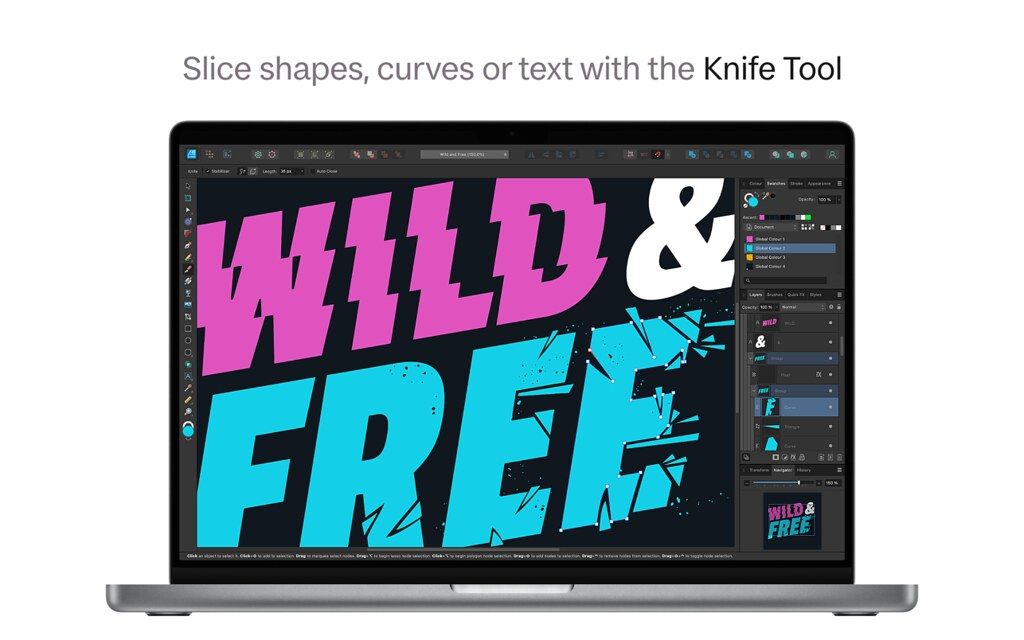
• Knife Tool
• X-ray view mode
• Measure and Area tools
• Style Picker Tool
• DXF/DWF import
• Drawing scale, including ability for different scales set per artboard
• Drag/drop bitmap texture fills
• Pencil Tool creates auto-closed or straight-line pencil strokes
• Multiple shadow, outline and overlay layer effects per object
• Force scale of stroke, effect and fills on object resize
INCREDIBLE PERFORMANCE
• Fully optimised for the latest Mac hardware and operating systems, including M1 chips and macOS Monterey
• Pan and zoom at 60fps
• Live gradients, transforms, effects and adjustments
• Optimised for documents of any complexity, zoom to over 1,000,000% for absolute precision
• Live pixel, retina, wireframe and x-ray views of vector artwork in and out of split screen mode
• Seamless switching between tools and editing modes for frustration-free design
• Incredibly accurate results with minimal nodes
PRECISE VECTOR TOOLS
• Rock solid vector tools that work just the way you want them to
• The best pen tool, node tool, curve editing and smart shape tools available
• Powerful contour tool to create abstract objects or increase the width of single open curves
• Pencil and brush stabilisation for drawing super-smooth curves freehand
• Non-destructive Boolean operations
• Live effects, blend modes and image adjustments
• Incredibly smooth gradient and transparency controls
RASTER OR VECTOR, YOU DECIDE
• Switch between v
Editor-checked details
Recommended for independent designers and small teams combining vector work, light raster texture and multi-format export. Workflow: define print/UI/web destination; set colour, units, artboards and grid; build global swatches, text styles, assets and symbols; keep critical geometry non-destructive; inspect Pixel/X-Ray; duplicate finals before expanding text/strokes; define names/scales in Export Persona; export SVG/PDF/PNG; validate in the target browser, device or printer preflight; archive source, presets, manifest and SHA-256. Illustrator better suits Adobe collaboration and plug-ins; Sketch/Figma suit collaborative UI prototypes; Inkscape suits open-source SVG; Affinity Photo suits deeper pixel work.
Pros
- Vector and Pixel Personas coexist in one document for logos, icons, illustration, UI, concept art and light texture work. Pen, Node, Shape Builder, Knife, non-destructive booleans, Vector Warp, Contour and precise snapping cover construction through deformation. Artboards, symbols, constraints, assets and Export Persona suit multi-size UI delivery; Vector, Pixel, Retina and X-Ray views expose node and raster issues early. It supports professional colour, wide gamut, 16-bit work, pressure input, DXF/DWG and large documents. The Universal build supports Intel and Apple silicon without a subscription.
Cons
- Illustrator interchange does not guarantee lossless proprietary appearances, plug-ins, scripts, variable data, gradient meshes or live effects; test the actual target format. It is not full CAD, so imported DXF/DWG still needs scale, layer, font, linetype and dimension checks. Pixel Persona is not a complete RAW/photo-compositing workflow. Many artboards, blurs, shadows, embedded bitmaps and saved history increase memory and export time. Symbols and constraints help UI work but do not replace interactive prototypes, design tokens or developer acceptance. Export presets cannot guarantee SVG accessibility, browser consistency, print colour or pixel-sharp icons.
Installation steps
- The official Affinity Designer 2.6.5 DMG is Universal for Intel and Apple silicon; the official feature page requires macOS 10.15 or later. Before updating, duplicate .afdesign sources and archive custom brushes, assets, swatches, styles, font lists and export presets; verify font and artwork licences. On a copy, test Pen/Node, Pencil auto-close and smoothing, Shape Builder, Vector Warp, Pixel Persona, artboards, symbols and export slices. For pixel icons, enable pixel alignment and inspect Vector, Pixel and Retina views. For print define ICC, CMYK, bleed and trim; for UI define points/pixels, scale and naming. After SVG/PDF/PNG export, inspect dimensions, transparency, fonts and strokes in the target browser, Preview or development tool.
Uninstallation steps
- Before uninstalling, archive each .afdesign with linked/embedded resources, legally archivable fonts, palettes, brushes, assets, shortcuts and export presets. Save interoperable SVG/PDF and final PNG, not previews alone. Record colour profile, artboard dimensions, slice scales, text-to-curves state, expanded strokes and export options. Create a manifest and SHA-256, then open the source in another account or offline copy and export one critical artboard to prove recovery. Disconnect unused content sync/cloud links, remove the app, and delete preferences or user resources only for an intentional full reset.
Common errors and fixes
- Malformed SVG in a browser often comes from unsupported filters, blends, clipping/masks, variable fonts or live text; simplify a copy and test in the target renderer. Soft PNG usually means non-integer artboards, half-pixel object coordinates/sizes, stroke alignment or wrong 1x/2x/3x scale. For stroke changes after resizing, distinguish scale-with-object from fixed strokes. Colour mismatch requires checking document ICC, RGB/CMYK, soft proof and export profile. Boolean failures often involve open/self-intersecting curves, duplicate nodes or fill rules; clean them with X-Ray and Node Tool. Pixel Persona creates raster content, so unlimited vector scaling no longer applies. Match exact font versions/OpenType features. Metal artefacts or crashes can be isolated by temporarily disabling acceleration, followed by regression on the production configuration.
What changed in this version
- The 2.6 line improved Pencil with auto-close, current line style and editable smoothing; Pen can also use the current line style. Double-clicking a node cycles Sharp/Smooth and double-clicking a Bézier handle removes it. A Colour-panel pick can apply directly to the selection. It also refined crossing marquee toggles, stroke-width profiles/reset, search within the current brush category, bounding boxes for rotated objects, image-layer behaviour and pixel selections. The published 2.6.5 note is bug fixes and stability improvements, so earlier V2 features such as Vector Warp, Shape Builder, Knife, DXF/DWG and X-Ray are not mislabelled as new.






Alternatives


Screenshots