Iconize
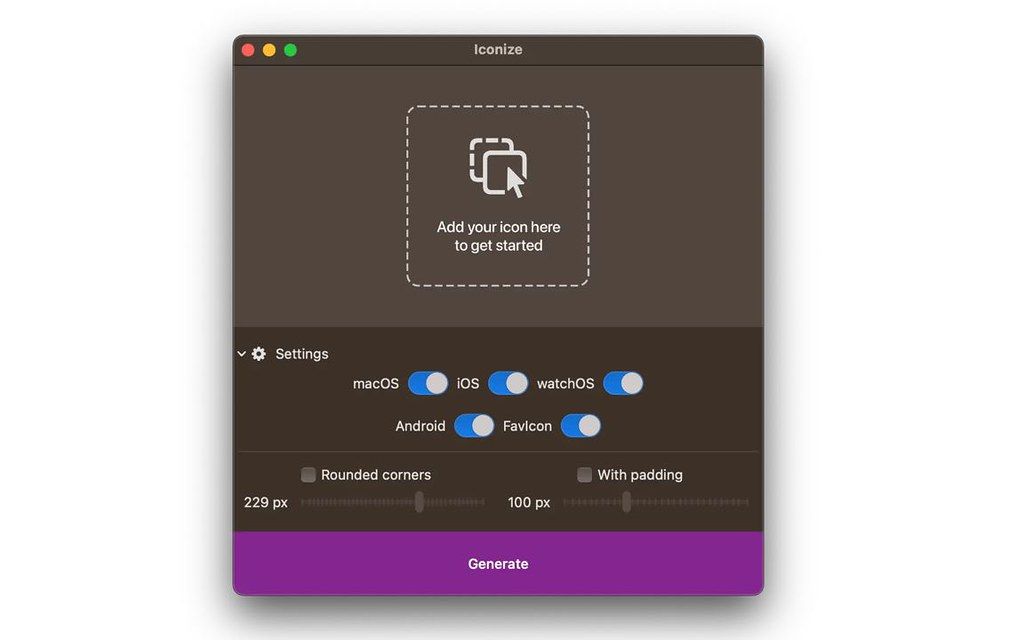
All your app icons. With one click. Customizeable icons? Mac? iOS? Android? Perhaps, a "favicon" for your website? Iconize has got...
- Intel, 64-bit processor
- macOS 11.0 or later
소개
All your app icons. With one click. Customizeable icons? Mac? iOS? Android? Perhaps, a “favicon” for your website? Iconize has got you covered.
Easy-to-use
Just drag’n’drop your icon image and Iconize will take care of the rest. You may use any image format your Mac recognizes!
Configurable
Your icon is not yet “ready” and decided you want to add rounded corners and/or padding to conform to the guidelines? Awesome!
Fast
All the speed of the Mac at your fingertips. The whole process will be complete before you even begin to notice!
WHAT’S NEW
Version 1.8.8:
• Release notes were unavailable when this listing was updated.
REQUIREMENTS
• Intel, 64-bit processor
• macOS 11.0 or later
ScreenShots
If you are using Adblocker!! Please support this website by adding us to your whitelist. Ads are what helps us bring you premium content! Or read this to know how you can support us. Thank you!
•
Size
– 3MB
Previous Versions
편집자 확인 정보
성숙한 master가 있고 multi-platform size를 빠르게 출력할 developer/small team에 권합니다. “vector master → sRGB 1024 px baseline → monochrome/light/dark/small recognition → platform safe zone/mask → platform별 generate → manifest/hash → Xcode/Android Studio/Web → simulator/device → store validation → Git tag”. SDK 변경 때 overwrite하지 말고 regenerate+diff review합니다. asset management는 IconJar, Mac icon creation은 Image2icon, Xcode 중심은 Asset Catalog Creator/App Icon Generator, vector master는 Affinity Designer/Sketch와 비교합니다. Android adaptive/monochrome/PWA manifest는 package 완전성을 확인하고 부족하면 official toolchain으로 보완합니다.
장점
- resize, naming, platform export를 add master→customise→generate 3단계로 묶어 Mac, iPhone/iPad, Watch, Android, Web을 배포하는 individual developer/small team에 유용합니다. macOS readable format을 쓰고 padding/corner를 넣어 size 누락을 줄입니다. local processing이라 미공개 brand asset을 online converter에 upload하지 않으며 candidate마다 full package를 빠르게 생성해 실기 비교할 수 있습니다. Apple silicon/Intel, macOS 11+, 낮은 cost와 scope가 장점입니다.
단점
- asset generator이지 logo/icon design, vector edit, brand system, store compliance review가 아닙니다. poor master, wrong safe zone, fine detail은 bulk scaling으로 좋아지지 않습니다. platform rule은 변하며 1.8.8의 itemised changelog가 없어 current Xcode, Android adaptive/monochrome, PWA, browser rule 충족을 자동 보장하지 않습니다. 공통 rounding/padding은 platform mask와 충돌할 수 있습니다. small bitmap은 optical correction이 필요합니다. approval, A/B, trademark, source collaboration을 관리하지 않아 Git/DAM이 필요합니다. macOS readable input도 profile, HDR, alpha의 target 일치를 보장하지 않습니다.
설치 방법
- Iconize 1.8.8은 macOS 11 이상, Apple silicon/Intel을 지원합니다. editable vector master와 sRGB 1024×1024 이상 lossless square PNG를 준비하고 JPEG artifact, 축소 시 사라지는 hairline, 가장자리 text를 피합니다. macOS, iOS/iPadOS, watchOS, Android, favicon을 따로 선택하고 source에 없을 때만 rounding/padding을 넣어 double corner와 glyph 축소를 방지합니다. Android adaptive icon은 foreground/background와 safe zone을 별도 확인하며 flat square PNG만으로 끝내지 않습니다. 최대 이미지만 보지 말고 16/32 px favicon, small macOS, iPhone/iPad/Watch, Android density를 확인하고 transparency, pixel alignment, color, filename, folder, alpha를 검사합니다. Xcode, Android Studio, browser tab, 실기 home screen에 import하고 manifest를 저장합니다.
제거 방법
- 삭제 전 vector master, original 1024 px PNG, brand color, font license, padding/corner, platform, 전체 output folder를 보관합니다. release마다 Iconize version, source SHA-256, dimension/color space, date, target, filename, output hash manifest를 남겨 작은 이미지 확대가 아닌 재생성이 가능하게 합니다. Xcode asset catalog, Android mipmap/drawable+adaptive XML, favicon ICO/PNG, apple-touch-icon, Web/PWA manifest를 version control합니다. obsolete size, duplicate Contents.json, wrong alpha, test icon을 제거하고 license는 private backup합니다. clean checkout에서 build/표시를 확인한 뒤 app과 cache를 삭제합니다.
자주 발생하는 오류와 해결 방법
- icon이 너무 작으면 source transparent margin과 padding 중복을 제거하고 tight master와 하나의 safe zone만 둡니다. white/double corner는 source와 generator 양쪽 rounding 때문이며 iOS 등의 system mask에 맡깁니다. small size blur/broken line은 16/32 px에서 detail simplification과 pixel grid correction이 필요합니다. color 차이는 sRGB conversion, profile, P3/non-P3를 확인합니다. Xcode slot/Contents.json error는 target/version과 asset catalog 전체를 확인하고 PNG만 복사하지 않습니다. Android OEM crop은 adaptive foreground/background와 여러 mask로 검사합니다. favicon은 browser/CDN cache, HTML link, MIME을 확인합니다. black transparency는 alpha/format 문제이며 JPEG는 투명을 지원하지 않습니다.
이번 버전 변경 사항
- 은 official/site가 일치하는 current version입니다. macOS가 인식하는 이미지를 drop하고 target platform을 선택하며 필요 시 rounding/padding을 더해 disk에 생성합니다. Mac, iOS/iPadOS, watchOS, Android, website favicon, macOS 11+, Apple silicon M1/M2/M3/M4, Intel 지원이 공식 명시돼 있습니다. itemised public changelog는 없으므로 fix를 만들지 않고 생성 package를 current Xcode/Android/Web 요구, 특히 asset catalog, adaptive icon, PWA/favicon, folder, metadata에 맞춰 검증합니다.






대체 소프트웨어





스크린샷