Autodesk Mudbox
Autodesk Mudbox digital painting and sculpting software provides 3D artists with an intuitive and tactile toolset for creating...
Description
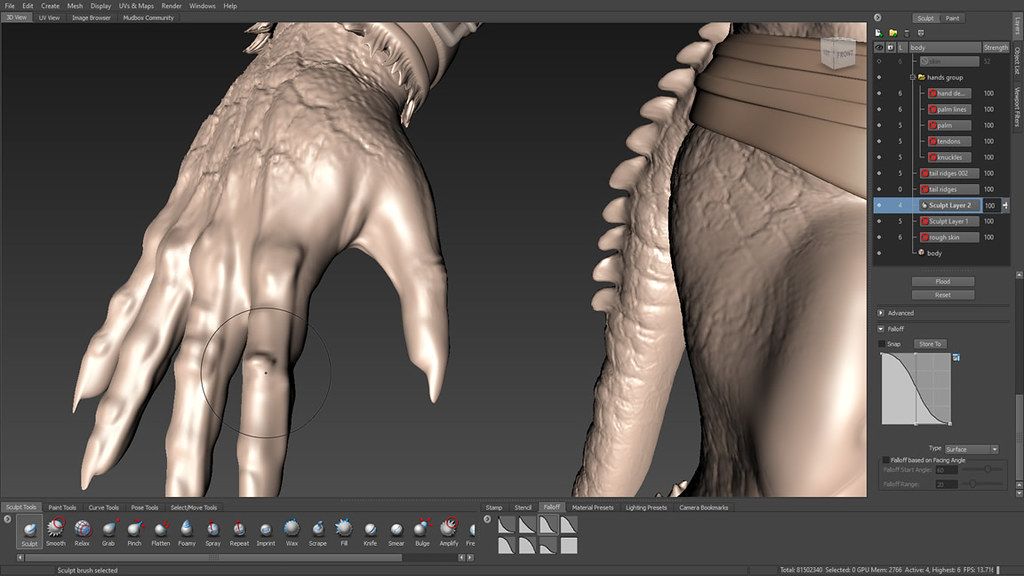
Autodesk Mudbox digital painting and sculpting software provides 3D artists with an intuitive and tactile toolset for creating highly detailed 3D geometry and textures for beautiful characters and environments. Autodesk has released Mudbox 2019, the latest update to the digital sculpting software, extending its dynamic tessellation system, and adding a new option to merge multiple meshes into a single object
Autodesk Mudbox software is a cost-effective digital sculpting and painting solution. Mudbox provides 3D artists with an intuitive and tactile toolset for creating and modifying high-quality 3D geometry and textures.
Autodesk Mudbox digital painting and sculpting software provides 3D artists with an intuitive and tactile toolset for creating and modifying 3D geometry and textures. Use Mudbox software to create high-quality 3D geometry and textures for your next project. Take advantage of an intuitive work environment and professional tools for 3D sculpting and painting.
Features of AutoDesk Mudbox 2024
• A new Preserve Volume option has been added the smooth tool to prevent excessive mesh degradation, especially when working with dynamic tessellation.
• Several improvements to Dynamic Tessellation, including support UVs, Selection Sets, Joint Weights, and Falloff Type.
• The ability to merge multiple meshes into a single object.
• The ability to separate merged meshes back to separate meshes.
• A new stamp offset parameter to fine tune the depth of a stamps imprint on a model.
• A new Delete UVs feature.
• The patch tool has been updated to allow the user to remove parts of a mesh without needing a hole or border faces in the tessellated mesh.
• Improved support for HiDPI monitors.
WHAT’S NEW
Version 2024
• Release notes are available here .
REQUIREMENTS
• Intel, 64-bit processor
• macOS 11.0 or later
ScreenShots
If you are using Adblocker!! Please support this website by adding us to your whitelist. Ads are what helps us bring you premium cont
Editor-checked details
Recommended for character, prop and environment artists in Maya/Autodesk pipelines who need layered sculpting, 3D painting and controlled map extraction. Workflow: finish scale/topology/UVs in Maya/Rhino; freeze an untouched base; import the lowest level and inspect normals/manifold; separate primary, secondary and fine detail into Sculpt Layers; organise Paint Layers by channel/material; regularly export low mesh and back up .mud; test search distance/smoothing/space at small resolution; produce 16/32-bit scalar or 32-bit EXR/TIFF vector displacement, normals and AO; rebuild and render in target Maya/Arnold or engine; fix seams/spikes and publish; archive base, high, layers, textures, settings, manifest and SHA-256. Compare ZBrush for a larger sculpt ecosystem, Maya for animation/rendering and Rhino for precise NURBS work.
Pros
- Its layer-centred digital sculpting and 3D painting interface is more focused than a full DCC for refining characters, props and environments. Multilevel subdivision preserves the base; Sculpt and Paint Layers allow non-destructive experiments, blending and rollback. Stamps, stencils, falloff and pressure input speed repeated detail. It extracts normals, AO and scalar/vector displacement from high sculpts to animation meshes, with 16/32-bit TIFF, OpenEXR and Ptex for high-dynamic detail. Single tile, multi-tile/UDIM and Ptex cover different texture pipelines. Maya Send To, FBX and texture-update workflows are direct. The 2024 app supports Intel and Apple silicon for mixed Mac migrations.
Cons
- Mudbox’s ecosystem, update pace, training and brush library are smaller than ZBrush and modern material tools; hard-surface, procedural materials, auto-retopo and real-time-engine preview often need other apps. Dense subdivisions, many 4K/8K tiles and 32-bit paint layers quickly exhaust RAM/GPU memory/disk, making minimum hardware unsuitable for production. Extraction is sensitive to source/target alignment, base topology, UVs, search distance, smoothing, bit depth and renderer encoding; failures may appear only downstream. Ptex avoids UV layout but requires matching topology and lacks universal engine support. Send To depends on matching versions and paths. The Apple-silicon app is supported, but installation uses Rosetta 2; certified GPU and target renderer still need validation. Subscription/account licensing adds deployment cost.
Installation steps
- The site package is Autodesk Mudbox 2024. Autodesk supports Intel and Apple-silicon application architectures; on Apple silicon the app can run natively, but the Intel-built installer may require Rosetta 2. The listed platform baseline is macOS 11+. Back up .mud files, base meshes, UV/UDIM/Ptex, paint layers, stamps/stencils, cameras, lights and export presets; verify licence and certified graphics. Benchmark a low/high asset: import the lowest subdivision, inspect manifold topology, normals, scale and UVs; subdivide progressively and sculpt on layers; test paint layers at modest texture size; extract tangent normals, scalar/vector displacement and AO. Prefer 32-bit EXR/TIFF for vector displacement and use Floating Point Absolute in Maya; use 16/32-bit scalar displacement for detail. Test Maya↔Mudbox Send To, FBX, single/multi-tile UV and Ptex round trips, validating texture paths, channels, colour space and renderer interpretation.
Uninstallation steps
- Before removal, freeze reproducible assets: native .mud, untouched base mesh, key subdivision levels, sculpt/paint layers, UV/UDIM/Ptex, cameras and stamps/stencils. Publish low FBX/OBJ, required high/subdivision geometry, tangent normals, AO, colour/roughness textures, 16/32-bit scalar displacement and 32-bit EXR/TIFF vector displacement. Record units, up axis, subdivision algorithm/level, UV smoothing, search distance, ray-cast/subdivision extraction method, displacement neutral value/scale, vector space/encoding, texture colour spaces and renderer settings. Rebuild materials and test-render in Maya or the target DCC/engine for seams, spikes, flipped normals and levels. Create manifest, SHA-256 and previews. Ensure no artist has unpublished paint layers, preserve licence records and quit. Multiple Mudbox releases can coexist; deleting 2024 is not required for another version. Clear prefs, templates, stamps and caches only after backup.
Common errors and fixes
- For subdivision/sculpt corruption, inspect the lowest level for non-manifold geometry, duplicate vertices, zero-area faces, normals and long triangles; retain an untouched base. A disabled extraction button/no output usually means filename/path, memory or source/target setup. Subdivision Locate requires identical base topology; use Ray Casting when topology differs. Too-small search distance misses detail, while too-large distance catches opposite limbs and creates spikes. For black, stepped or soft displacement, inspect UV area, resolution, bit depth, Smooth Target UVs, Smooth Source Model and target subdivision; prefer 32-bit float. For inflated/wrong vector displacement in Maya, use EXR/TIF, Floating Point Absolute and matching tangent/object/world space. Paint seams/blur require UV overlap/padding, tile naming, colour space and texture-memory checks. Ptex avoids UVs but topology must match. Broken Send To requires matching Maya/Mudbox versions, permissions and paths. Installer failure on Apple silicon may require Rosetta 2.
What changed in this version
- The verifiable key platform change in Mudbox 2024 is application support for both Intel and Apple-silicon architectures. Because the macOS installer remains Intel-built, Rosetta 2 is required during installation on Apple silicon. Autodesk maintains separate 2024 release notes focused on fixes and known limitations. Preserve Volume, dynamic-tessellation UV/weight support, mesh merge/separate, Stamp Offset, Delete UVs, Patch Tool and HiDPI in the source description originated in earlier Mudbox releases; they remain usable workflows but are not mislabelled here as new 2024 features.






Alternatives


Screenshots