ZBrush
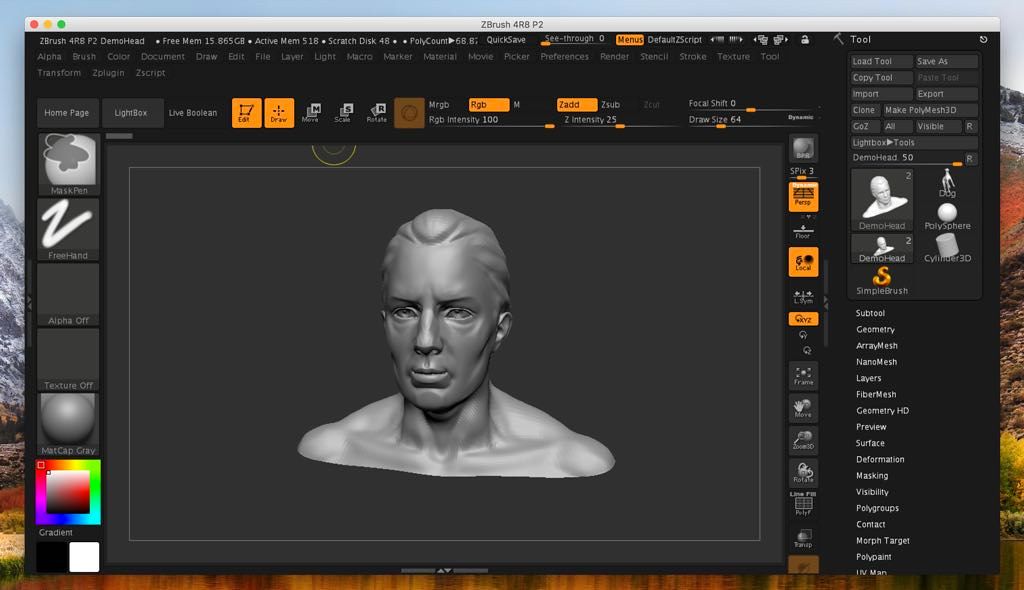
ZBrush is a digital sculpting and painting program that has revolutionized the 3D industry with its powerful features and intuitive...
- Intel, 64-bit processor
- macOS 10.14 or later
Description
ZBrush is a digital sculpting and painting program that has revolutionized the 3D industry with its powerful features and intuitive workflows. Built within an elegant interface, ZBrush offers the world’s most advanced tools for today’s digital artists.
With an arsenal of features that have been developed with usability in mind, ZBrush creates a user experience that feels incredibly natural while simultaneously inspiring the artist within. With the ability to sculpt up to a billion polygons, ZBrush allows you to create limited only by your imagination.
Designed around a principle of circularity, the menus in ZBrush work together in a non-linear and mode-free method. This facilitates the interaction of 3D models, 2D images and 2.5D Pixols in new and unique ways.
ZBrush gives you all of the tools needed to quickly sketch out a 2D or 3D concept and then take that idea all the way to completion. You can create realistic renders directly in ZBrush with lighting and atmospheric effects. With the many powerful export options, you can easily prepare your model for 3D printing or use within any other digital application.
Because ZBrush users are enabled by its powerful software processing, you can sculpt and paint with millions of polygons with out having to worry about purchasing expensive graphics cards. It is for this reason why ZBrush is used by everyone from art enthusiast to major film and games studios.
Leave technical hurdles and steep learning curves behind, as you sculpt and paint with familiar brushes and tools.
WHAT’S NEW
Version 2026.2.0:
• Release notes were unavailable when this listing was updated.
REQUIREMENTS
• Intel, 64-bit processor
• macOS 10.14 or later
ScreenShots
If you are using Adblocker!! Please support this website by adding us to your whitelist. Ads are what helps us bring you premium content! Or read this to know how you can support us. Thank you!
•
Size
– 2.86GB
Previous Versions

Editor-checked details
Recommended for character/creature artists, collectible sculpture, film/game high-poly assets, concept sculpting and 3D printing. Use: units/scale; references/naming; low-poly blockout; SubTools/Polygroups; Dynamesh/Sculptris; primary/secondary forms; subdivisions/layers; detail/Polypaint; ZRemesher or manual topology; UV/bakes; decimation/print checks; GoZ/OBJ/FBX round trip; archive ZTL, ZPR, open formats, maps, manifest and hashes. Save increments before destructive stages and isolate plug-in upgrades. Compare Blender for free general sculpting, Maya for character production, Cinema 4D for scenes/rendering, Substance 3D Painter for materials and Nomad Sculpt/3DCoat for voxel/concept/print work. Automation does not replace judgement of silhouette, anatomy, edge flow and tolerances.
Pros
- ZBrush is deep and mature for dense digital sculpting, concept forms, character/creature detail, hard surface and print preparation. Subdivision, Dynamesh, Sculptris Pro, ZRemesher, Live Boolean, ZModeler, IMM/VDM, Layers, Morph Targets and extensive brushes support progression from blockout to detail. SubTools, Polygroups, masks and PolyPaint make complex assets manageable; UV Master, Decimation Master, scale/print tools and OBJ/FBX/GoZ connect film, games, rendering and printing. Core work remains strongly CPU/RAM oriented and supports Apple silicon and Intel. 2026.2 improves Mac camera output, UV/ZModeler stability and Substance Bridge hand-off.
Cons
- Its interface and 2.5D/Tool/Document concepts differ from conventional DCCs, creating a steep learning curve around hotkeys, canvas state, SubTools and transforms. It is not a complete animation, scene assembly, precision CAD, node-material, team asset-management or compositing platform, so Blender/Maya/Cinema 4D, Substance and renderers remain common. Tens of millions of polygons, subdivision layers, HD Geometry, huge maps and Undo History consume RAM, scratch and save time; minimum requirements are not production guidance. ZTL/ZPR and custom plug-ins/brushes are proprietary dependencies, requiring open-format archives and manifests. GoZ, third-party plug-ins, Redshift and licensing have separate compatibility. Automatic retopo, UV and decimation still need topology, stretch, normal, scale and printability checks.
Installation steps
- The listed ZBrush 2026.2.0 requirement is macOS 10.14+ and 64-bit Intel; Maxon also confirms Apple silicon support. The 4 GB RAM/8 GB disk minimum suits light files; multi-million-poly work benefits from 8–16 GB+ RAM, SSD/scratch space and a pressure tablet. Back up ZTL/ZPR, brushes, alphas, textures, materials, lights, macros, hotkeys, UI, plug-ins and GoZ targets. On a representative copy test SubTools, subdivisions, Dynamesh/Sculptris Pro, Polypaint, UV Master, ZModeler, Boolean, BPR and OBJ/FBX/GoZ. Validate plug-ins individually. GoZ installer no longer ships inside ZBrush and must be obtained from Maxon support when needed. Redshift has separate, higher requirements.
Uninstallation steps
- Before removal, save incremental read-only ZTL and complete ZPR copies; export critical models as OBJ/FBX/USD/STL and preserve high/low meshes, subdivisions, UVs, Polygroups, Polypaint, texture/normal/displacement maps and scale. Collect custom brushes, alphas, IMM/VDM, materials, LightCaps, macros, hotkeys, UI, plug-ins, GoZ settings, fonts, references and licence sources. Record exact build, units, SubTool hierarchy, vertex/poly counts, map colour spaces, export axes and plug-in versions; create a manifest and SHA-256. In Blender/Maya/Cinema 4D or a slicer inspect scale, normals, UVs, maps, SubTool separation and watertightness. Confirm Maxon account/seat recovery before deleting the app and regenerable caches. Undo History and QuickSave are not sole backups.
Common errors and fixes
- For memory pressure/crashes reduce visible SubTools, lower preview subdivisions, use Decimation/HD Geometry, enlarge SSD scratch space and save stages. For lost pen pressure check macOS input permissions, tablet driver and ZBrush tablet settings, then test a default brush. 2026.2 fixes document export, point welding and some ZModeler crashes; if trouble remains disable third-party plug-ins and reset custom UI. Re-test UV Master with Polygroups, ZModeler Bevel/Unweld and PolygroupIt on copies. Universal Camera banding on Mac is a fixed item; remaining issues warrant display colour/HDR/render-path checks. For broken GoZ install the separate component and correct paths/permissions. Export scale/normals require consistent units, axes, face orientation and SubTools. Diagnose Redshift against its own requirements.
What changed in this version
- ZBrush 2026.2.0 was released on 15 April 2026. It adds Send to Adobe Painter through Substance Bridge, desktop/iPad keyboard-hotkey import in both directions, and a PolygroupIt polypaint-intensity slider. Fixes cover PolygroupIt launch, Universal Camera banding on Mac, UV Master with Polygroups, invalid Document Save As names, document-export and weld-point crashes, ZModeler Unweld/Bevel and preset-deletion crashes, HDR previews in LightBox and Timeline audio playback. GoZ installer no longer ships with ZBrush and is obtained through Maxon support. Several utility plug-ins were updated for 2026.1 and newer.