AI War 2
AI War 2 is a grand strategy/RTS hybrid against a galaxy that has already been conquered by rogue artificial intelligence. It's also "a ...
- Intel, 64-bit processor
- macOS 10.13 or later
Description
AI War 2 is a grand strategy/RTS hybrid against a galaxy that has already been conquered by rogue artificial intelligence. It’s also “a sequel to [Arcen’s] enormo-space RTS AI War, which we called ‘one of this year’s finest strategy games’ back in 2009″ (Tom Sykes, PC Gamer)
The most devious and acclaimed artificial intelligence in strategy gaming returns… with a host of mutual enemies.
Face off against a more advanced version of the original AI, who once again has captured the entire galaxy leaving you only a tiny planet to yourself. Then strike out and find a way to cleverly outwit it nonetheless. All the new capturables, larger fleets, and hacking abilities are sure to help. (You’re going to need it.)
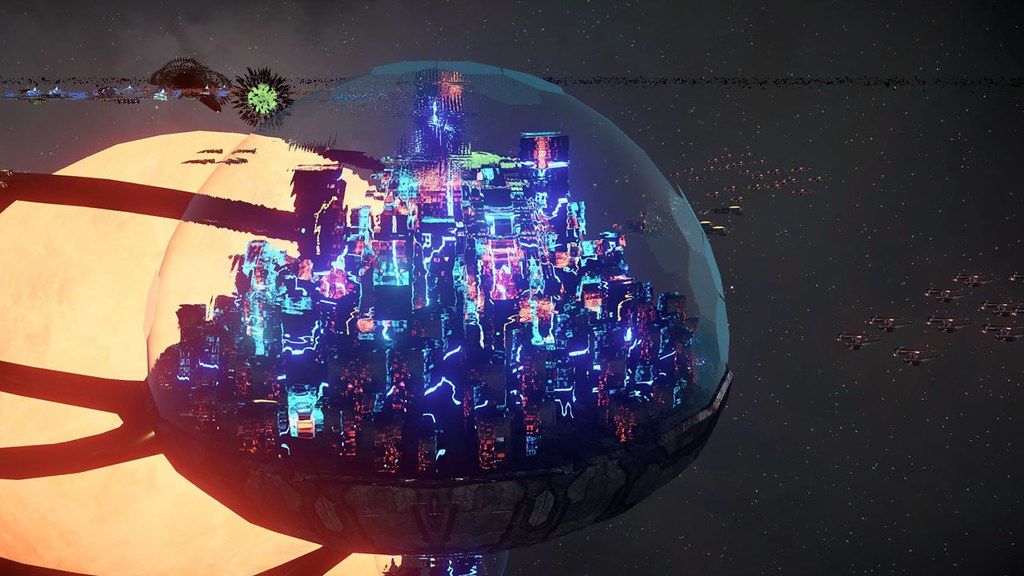
Or immerse yourself in a far more complicated galactic struggle involving the nanocaust, macrophages, dyson spheres, and more. Other factions each have their own goals, rules, units, and entirely unique economies.
Make the scenario complicated enough and it can become “World War XV is in progress, you’re in a tiny farm in the middle of it, nobody likes you, but if you can just kill that one giant angry enemy leader this will all be over.”
If that sounds over the top — and frankly that bit is wearying to us to imagine even though some people seek it out — then take a break and maybe hack the all-consuming computer virus to be your ally, and convince the star-sized alien hives to watch your back as you take on a suddenly-less-arrogant AI.
Modernized and supercharged.
It’s been ten years since the original AI War launched, and the gaming world has changed a lot — as has the available computing power on any device you’re using to read this.
We’ve pulled out all the stops to build foes more formidable and intelligent than before, and to create simulations of hundreds of thousands of units running at 120fps in a lot of cases. You can speed up and slow down the simulation without any extra load on your CPU, and pause at will.
The interface respects your time by
Editor-checked details
Recommended for advanced strategy players who value intelligence, restrained expansion and long-term deception of the AI over constant micro. Use a small galaxy, lower AI difficulty and few third-party factions for the first campaign. Before capturing, ask what it grants, how much AI Progress it adds and whether the connecting node can be defended. Build two defensive layers, retain a rapid-response fleet and do not capture worthless systems merely to clean the map. Spend Hacking Points on actions that transform a fleet or key objective. Learn one mod-free campaign before co-op. Safe order: dual backup; 5.807/SHA-256; small mod-free galaxy; capture/hack; defense alert; reload; old save.
Pros
- The core is not uniform expansion but gaining enough fleets, science and hacking from minimal territory without waking an overwhelmingly stronger AI; every capture has a strategic cost. The AI adjusts pressure around the map, threats and player behavior, while third-party factions have distinct goals, economies and units, producing unscripted galactic wars. Automation handles routine micro, but players can redesign fleets, place spy nanites, alter rules and perform unusual hacks. Simulation speed is decoupled from rendering, with pause and free speed control. It supports mods, solo and cross-platform co-op.
Cons
- AI Progress, Threat, hacking, fleet leaders, logistics, automation and several hostile/neutral factions operate simultaneously, leaving high information density after tutorials. Treating it like a normal territory-grabbing 4X often ends in overexpansion. Large galaxies and many factions increase CPU simulation load; game time can slow even when rendering FPS remains fine. Visuals favor function over spectacle, and huge fleets are not designed for inspecting individual ships. Multiplayer’s complex simulation makes mismatched mods harder to diagnose. The game has only English interface/audio, requiring extensive terminology comprehension in every site locale. Native Apple Silicon support is not explicitly stated.
Installation steps
- This page covers AI War 2 5.807. Official Mac minimums are a 2.2 GHz dual-core 64-bit CPU, 4 GB RAM, GTX 510/Radeon HD 5900/Intel HD 4000-class graphics and 4 GB storage; the channel package requires macOS 10.13+, which is the practical installation floor here. Back up campaign seed, difficulty, AI Progress, galaxy state, fleet leaders, science, Hacking Points, Threat, factions/DLC, automation rules, mods and Cloud, then record 5.807/SHA-256. With mods off in a small fresh galaxy, scout, capture one low-value system, assemble a fleet, place defenses, perform one hack, pause/change speed and save/reload. Compare AI Progress, Threat, Fleet Strength and map alerts before restoring an old campaign.
Uninstallation steps
- Before uninstalling, pause the simulation and let active hacking, inter-system fleet movement, construction and combat resolution finish. Do not force-quit during multiplayer self-repair or a large-battle save. Keep two rotating saves and record game time, AI Progress, Threat, science, Hacking Points, primary fleets, key defenses, factions and 5.807/SHA-256. Export the mod/custom-rule list and back up Cloud separately. Reinstall with Cloud and mods off, run a small fresh galaxy for ten minutes and save/reload. Restore the old campaign only after simulation speed, automation and alerts behave correctly, then enable mods one by one.
Common errors and fixes
- If expansion suddenly lets the AI crush a defense, the issue is often excessive AI Progress from low-value captures rather than one battle’s stats. Reload and compare whether each target grants fleet, science, hacking or logistics worth the attention increase; take only strategically transformative nodes. If Threat fleets bypass the front, inspect wormholes, gravity wells, guard radius and movement automation so logistics ships do not follow distant scouts. When simulation slows but FPS remains normal, CPU/unit scale—not graphics—is the bottleneck: reduce factions, galaxy size, unit cap or battle complexity. For multiplayer desync, disable mismatched mods and let self-repair finish. Reduce particles, backgrounds and resolution on old Intel graphics. The game is English-only; this five-language editorial is not game localization.
What changed in this version
- The site build is 5.807. No public official itemized notes were found that precisely match the complete number, so changes from other 5.x updates are not misrepresented as additions to this build, and no higher version is disclosed. Verifiable scope includes inverted 4X/RTS structure, AI Progress, Threat, fleet leaders, capturable nodes, hacking, automation rules, pause/speed control, multiple AI/third-party factions, mods, solo and cross-platform online/LAN co-op. Acceptance covers displayed 5.807, a mod-free small galaxy, one capture, one hack, a defense alert and save reload.
File verification






Alternatives


Screenshots