Sid Meier's Civilization VII
In Civilization VII, your strategic decisions shape the unique cultural lineage of your evolving empire. Rule as one of many legendary...
- Apple M1 chip or later
- macOS 15.0 or later
Description
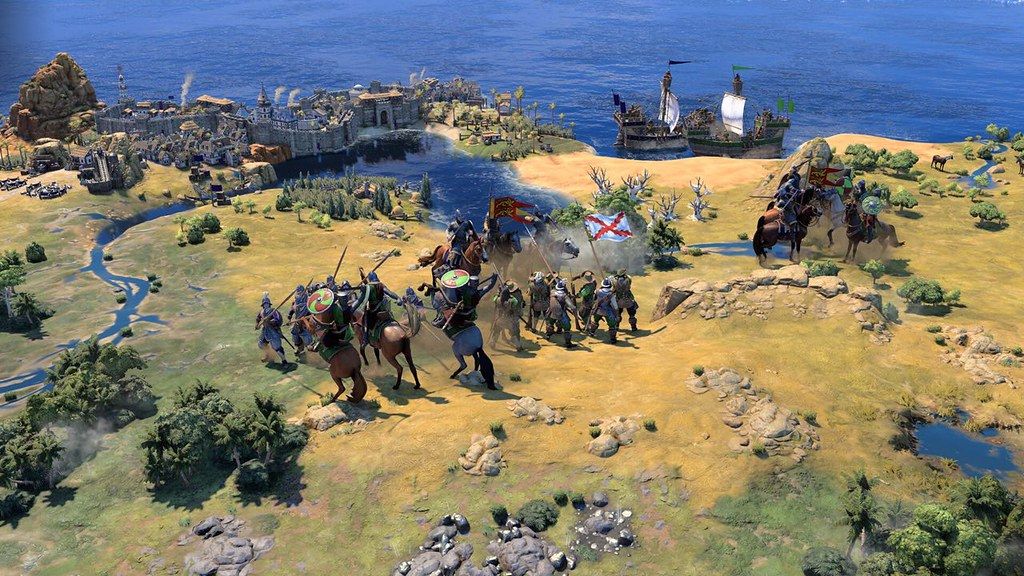
In Civilization VII , your strategic decisions shape the unique cultural lineage of your evolving empire. Rule as one of many legendary leaders from throughout history and steer the course of your story by choosing a new civilization to represent your empire in each Age of human advancement.
Construct cities and architectural wonders to expand your territory, improve your civilization with technological breakthroughs, and conquer or cooperate with rival civilizations as you explore the far reaches of the unknown world. Pursue prosperity in an immersive solo experience or play with others in online multiplayer.**
Whether you choose to follow a path rooted in history or reimagine possibilities to chart your own way forward, build something you believe in and create a legacy that echoes through the Ages in Civilization VII.
BUILD AN EMPIRE THAT STANDS THE TEST OF TIME
Lead your empire through distinct Ages of human history. Each Age is its own rich, nuanced journey, with unique playable civilizations, available resources, explorable land, and even entire gameplay systems, creating a deep, historically immersive strategy experience.
Strive to accomplish significant scientific, cultural, militaristic, and economic milestones within each Age to unlock impactful advantages in the next!
EVOLVE YOUR EMPIRE AS EACH NEW AGE DAWNS
To build a legacy that truly stands the test of time, you must adapt. Forge your own path through history as you reshape your empire at the start of each Age, selecting from a pool of new Age-relevant civilization options determined by your prior gameplay accomplishments. Evolving your empire unlocks fresh gameplay bonuses and unique units, so your current civilization is always at the height of its power.
PLAY AS VISIONARY LEADERS OF PROGRESS
Embody an illustrious leader with one of Civilization’s most diverse rosters yet, from traditional heads of state known for their militaristic might or political prowess, to visionary leaders who made
Editor-checked details
Recommended for Apple-silicon players willing to learn the new Age structure and who enjoy turn-based empire planning, diplomacy and cultural/scientific/military competition. Start M1/8 GB on a small map at low/medium quality; M2 Pro/16 GB is safer. Workflow: reserve 40 GB; back up every save, Hall of Legends and mods; record 1.4.1.2, DLC and SHA-256; play 20–30 clean turns; test Hotseat, Government, Happiness, Celebrations and Age Transition; open old saves only as copies; restore only compatible mods. Compare Civilization VI for a mature traditional system, Stellaris for space empires, or Crusader Kings III for character-led medieval strategy, after confirming Mac support.
Pros
- Separated leaders/civilizations, Age transitions, city/town roles, Commander armies, navigable rivers and multiple victory routes create a distinctive 4X toolkit. Reworked Government, Happiness and Celebrations deepen domestic management, while Hotseat supports local turn-taking. Maps, buildings and units have rich cultural art direction, with full audio/interface/subtitles in English, Simplified/Traditional Chinese, Japanese and Korean. Native Apple-silicon support, Workshop, HDR, cross-platform multiplayer and offline single-player are included.
Cons
- Intel Macs are completely unsupported and M1/8 GB is only minimum; large maps, late-game units and high quality raise turn time, memory use and heat, so M2 Pro/16 GB is preferable. Age/civ switching, revised Government/Happiness and dense tooltips create a learning curve even for series veterans. Some leaders, civilizations and Wonders are paid content, and online interaction needs a 2K Account. Major system updates can invalidate saves and Workshop mods; 1.4.1 disables all mods by default. Divided Steam reviews also reflect UI, AI, pacing and design choices that will not suit everyone.
Installation steps
- This page covers Sid Meier’s Civilization VII 1.4.1.2. Official Mac minimums are an 8-core Apple M1, 8 GB RAM, macOS Sequoia and 25 GB storage; a 10-core M2 Pro/16 GB is recommended. Intel Macs are unsupported. Keep 40 GB free for installation, updates, shaders, autosaves and mods. Back up solo/multiplayer saves, Hall of Legends, Mementos, mods and settings; record 1.4.1.2, DLC, 2K Account state and SHA-256. Update 1.4.1 disables active mods, so leave them off and use a new small-map game to test cities, diplomacy, government, Happiness, Celebrations, Age Transition, Hotseat, save/load and end turn. Open old saves only as copies. Match version, DLC, map and mods before multiplayer.
Uninstallation steps
- At the start of a turn with no combat/diplomacy dialog, make a manual save and quit. Copy manual, autosave and quicksave files, configuration, Hall of Legends, Mementos and mod manifest; label them with 1.4.1.2, leader/civ, Age, turn, map seed, DLC, last-save time and SHA-256. Load the copy offline and complete production, diplomacy and an end turn. For diagnosis, keep mods disabled and rename configuration/cache rather than deleting the only save. Preserve local and cloud copies during cross-platform/cloud conflicts. After reinstalling, play 20 turns and save on a new game before restoring a copy; never overwrite with missing DLC/mods or a mismatched version.
Common errors and fixes
- For launch failure or low FPS, confirm Apple M1+, Sequoia, free space and SHA-256, disable mods/overlays and reduce resolution, leader quality, shadows and map detail. Intel cannot be fixed with Rosetta. Mods disappearing after updating is intentional in 1.4.1; wait for compatibility and enable them individually. If an old save hangs on end turn, Age Transition or load, retry a mod-free copy and verify DLC; a new campaign is safer after major system changes. For multiplayer mismatch, match full build 1.4.1.2 and DLC and recreate the lobby. Relearn Happiness, Government and Celebration tooltips and reproduce faults on a clean game. Name Hotseat saves separately from online saves.
What changed in this version
- Update 1.4.1 adds local Hotseat multiplayer and a Voronoi-based Archipelago map, and reworks Happiness, Governments and Celebrations, including Government Traditions whose impact can persist across Ages. Brush & Blade Part 1 brings Toyotomi, Heian Japan and Sengoku Japan content when the corresponding DLC is owned, alongside many balance, UI, AI, map and stability fixes. The update automatically disables active mods so older work cannot immediately break the revised systems. The site build is 1.4.1.2; no separate public itemised log was found for the “.2” suffix, so this section stays within official 1.4.1 scope and excludes later updates.
File verification






Alternatives

Screenshots