Room Arranger
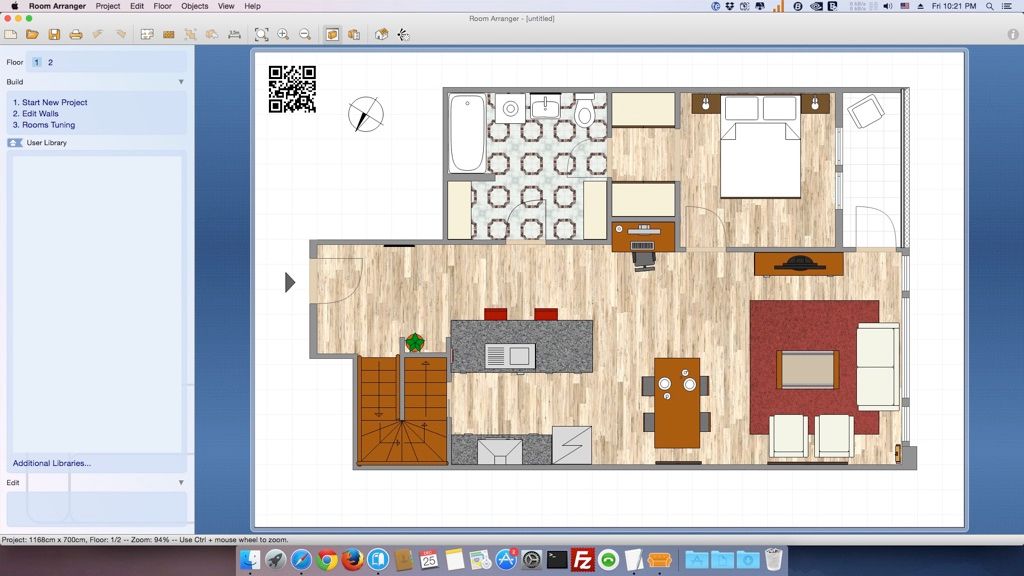
Room Arranger는 간단한 사용자 인터페이스를 갖춘 3D 방/아파트/층별 설계 도구입니다. 기본 기능을 익히면 상상하는 모든 것을 그릴 수 있습니다……
- Intel, 64-bit processor
- OS X 10.8 or later
소개
Room Arranger는 간단한 사용자 인터페이스를 갖춘 3D 방, 아파트, 층별 설계 도구입니다. 기본 기능만 익히면 상상하는 모든 레이아웃을 자유롭게 그릴 수 있습니다. 풍부한 객체 라이브러리를 제공함과 동시에, 사용자가 직접 가구를 쉽게 제작할 수도 있습니다. Room Arranger는 프로젝트를 3D로 시각화해 보여주며, 이를 위해 VRML 표준을 사용합니다. 따라서 인터랙티브 3D 장면을 웹에 바로 게시할 수 있습니다. 사람마다 요구 사항이 다르고, 각 장비도 고유한 특성을 지니기 때문에, 우리는 Room Arranger에 모든 것을 포함시킬 수 없습니다.
하지만 사용자는 이 프로그램을 통해 자신만의 특수 객체를 신속하고 간편하게 직접 설계할 수 있습니다. 일부 사용자는 당사의 온라인 객체 라이브러리에 작품을 기여하고 공유하기도 했습니다. 또한 이 프로그램은 정원 건축, 주택 개발(건물을 객체로 취급), 웹 디자인 등 다양한 분야에도 활용 가능합니다.
버전 10.3.4의 새로운 기능: 본 목록 업데이트 당시에는 릴리스 노트가 제공되지 않았습니다.
시스템 요구사항: Intel 64비트 프로세서, macOS 10.8 이상.
스크린샷
광고 차단기를 사용 중이라면, 당사 사이트를 화이트리스트에 추가하여 지원해 주세요. 광고 수익이 곧 고품질 콘텐츠를 제공하는 데 필요한 원동력입니다! 또는 이 안내를 참고하여 어떻게 지원할 수 있는지 확인하세요. 감사합니다!
용량: 48.9MB
이전 버전
편집자 확인 정보
home renovation, office move, exhibit/garden layout, non-designer 설명에 권장합니다. site measurement/error → unit lock → underlay calibrate → wall close → opening/fixed equipment → clearance → true furniture envelope → layer/name → object/area table → option copy → 3D → scaled PDF/PNG measure → RAP+underlay+library+manifest/hash archive 순서입니다. 한 room과 1:50 proof를 먼저 확인합니다. residential은 Live Home 3D, concept는 SketchUp, BIM은 Archicad/Vectorworks, 2D는 AutoCAD, free는 Sweet Home 3D와 비교하며 site/manufacturer/code가 기준입니다.
장점
- compact하고 배우기 쉬우며 wall, room, opening, furniture, custom object로 home/office/garden을 빠르게 계획합니다. object size/color/texture/rotation/height, library, layer, label, object list, area statistics가 비교와 구매 검토에 유용합니다. multi-floor/3D walk-through, scaled tiled print, crop mark, PNG/clipboard, calibrated underlay, light RAP, autosave, project merge를 지원하며 registration은 subscription이 아닙니다.
단점
- layout planner이며 BIM, construction docs, structure/MEP, code check, precision CAD, photoreal render가 아닙니다. area는 closed wall, underlay는 manual calibration에 의존해 unit/scale error가 전체를 왜곡합니다. library object는 approximate이며 manufacturer dimension/clearance가 아닙니다. VRML은 modern browser에서 지원되지 않습니다. old Intel/Rosetta build의 future OS는 불확실합니다. RAP는 proprietary라 PDF/PNG/object table/measurement도 필요하고 100% high-res는 memory를 사용합니다.
설치 방법
- 게시판 10.3.4는 Intel 64-bit, OS X 10.8+이며 Apple silicon에서는 Rosetta 2 앱으로 검증합니다. DMG에서 Applications로 옮깁니다. wall, opening, ceiling, furniture envelope, clearance를 실측하고 metric/imperial을 고정합니다. PDF/image underlay는 known dimension으로 calibrate한 뒤 잠급니다. 한 room에서 closed endpoint, wall thickness, area, object size/rotation/height, layer, 3D를 확인하고 multi-floor로 확장합니다. autosave, incremental RAP, scaled print, PNG, object list, VRML/web export를 시험합니다.
제거 방법
- 제거 전 current/incremental RAP, high-res PNG, scaled/dimensioned PDF, object/room statistics, 필요 시 index.html+Image2D.png+Image3D.wrl+library.wrl을 보관합니다. underlay, texture, custom/additional RAL, font, measurement, unit/scale, floor, print, registration, manifest/SHA-256을 모읍니다. PDF/PNG의 known dimension과 wall join, opening, clearance, area, height, viewpoint를 확인합니다. Documents/config를 백업한 뒤 제거하며 recent/online/web은 source backup이 아닙니다.
자주 발생하는 오류와 해결 방법
- room area/wall leak는 wall start/end coordinate를 정확히 연결하고 thickness는 boundary에 포함되지 않으므로 coordinate picker를 씁니다. underlay는 known length로 다시 calibrate합니다. 1:50/1:100 print는 100%, orientation, margin, tile, crop mark, fit scaling을 확인하고 실측합니다. high-res memory error는 100% off/분할 출력합니다. 3D object는 height, side view, floor elevation, rotation을 점검합니다. VRML은 modern browser plugin이 없어 2D PNG와 모든 WRL/library files를 유지합니다. Rosetta/permission도 확인합니다.
이번 버전 변경 사항
- 게시 버전은 10.3.4입니다. 공식 version-10 help는 RAP, multi-floor, layer, user/additional library, label, object list, unit conversion, autosave, tiled scaled print, PNG, VRML, web export를 확인하지만 전체 10.3.4 changelog는 없습니다. 기존 feature를 신규로 표시하거나 higher major version을 언급하지 않습니다. maintenance build로 동일 RAP의 wall join, area, object size, 3D, print scale, image, web/VRML set을 회귀 검증합니다.






대체 소프트웨어






스크린샷