SketchUp Pro 2026.3
SketchUp은 배우기 쉬운 3D 모델링 프로그램으로, 3D로 세상을 탐색할 수 있습니다. 단 몇 가지 간단한 도구만으로도 주택, 창고, 데크, 주택 증축물, 목공 프로젝트, 심지어 우주선까지도 3D 모델로 만들 수 있습니다……
- Intel, 64-bit processor
- macOS 13.0 or later
소개
SketchUp은 배우기 쉬운 3D 모델링 프로그램으로, 3D로 세상을 탐색할 수 있습니다. 단 몇 가지 간단한 도구만으로도 주택, 창고, 데크, 주택 증축물, 목공 프로젝트, 심지어 우주선에 이르기까지 다양한 3D 모델을 만들 수 있습니다. 모델을 완성한 후에는 Google Earth에 배치하거나, 3D Warehouse에 게시하거나, 인쇄본을 출력할 수도 있습니다.
SketchUp의 전면적인 기능을 활용하세요: 모델링 방식 — 데스크톱, iPad, 웹 애플리케이션에서 통합적으로 모델링 가능; 공유 방식 — 프로젝트 접근 권한 관리, 모델에 주석 추가, 클라우드에서 파일 동기화를 통해 피드백 수집 가능; 시각화 방식 — 2D 평면도, 3D 애니메이션, 실시간 워크스루 등 다양한 형식으로 이해관계자에게 설계 비전을 생생하게 전달 가능합니다. 새로 추가된 기능: 버전 2026.3(26.2.242): 본 항목 업데이트 당시 릴리스 노트는 제공되지 않았습니다. 시스템 요구 사항: Intel 64비트 프로세서, macOS 13.0 이상.
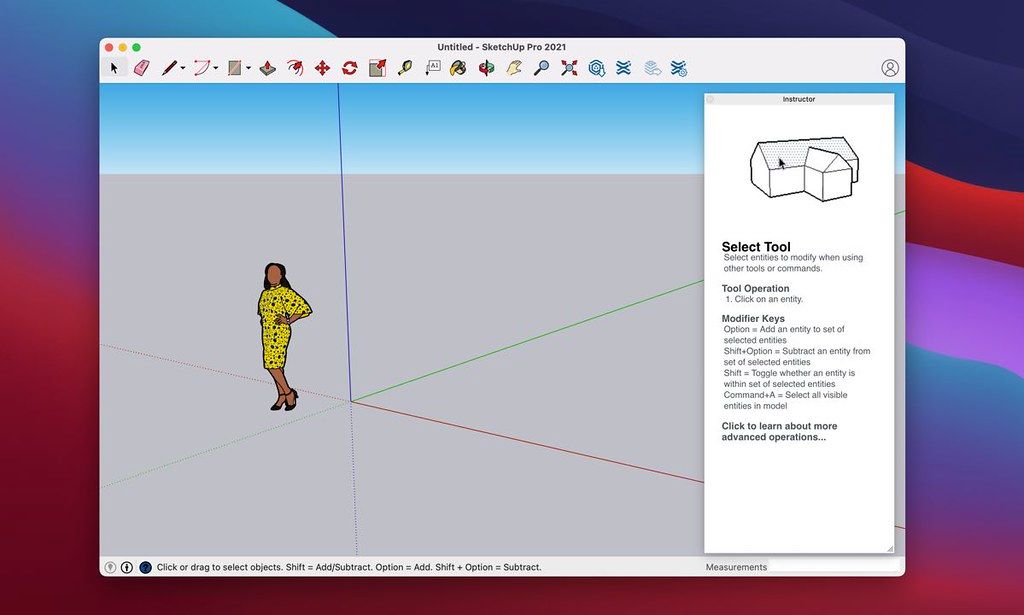
스크린샷: 광고 차단기를 사용 중이라면, 당사 사이트를 화이트리스트에 등록하여 지원해 주세요. 광고 수익이 곧 고품질 콘텐츠 제공의 원동력입니다! 또는 당사를 어떻게 지원할 수 있는지 확인하려면 이 안내를 읽어 보세요. 감사합니다! 용량: 1.59GB; 이전 버전
편집자 확인 정보
architecture/interior concept, landscape massing, woodwork, exhibit, retail, rapid 3D team에 권합니다. “template/unit → geolocation/north → component/group → Tag는 container → proxy/texture budget → scene/section → Advanced Shadows → LayOut scale → PDF/DWG/IFC validation → purge/check → SKP+open format+manifest/hash”. upgrade는 extension isolation copy에서 no-plugin→개별 migrate합니다. NURBS는 Rhino, BIM은 Archicad/Vectorworks, 2D CAD는 AutoCAD, free model/render는 Blender, 주택 layout은 Live Home 3D와 비교합니다. shadow는 concept screening용이며 regulation/energy는 validated specialist tool을 씁니다.
장점
- direct modelling, Push/Pull, inference, component, scene은 architecture massing, interior, woodwork, exhibit, concept에 접근하기 쉽습니다. 3D Warehouse, Extension Warehouse, LayOut이 model→drawing/presentation을 잇습니다. Advanced Shadows, point-cloud visibility, IFC/DWG는 solar/existing condition에 유용합니다. component, Tags/Outliner, dynamic object, Ruby extension은 team template/automation으로 확장합니다. new graphics engine은 PBR, AO, environment, classic engine은 old hardware fallback을 제공합니다. Apple silicon/Intel과 LayOut scaled viewport, annotation, PDF는 design communication에 적합합니다.
단점
- full parametric BIM, mechanical assembly, simulation, offline renderer가 아니므로 rich object data, code check, construction coordination, high-end render는 전문 tool/extension이 필요합니다. raw geometry는 붙으므로 group/component/Tag discipline이 없으면 모델이 손상됩니다. high-poly, point cloud, huge texture, edge/PBR/AO는 GPU/RAM/LayOut time을 늘리고 8 GB minimum은 light work용입니다. new engine은 Metal 2가 필요하고 일부 Intel GPU와 Remote Desktop은 미지원입니다. subscription/online library는 network 의존이며 extension은 version/signature/Ruby API/supply chain을 개별 검증합니다. SKP archive에는 IFC/DWG/OBJ/PDF+texture도 필요합니다.
설치 방법
- SketchUp Pro 26.2.242는 2026.2 Mac build입니다. macOS 14 Sonoma, 15 Sequoia, 26 Tahoe, 64-bit Apple silicon/Intel, internet authorization, 8 GB RAM 이상, 약 6 GB space, 3-button wheel mouse를 권장합니다. new graphics engine은 Metal 2가 필요하고 일부 old Intel HD/Iris GPU는 미지원이므로 System Information을 확인하고 필요 시 classic engine을 씁니다. upgrade 전 SKP, LayOut, material, style, template, scrapbook, extension inventory를 copy하고 plugin은 일괄 이전하지 말고 2026/Ruby API/signature를 개별 확인합니다. unit, precision, geolocation/north, Tag/Outliner rule, component origin을 먼저 정하고 geometry는 group/component 안에 둡니다. representative model로 viewport, PBR, AO, shadow, scene, LayOut, PDF/DWG/IFC, extension을 검증합니다.
제거 방법
- 삭제 전 untouched read-only copy를 보관한 뒤 Purge Unused/model check를 합니다. SKP, LayOut, reference, texture, PBR map, environment, font, scrapbook, style, template, Ruby extension, license/source inventory를 archive합니다. critical scene은 PDF, DWG/DXF, IFC, OBJ/DAE로 export하고 다른 앱에서 unit, axis, origin, component hierarchy, material, section, dimension을 확인합니다. exact build, graphics engine, macOS/GPU, extension version, unit, export setting, SHA-256을 기록합니다. 3D Warehouse, Trimble Connect, online installer는 local backup이 아닙니다. seat release/sign-out 전 admin/recovery를 확인하고 user Library를 backup하며 unique model은 compatibility copy 후 삭제합니다.
자주 발생하는 오류와 해결 방법
- launch hardware acceleration error는 macOS/Metal 2를 확인하고 unsupported old Intel HD/Iris는 classic engine을 씁니다. Remote Desktop은 미지원입니다. black/flicker/PBR은 new/classic 비교, AO/environment/PBR을 하나씩 끕니다. slow model은 group/component, high-poly/point cloud simplification, small texture, Purge Unused, shadow/edge reduction을 적용합니다. broken face/sticky Push-Pull은 edit context, reversed face, tiny coplanar edge, unit를 확인합니다. extension crash는 모두 disable 후 signed compatible version을 개별 enable합니다. LayOut blur/scale은 model reference, render mode, scale, resolution, font를 확인합니다. authorization은 internet, Trimble ID/seat, clock. IFC/DWG offset은 unit/origin, preserve-origin/tag option을 맞춥니다.
이번 버전 변경 사항
- 는 SketchUp Desktop 2026.2의 official Mac 64-bit build입니다. Analysis Hub Advanced Shadows는 solstice/equinox와 time으로 주변 building/tree의 sunlight를 분석합니다. Migrate Extensions는 restart 없이 이전하고 Scan Essentials는 point-cloud visibility를 개선합니다. LayOut improved graphics engine은 default이며 Group/Scaled Group에 clipping mask가 추가됩니다. Ruby API는 material/style duplicate, definition manifold, InstancePath, text font, IFC preserve_origin/tags_handling, LayOut clip_mask와 load/require, tool name, dimension attachment fix를 제공합니다. Windows-only component filter는 Mac 기능으로 쓰지 않습니다.






대체 소프트웨어




스크린샷