Room Arranger
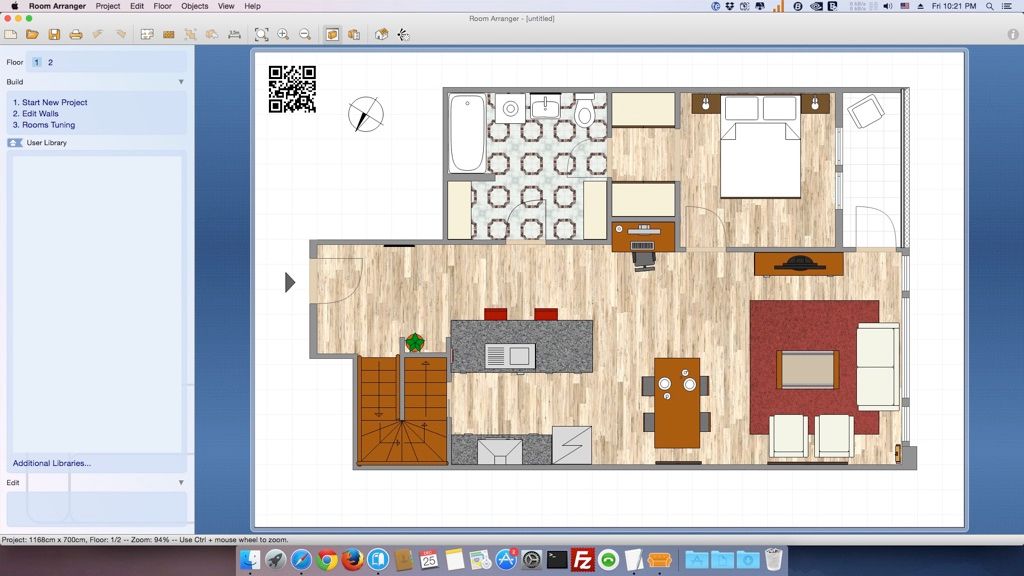
Room Arranger 是一款具簡潔使用者介面的 3D 房間/公寓/樓層規劃工具。只要掌握基本操作,您就能繪製出任何想像中的佈局……
- Intel, 64-bit processor
- OS X 10.8 or later
軟體介紹
Room Arranger 是一款具簡潔使用者介面的 3D 房間、公寓與樓層規劃工具。只要掌握基本操作,您就能隨心所欲繪製任何想像中的空間配置。軟體內建豐富的物件圖庫,同時也讓您能輕鬆建立專屬的傢具模型。Room Arranger 可將您的設計以 3D 方式呈現,並採用 VRML 標準實現此功能,因此您可將互動式 3D 場景直接嵌入網站中。每個人的需求皆不盡相同,每項設備也都獨一無二。我們無法將所有內容都納入 Room Arranger,但您可快速且輕鬆地自行設計所有特殊物件。部分使用者已將作品貢獻至我們的線上物件圖庫,並與大眾分享。此外,本程式亦廣泛應用於其他領域,例如園藝建築、住宅開發(將房屋作為物件處理)、網頁設計等。
版本 10.3.4 更新內容:本次更新時,發行說明尚未提供。
系統需求:Intel 64 位元處理器;macOS 10.8 或更新版本。
螢幕截圖
若您正在使用廣告攔截器,請將本網站加入白名單以示支持。正是廣告收入,讓我們得以持續為您提供高品質內容!或閱讀此說明,了解如何支持我們。謝謝您的支持!
檔案大小:48.9MB
舊版下載
編輯核對資料
推薦 home renovation、office move、exhibit/garden layout 與向 non-designer 說明空間。流程:site measurement/error → unit lock → underlay calibrate → wall close → opening/fixed equipment → clearance → true furniture envelope → layer/name → object/area table → option copy → 3D → scaled PDF/PNG measure → RAP+underlay+library+manifest/hash archive。先驗證一個 room 與 1:50 proof。residential 比較 Live Home 3D,concept 比較 SketchUp,BIM 比較 Archicad/Vectorworks,2D 比較 AutoCAD,free 比較 Sweet Home 3D;site/manufacturer/code 為準。
優點
- 小巧易學,可用 wall、room、opening、furniture、custom object 快速規劃 home/office/garden。object size/color/texture/rotation/height、library、layer、label、object list、area statistics 適合方案與採購比較。支援 multi-floor/3D walk-through、scaled tiled print、crop mark、PNG/clipboard、calibrated underlay、light RAP、autosave、project merge;registration 非 subscription。
不足
- 是 layout planner,不是 BIM、construction docs、structure/MEP、code check、precision CAD、photoreal render。area 依賴 closed wall,underlay 依賴 manual calibration,unit/scale error 會扭曲全案。library object 為 approximate,不是 manufacturer dimension/clearance。VRML 不受 modern browser 支援。old Intel/Rosetta build 的 future OS 不確定。RAP 是 proprietary,需另交 PDF/PNG/object table/measurement;100% high-res 消耗 memory。
安裝步驟
- 站內 10.3.4 要求 Intel 64-bit、OS X 10.8+;Apple silicon 以 Rosetta 2 App 驗證。由 DMG 拖至 Applications。實測 wall、opening、ceiling、furniture envelope、clearance,固定 metric/imperial。PDF/image underlay 先以 known dimension calibrate 並鎖定。以單一 room 核對 closed endpoint、wall thickness、area、object size/rotation/height、layer、3D,再擴展 multi-floor。開啟 autosave,保留 incremental RAP,測試 scaled print、PNG、object list、VRML/web export。
解除安裝步驟
- 移除前保存 current/incremental RAP、high-res PNG、scaled/dimensioned PDF、object/room statistics,需要時保存 index.html+Image2D.png+Image3D.wrl+library.wrl。封存 underlay、texture、custom/additional RAL、font、measurement、unit/scale、floor、print、registration、manifest/SHA-256。核對 PDF/PNG known dimension、wall join、opening、clearance、area、height、viewpoint。備份 Documents/config 後移除;recent/online/web 不是 source backup。
常見錯誤及解決方法
- room area/wall leak 要精確連接 wall start/end coordinate;thickness 不算 boundary,使用 coordinate picker。underlay 以 known length 重新 calibrate。1:50/1:100 print 核對 100%、orientation、margin、tile、crop mark、fit scaling 並實測。high-res memory error 改 100% off/分區輸出。3D object 查 height、side view、floor elevation、rotation。VRML 在 modern browser 常無 plugin,需交付 2D PNG 並保留全部 WRL/library files。另查 Rosetta/permission。
本次版本更新內容
- 站內版為 10.3.4。官方 version-10 help 確認 RAP、multi-floor、layer、user/additional library、label、object list、unit conversion、autosave、tiled scaled print、PNG、VRML、web export,但沒有完整 10.3.4 changelog。既有 feature 不誤列新增,也不引用 higher major version。按 maintenance build 處理,以同一 RAP 回歸測試 wall join、area、object size、3D、print scale、image、web/VRML set。






同類替代軟體






截圖預覽