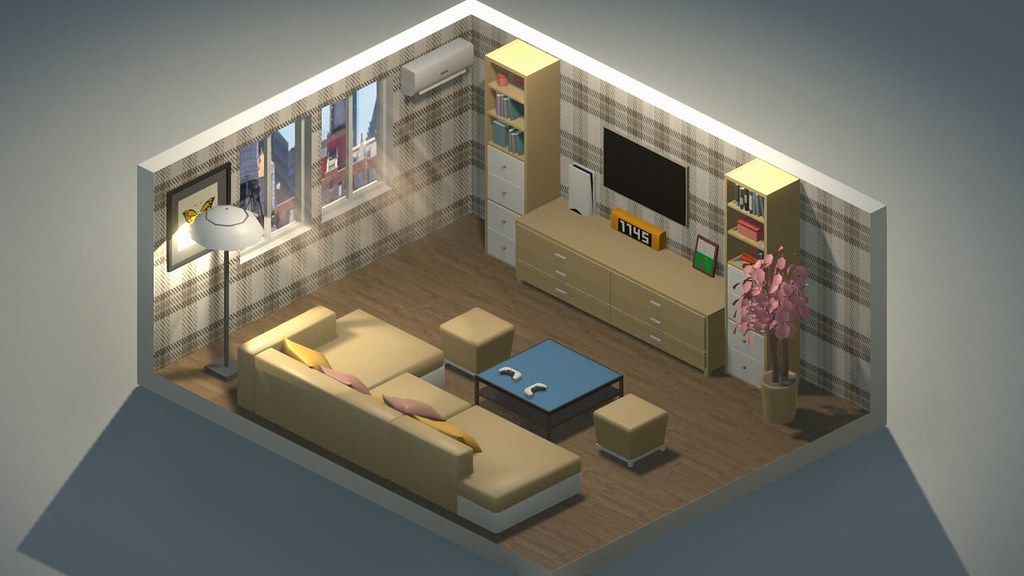
My Dream Setup
Do you want to create your dream setup? In My Dream Setup, you can create any setup you want. Any color combination...
- Intel, 64-bit processor
- macOS 10.13 or later
概要
Do you want to create your dream setup? In My Dream Setup, you can create any setup you want. Any color combination, any budget and any purpose. You are free to create whatever you want.
My Dream Setup is a simulation game about building the room you’ve always dreamed of. A huge selection of furniture, computers and their accessories, posters, pictures, plants, and other interior details await you. Try all of them and create your dream setup.
Arrange the furniture the way you want. No placing by the grid – complete freedom of action. If you don’t like where you put a piece of furniture, just move it at any time. No limits on the amount of furniture in the room. Make a small neat office or a huge studio with a bunch of computers, monitors and other things – it’s all up to you.
Change the color of the furniture. All colors of the RGB palette are available to you. Each piece of furniture is customizable separately. This allows you to create all kinds of color combinations. You can paint almost anything: doors, windows, furniture and background color. Try combining different colors and shades to get the best looking room.
A huge selection of wallpapers and wall paints awaits you. Do you want to put wallpaper with flowers in your room? Or are you a fan of loft and want a brick wall? Paint each wall separately to create the most unexpected designs, or paint an entire room in one click. We let your imagination run wild.
See how your room looks under different lighting and weather conditions. We offer you five weather options: sunny, sunset, rain, snow, and night. Each option gives the room a new atmosphere as well as a new view from the window. Also in rainy and snowy weather, precipitation appears on the windows for even more immersion.
My Dream Setup offers you the opportunity to design the room you’ll be setting up yourself. Use Blueprint mode to place walls, windows, and doors. You can redesign the room at any time, even if you’ve already started decorating
編集部確認情報
実際の Desk、Stream Room、Gaming Room の Color/Layout Preview と制限なし Creation に推奨。Blueprint で Room Size、Door、Window、Walkway を決め、Desk/Cabinet→Computer/Monitor→Small Décor/Poster/RGB の順にします。Phase ごとに Room Copy と Workshop Subscription List を保存。Sunny で配置後、5 Weather で Reflection/Window/Light を確認。2026.07.18 更新後は Catalog の Old Item Order を最初に確認。安全順序は Dual Backup→Date/SHA-256→Blueprint→Large Furniture→RGB/Weather→Reload→Workshop→Old Room です。
長所
- Budget、Grid、Furniture Count 制限がなく Small Office から Multi-computer Studio まで作り、配置後も移動できます。Blueprint は Wall/Window/Door を再設計し Fixed Shell に縛られません。Furniture、Opening、Background を個別 RGB Palette で Brand Color/Light Theme に統一可能。Sunny、Sunset、Rain、Snow、Night が同じ Room の Atmosphere を変えます。Furniture、PC Accessory、Poster、Plant、Wallpaper と Steam Workshop が豊富で、Failure なしの Creation に向きます。
短所
- Management Game ではなく Interior Sandbox で、Budget、Client、Construction Sequence、Functional Score がなく自己目標が必要。Large Room に Object、RGB、Workshop Model を増やすと Loading/Editing が低下し Rain/Snow も負荷。Free Placement でも Collision/Support があり Precise Axis Alignment は時間がかかります。Blueprint 変更で Floating/Wall Intersection が発生。Workshop の Quality/Scale/Compatibility は不均一で Unsubscribe は Missing Object の原因。公式 Mac GPU は旧 GTX 560 Ti/960 で Apple Silicon を明記せず現代 Mac 比較が不明瞭です。
インストール手順
- このページは My Dream Setup 2026.07.18 用です。公式最小は macOS High Sierra 10.13、Dual Core 2.5 GHz、RAM 4 GB、GTX 560 Ti 級、3 GB。推奨は macOS Sonoma 14.4、Dual Core 3.4 GHz、RAM 4 GB、GTX 960 級、3 GB。旧 GPU 表記だけでは全 Apple Silicon を保証できません。Room、Blueprint Wall/Window/Door、Furniture Position/Color、RGB Light、Wallpaper、Weather、Workshop、Setting を保存し 2026.07.18/SHA-256 を記録。新規 Room で Blueprint、Desk/Chair/Computer、RGB、Sunny/Sunset/Rain/Snow/Night、Save/Reload を確認します。
アンインストール手順
- 削除前に Furniture Drag、Color、Blueprint Edit を終了し Room Save→List に戻ります。Workshop Import、Remove-all-furniture、Weather Switch、Loading 中は強制終了しません。Local Room と Steam/Workshop Subscription List を別保存し Wall、Door/Window、Floor、Coordinate、Color、Light、Weather、2026.07.18/SHA-256 を残します。Workshop を無効にして再導入し、新規 Room で Wall、Window、Item、RGB、Save/Load を確認。旧 Room 後に Workshop を Batch で戻し、Missing Object 時は旧 Save を上書きしません。
よくあるエラーと解決策
- Long Loading/Not Responding は 1 回完全に待ち連打しません。以前の Hotfix は Loading Speed/Stutter を改善し、2026.07.18 は Old Item Order を復元。Catalog 順が違う場合は Content Loss と決めず Build を確認します。Placement は Collision、Support Surface、Wall Direction を確認し Snap Point から離して Rotate。No Grid でも Physical Bounds はあります。Blueprint Wall 後の Floating Furniture は移動してから Save。Workshop Missing は Subscription/Download と Empty Room で確認。Rain/Snow Stutter は Furniture/RGB を減らします。Apple Silicon は Processor 欄に明記されません。
今回の更新内容
- 公式 2026-07-18 Hotfix は Site 2026.07.18 と一致し、明記された唯一の Change は「Old items order returned」です。Furniture/Item Selector を開き Catalog Category の旧 Order 復元、常用 Item の Find/Place/Recolor/Save を確認。7/17 と 7/14 の Loading Speed、Not Responding、Stutter、Menu Gap Fix は以前の背景で、7/18 の新規項目として重複しません。未記載 Furniture/DLC/Performance/Compatibility は推測せず上位版も掲載しません。
ファイル検証






代替ソフト


スクリーンショット