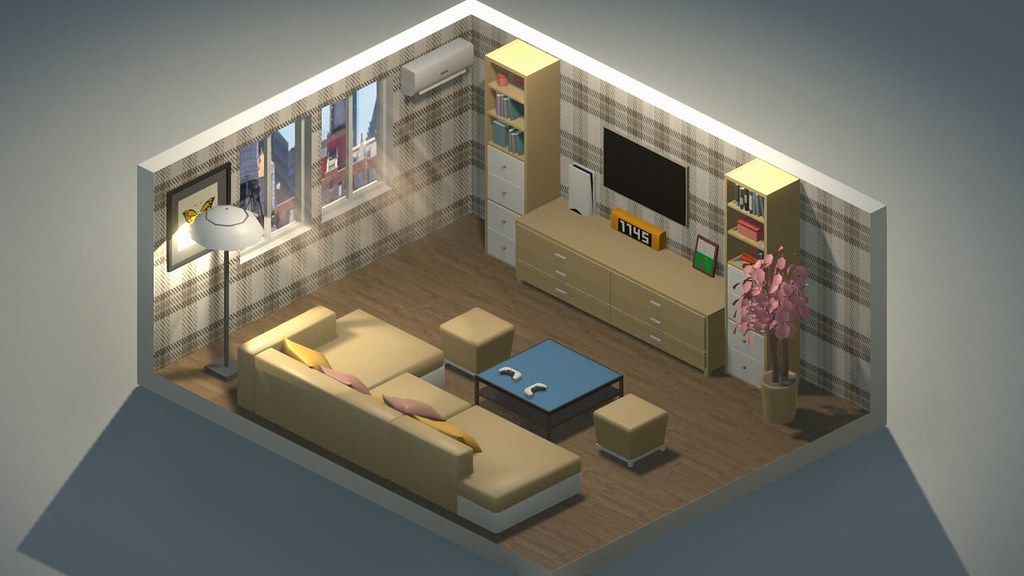
My Dream Setup
Do you want to create your dream setup? In My Dream Setup, you can create any setup you want. Any color combination...
- Intel, 64-bit processor
- macOS 10.13 or later
軟體介紹
Do you want to create your dream setup? In My Dream Setup, you can create any setup you want. Any color combination, any budget and any purpose. You are free to create whatever you want.
My Dream Setup is a simulation game about building the room you’ve always dreamed of. A huge selection of furniture, computers and their accessories, posters, pictures, plants, and other interior details await you. Try all of them and create your dream setup.
Arrange the furniture the way you want. No placing by the grid – complete freedom of action. If you don’t like where you put a piece of furniture, just move it at any time. No limits on the amount of furniture in the room. Make a small neat office or a huge studio with a bunch of computers, monitors and other things – it’s all up to you.
Change the color of the furniture. All colors of the RGB palette are available to you. Each piece of furniture is customizable separately. This allows you to create all kinds of color combinations. You can paint almost anything: doors, windows, furniture and background color. Try combining different colors and shades to get the best looking room.
A huge selection of wallpapers and wall paints awaits you. Do you want to put wallpaper with flowers in your room? Or are you a fan of loft and want a brick wall? Paint each wall separately to create the most unexpected designs, or paint an entire room in one click. We let your imagination run wild.
See how your room looks under different lighting and weather conditions. We offer you five weather options: sunny, sunset, rain, snow, and night. Each option gives the room a new atmosphere as well as a new view from the window. Also in rainy and snowy weather, precipitation appears on the windows for even more immersion.
My Dream Setup offers you the opportunity to design the room you’ll be setting up yourself. Use Blueprint mode to place walls, windows, and doors. You can redesign the room at any time, even if you’ve already started decorating
編輯核對資料
推薦給想預演真實桌面、直播間或遊戲房配色和配置,以及喜歡無資源限制創作者。先用 Blueprint 確定房間尺寸、門窗及通道,再放桌櫃等大型家具,接著電腦/螢幕,最後小擺設、海報和 RGB,避免結構變化反覆破壞細節。每階段另存房間副本並保存 Workshop 訂閱清單。用晴天完成配置,再切五種天氣檢查反光、窗景和燈光。更新 2026.07.18 後先確認物品目錄恢復舊順序。安全順序:雙備份→日期/SHA-256→空房藍圖→大型家具→RGB/天氣→重載→Workshop→舊房。
優點
- 沒有預算、網格或家具數量限制,可從小型工作區做到多電腦大型工作室,並隨時移動已放物件。Blueprint 可重建牆、窗和門,不只是在固定房型換裝。幾乎每件家具、門窗與背景都能獨立使用 RGB 色盤,適合品牌色或燈光主題。晴天、日落、雨、雪和夜晚讓同一房間快速改變氛圍。家具、電腦配件、海報、植物和牆紙豐富,Steam Workshop 再補充社群物件;沒有失敗條件,適合純創作。
不足
- 它較像室內佈置沙盒而非經營遊戲:沒有預算、客戶、施工流程或功能評分,需靠自訂目標。大型房間放大量物件、RGB 與 Workshop 模型後,載入和編輯會下降,雨雪也增加負擔。自由擺放仍受碰撞與承載面限制,缺少精密軸向移動時對齊小物件較慢。Blueprint 改結構可能令家具懸空或卡牆。Workshop 品質、比例與相容性不一,取消訂閱會令舊房缺物件。官方 Mac 顯卡仍用舊 GTX 560 Ti/960,也未明確 Apple Silicon,現代 Mac 對照不直觀。
安裝步驟
- 本頁對應 My Dream Setup 2026.07.18。官方最低為 macOS High Sierra 10.13、雙核 2.5 GHz、4 GB、GTX 560 Ti 級圖形及 3 GB;建議 macOS Sonoma 14.4、雙核 3.4 GHz、4 GB、GTX 960 級及 3 GB。舊顯卡名稱不能直接保證所有 Apple Silicon。備份房間、Blueprint 牆/窗/門、家具位置與顏色、RGB、牆紙、天氣、Workshop 及設定,記錄 2026.07.18/SHA-256。新檔建一房,修改藍圖,放桌椅電腦、調 RGB、切換晴天/日落/雨/雪/夜晚並存取。
解除安裝步驟
- 移除前退出家具拖動、選色及 Blueprint 編輯,儲存房間並回列表;不要在匯入 Workshop、清空家具、切換天氣或載入時強制退出。分別備份本機房間與 Steam/Workshop 訂閱,保留牆、門窗、樓層、家具座標、顏色、燈光、天氣及 2026.07.18/SHA-256。重裝後先停用 Workshop,以新房測試牆、窗、家具、RGB 和存取;再恢復舊房並分批啟用 Workshop。缺物件時不要覆蓋舊檔,先恢復相關訂閱。
常見錯誤及解決方法
- 載入時間長或「未回應」時先等待一次完整載入,不要連點。先前熱修提升載入速度並減少卡頓,2026.07.18 恢復舊物品排列順序。目錄順序不同時先確認日期版本,不要誤判內容遺失。家具不能放置時檢查碰撞、承載面及牆向,離開吸附點再旋轉;無網格不代表沒有物理邊界。Blueprint 改牆後先移動懸空家具再儲存。Workshop 缺物件時查訂閱與下載,以空房排除模組。雨雪卡頓可減家具/RGB 或用晴天。Apple Silicon 未在處理器欄明確列出。
本次版本更新內容
- 官方 2026 年 7 月 18 日熱修與站內 2026.07.18 完全對應,唯一明列變化是「恢復舊的物品排列順序」。驗收時開啟家具/物品選單,確認分類回到舊順序,常用家具仍可找到、擺放、改色與儲存。7 月 17/14 日公告的載入速度、未回應、卡頓及選單空隙修正屬較早背景,不重複宣稱為 7 月 18 日新增內容。其餘未列家具、DLC、效能或相容變化不作推測,也不披露更高版本。
檔案校驗與安全資訊






同類替代軟體


截圖預覽