My Dream Setup
Do you want to create your dream setup? In My Dream Setup, you can create any setup you want. Any color combination...
- Intel, 64-bit processor
- macOS 10.13 or later
소개
Do you want to create your dream setup? In My Dream Setup, you can create any setup you want. Any color combination, any budget and any purpose. You are free to create whatever you want.
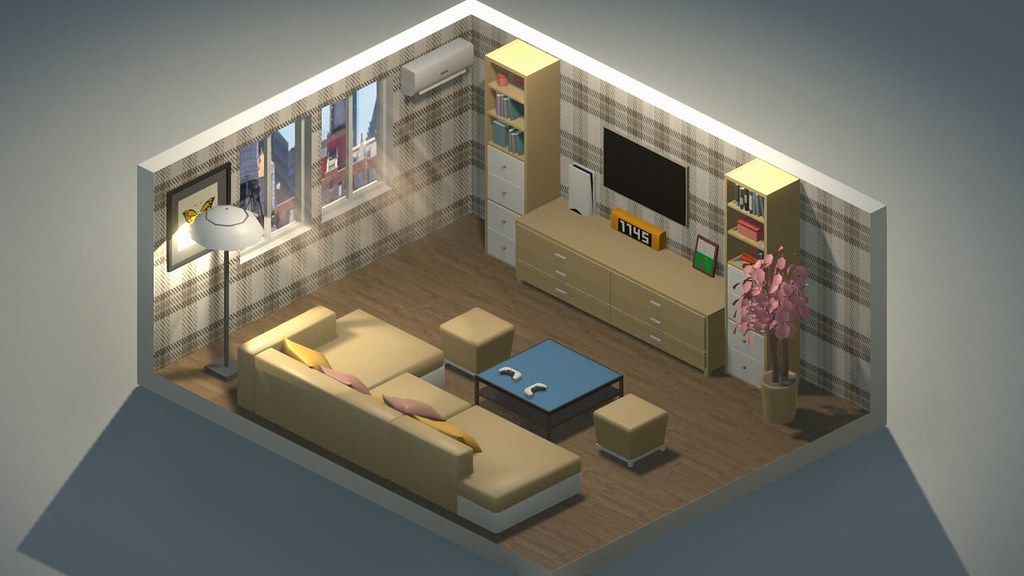
My Dream Setup is a simulation game about building the room you’ve always dreamed of. A huge selection of furniture, computers and their accessories, posters, pictures, plants, and other interior details await you. Try all of them and create your dream setup.
Arrange the furniture the way you want. No placing by the grid – complete freedom of action. If you don’t like where you put a piece of furniture, just move it at any time. No limits on the amount of furniture in the room. Make a small neat office or a huge studio with a bunch of computers, monitors and other things – it’s all up to you.
Change the color of the furniture. All colors of the RGB palette are available to you. Each piece of furniture is customizable separately. This allows you to create all kinds of color combinations. You can paint almost anything: doors, windows, furniture and background color. Try combining different colors and shades to get the best looking room.
A huge selection of wallpapers and wall paints awaits you. Do you want to put wallpaper with flowers in your room? Or are you a fan of loft and want a brick wall? Paint each wall separately to create the most unexpected designs, or paint an entire room in one click. We let your imagination run wild.
See how your room looks under different lighting and weather conditions. We offer you five weather options: sunny, sunset, rain, snow, and night. Each option gives the room a new atmosphere as well as a new view from the window. Also in rainy and snowy weather, precipitation appears on the windows for even more immersion.
My Dream Setup offers you the opportunity to design the room you’ll be setting up yourself. Use Blueprint mode to place walls, windows, and doors. You can redesign the room at any time, even if you’ve already started decorating
편집자 확인 정보
실제 책상, 방송실이나 게임방 색과 배치를 미리 보거나 제한 없이 창작하려는 사람에게 추천합니다. Blueprint에서 방 크기, 문, 창과 통로를 먼저 정하고 책상/수납장→컴퓨터/모니터→작은 장식/포스터/RGB 순서로 놓아 구조 변경이 세부를 망치지 않게 합니다. 단계마다 방 복사본과 Workshop 구독 목록을 저장합니다. 맑음에서 꾸민 뒤 다섯 날씨로 반사, 창과 조명을 확인합니다. 2026.07.18 업데이트 뒤 물건 목록이 예전 순서인지 먼저 봅니다. 안전 순서: 이중 백업→날짜/SHA-256→청사진→큰 가구→RGB/날씨→재로드→Workshop→기존 방.
장점
- 예산, 격자나 가구 수 제한 없이 작은 사무실부터 여러 컴퓨터가 있는 스튜디오까지 만들고 배치한 물건을 언제든 옮깁니다. Blueprint는 고정 방에 장식만 하는 것이 아니라 벽, 창과 문을 다시 설계합니다. 거의 모든 가구와 배경을 개별 RGB 색으로 바꿔 브랜드색과 조명 주제를 맞출 수 있습니다. 맑음, 일몰, 비, 눈, 밤이 같은 방 분위기를 빠르게 바꿉니다. 가구, 컴퓨터 주변기기, 포스터, 식물, 벽지가 많고 Steam Workshop이 커뮤니티 물건을 더합니다. 실패 없는 창작에 적합합니다.
단점
- 경영 게임보다 인테리어 샌드박스라 예산, 고객, 공사 순서나 기능 점수가 없고 스스로 목표를 정해야 합니다. 큰 방에 물건, RGB와 Workshop 모델을 많이 두면 로딩/편집이 느려지고 비/눈도 부담을 줍니다. 자유 배치도 충돌/받침면을 따르며 정밀 축 이동이 없어 작은 물건 정렬이 오래 걸릴 수 있습니다. Blueprint 구조 변경은 가구를 띄우거나 벽에 끼게 합니다. Workshop 품질, 크기와 호환성이 다르고 구독 해제는 기존 방 물건 누락을 만듭니다. 공식 Mac GPU 표는 오래된 GTX이며 Apple Silicon을 명시하지 않습니다.
설치 방법
- 이 페이지는 My Dream Setup 2026.07.18 기준입니다. 공식 최소 사양은 macOS High Sierra 10.13, 듀얼코어 2.5 GHz, RAM 4 GB, GTX 560 Ti급 그래픽, 3 GB이며 권장은 macOS Sonoma 14.4, 듀얼코어 3.4 GHz, RAM 4 GB, GTX 960급, 3 GB입니다. 오래된 GPU 표기만으로 모든 Apple Silicon을 보장할 수 없습니다. 방, Blueprint 벽/창/문, 가구 위치/색, RGB 조명, 벽지, 날씨, Workshop과 설정을 백업하고 2026.07.18/SHA-256을 기록합니다. 새 방에서 청사진, 책상/의자/컴퓨터, RGB, 다섯 날씨와 저장을 확인합니다.
제거 방법
- 삭제 전 가구 드래그, 색 선택과 Blueprint 편집을 끝내고 방을 저장해 목록으로 돌아갑니다. Workshop 가져오기, 모든 가구 삭제, 날씨 전환이나 로딩 중에는 강제 종료하지 않습니다. 로컬 방 파일과 Steam/Workshop 구독 목록을 따로 백업해 벽, 문/창, 바닥, 가구 좌표, 색, 조명, 날씨와 2026.07.18/SHA-256을 보존합니다. Workshop을 끄고 재설치한 뒤 새 방에서 벽, 창, 물건, RGB와 저장을 시험하고 기존 방과 구독을 단계적으로 복원합니다.
자주 발생하는 오류와 해결 방법
- 로딩이 길거나 응답 없음이면 한 번 완전히 기다리고 연속 클릭하지 않습니다. 이전 핫픽스는 로딩과 끊김을 개선했고 2026.07.18은 예전 물건 순서를 복원했습니다. 카탈로그 순서가 다르면 콘텐츠 손실로 보지 말고 날짜 빌드를 확인합니다. 배치 실패는 충돌, 받침면과 벽 방향을 확인하고 스냅에서 벗어나 회전합니다. 무격자여도 물리 경계는 있습니다. Blueprint 벽 변경 뒤 떠 있는 가구를 옮긴 후 저장합니다. Workshop 누락은 구독/다운로드와 빈 방으로 확인합니다. 비/눈 끊김은 가구/RGB를 줄입니다. Apple Silicon은 CPU 항목에 명시되지 않습니다.
이번 버전 변경 사항
- 공식 2026년 7월 18일 핫픽스는 사이트 2026.07.18과 정확히 일치하며 명시된 유일한 변경은 “예전 물건 순서 복원”입니다. 가구/물건 선택기를 열어 카탈로그가 이전 순서인지, 익숙한 물건을 찾고 배치·색 변경·저장할 수 있는지 확인합니다. 7월 17일/14일 로딩 속도, 응답 없음, 끊김과 메뉴 빈칸 수정은 이전 배경이며 7월 18일 신규 내용으로 반복하지 않습니다. 목록 밖 가구, DLC, 성능이나 호환성은 추측하지 않고 상위 버전도 공개하지 않습니다.
파일 검증






대체 소프트웨어


스크린샷