My Dream Setup
Do you want to create your dream setup? In My Dream Setup, you can create any setup you want. Any color combination...
- Intel, 64-bit processor
- macOS 10.13 or later
Description
Do you want to create your dream setup? In My Dream Setup, you can create any setup you want. Any color combination, any budget and any purpose. You are free to create whatever you want.
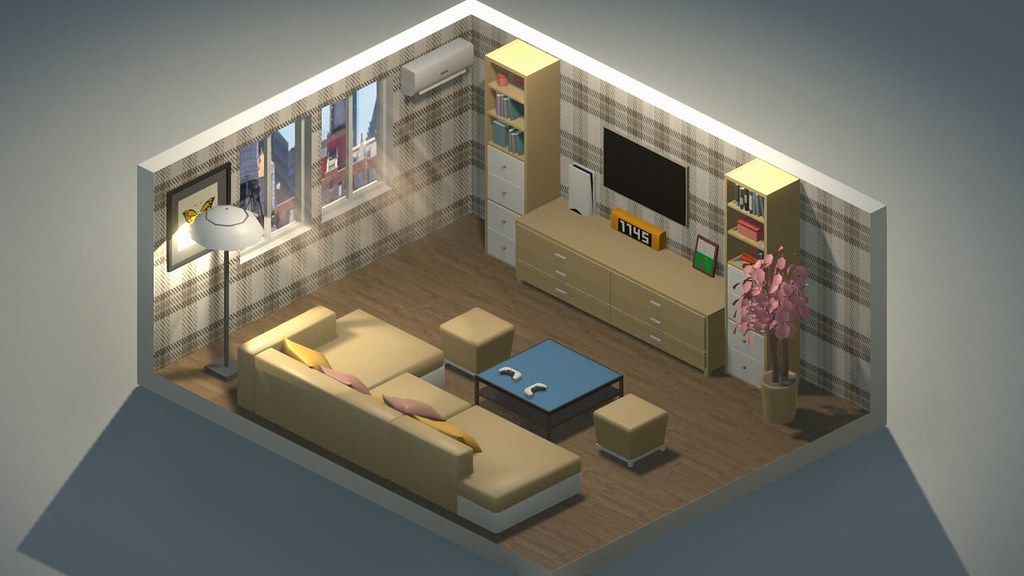
My Dream Setup is a simulation game about building the room you’ve always dreamed of. A huge selection of furniture, computers and their accessories, posters, pictures, plants, and other interior details await you. Try all of them and create your dream setup.
Arrange the furniture the way you want. No placing by the grid – complete freedom of action. If you don’t like where you put a piece of furniture, just move it at any time. No limits on the amount of furniture in the room. Make a small neat office or a huge studio with a bunch of computers, monitors and other things – it’s all up to you.
Change the color of the furniture. All colors of the RGB palette are available to you. Each piece of furniture is customizable separately. This allows you to create all kinds of color combinations. You can paint almost anything: doors, windows, furniture and background color. Try combining different colors and shades to get the best looking room.
A huge selection of wallpapers and wall paints awaits you. Do you want to put wallpaper with flowers in your room? Or are you a fan of loft and want a brick wall? Paint each wall separately to create the most unexpected designs, or paint an entire room in one click. We let your imagination run wild.
See how your room looks under different lighting and weather conditions. We offer you five weather options: sunny, sunset, rain, snow, and night. Each option gives the room a new atmosphere as well as a new view from the window. Also in rainy and snowy weather, precipitation appears on the windows for even more immersion.
My Dream Setup offers you the opportunity to design the room you’ll be setting up yourself. Use Blueprint mode to place walls, windows, and doors. You can redesign the room at any time, even if you’ve already started decorating
Editor-checked details
Recommended for previewing a real desk, stream room or gaming-room palette/layout, and for unrestricted creation. Define room size, doors, windows and walkways in Blueprint first; place desks/cabinets, then computers/monitors, and only then small décor, posters and RGB, so structural edits do not repeatedly destroy details. Save a room copy after each phase and preserve the Workshop subscription list. Build in sunny weather, then inspect reflections, windows and lights under all five conditions. After updating to 2026.07.18, first confirm the catalog restored the old item order. Safe order: dual backup; date/SHA-256; empty Blueprint; large furniture; RGB/weather; reload; Workshop; old rooms.
Pros
- There is no budget, grid or furniture-count limit, so players can build a small office or a multi-computer studio and move placed items at any time. Blueprint editing rebuilds walls, windows and doors instead of restricting decoration to a fixed shell. Nearly every furnishing, opening and background can use an independent RGB palette, useful for brand colors or lighting themes. Five weather states quickly transform one room through sunny, sunset, rain, snow and night views. Furniture, computer accessories, posters, plants and wallpapers are broad, while Steam Workshop adds community objects. Simple goals and no failure state suit pure creation and composed room views.
Cons
- It is an interior sandbox rather than a management game: no budget pressure, clients, construction sequence or functional scoring means motivation depends on self-set goals. Large rooms packed with objects, RGB lights and Workshop models can slow loading/editing; rain and snow add load. Free placement still obeys collision/support surfaces, and precise alignment can be time-consuming without detailed axis movement. Blueprint structural edits may leave furniture floating or intersecting walls and require cleanup. Workshop quality, scale and compatibility vary, while unsubscribing causes missing objects in old rooms. The official Mac GPU table still uses legacy GTX 560 Ti/960 references and does not explicitly identify Apple Silicon, making modern comparison unclear.
Installation steps
- This page covers My Dream Setup 2026.07.18. Official minimums are macOS High Sierra 10.13, dual-core 2.5 GHz, 4 GB RAM, GTX 560 Ti-class graphics and 3 GB; recommended is macOS Sonoma 14.4, dual-core 3.4 GHz, 4 GB, GTX 960-class graphics and 3 GB. The legacy GPU labels do not by themselves guarantee every Apple Silicon model. Back up rooms, Blueprint walls/windows/doors, furniture positions/colors, RGB lighting, wallpapers, weather, Workshop items and settings, then record 2026.07.18/SHA-256. Build one fresh room, edit its blueprint, place desk/chair/computer, recolor items, switch sunny/sunset/rain/snow/night, save and reload.
Uninstallation steps
- Before uninstalling, leave furniture drag, color selection and Blueprint editing, save the room and return to its list. Do not force-quit during Workshop import, remove-all-furniture, weather switch or loading. Back up local room files and the Steam/Workshop subscription list separately, retaining walls, doors/windows, floors, furniture coordinates, colors, lights, weather and 2026.07.18/SHA-256. Reinstall with Workshop disabled, then test one wall, window, item, RGB and save/load in a fresh room. Restore old rooms and enable Workshop items in batches. If objects are missing, never overwrite the old save before restoring the related subscriptions.
Common errors and fixes
- For long loading or “Not Responding,” allow one full load and avoid repeated clicks. Earlier hotfixes improved loading speed/stutter, while 2026.07.18 restores the old item order. If the catalog order differs from recent memory, verify the dated build and relearn the restored order rather than assuming content loss. Placement failures usually involve collision, support surfaces or wall direction; move away from snap points before rotating. There is no grid restriction, but physical bounds still apply. After Blueprint wall changes, move any floating furniture before saving. For missing Workshop objects, confirm subscriptions/downloads and test an empty room without mods. Reduce furniture/RGB lights or use sunny weather for rain/snow stutter. Apple Silicon is not explicit in the processor line, so Sonoma alone does not prove compatibility.
What changed in this version
- The official July 18, 2026 hotfix exactly matches the site’s 2026.07.18 dated build. Its sole explicitly listed change is “Old items order returned.” Validate by opening the furniture/item selector, confirming catalog categories use the restored order, and checking familiar items remain findable, placeable, recolorable and saved. July 17 and July 14 announcements mention loading speed, Not Responding screens, loading stutter and item-menu gap fixes, but those are earlier context and are not repeated as newly added July 18 changes. No unlisted furniture, DLC, performance or compatibility change is inferred, and higher versions are not disclosed.
File verification






Alternatives


Screenshots