Hozy

Hozy

· v1.2.1 無料

After things don’t quite work out in the big city, you return to your small hometown. Once lively, it now feels a little faded...

 システム要件
  • Apple M1 chip or later
  • macOS 14.0 or later

概要

After things don’t quite work out in the big city, you return to your small hometown. Once lively, it now feels a little faded and forgotten. In that stillness, you discover something unexpected: a new passion. Room by room, space by space, you clean, paint, and gently restore the sense of community that once filled these streets.


Hozy is about slowing down. There are no timers, scores, penalties, and absolutely no stress or pressure. Just you, your tools, and the simple joy of making spaces beautiful again. Whether you’re wiping windows, repainting walls, or finding the perfect spot for a sofa, everything is designed to keep you in a calm, satisfying flow.


Wrap yourself in a cozy atmosphere where every small action and detail matters. Open a window to let the wind play with floating dust and bring nature’s sounds closer. Light candles, arrange books on shelves, paint a portrait on the wall, or switch on a projector. Everything you touch and every choice you make delivers a sense of satisfaction and a gentle “aha!” moment.


Hozy features nine unique locations to explore and restore. Each space is filled with its residents’ personal stories, as well as unique objects and small details that make every room feel lived in. Begin your journey in your parents’ home, step into an artist’s workshop, then visit an old café full of memories. Explore dreamlike spaces and help fulfil your father’s long-held dream of a peaceful place by the sea.


Skip the endless catalogue overwhelm. Hozy offers a carefully curated selection of furniture and décor for each level that work well together. Place items freely, rotate and arrange them however you like – there is no right or wrong and no room is ever the same. Use the tools at your disposal wisely, and you’ll create spaces worthy of an interior-design magazine!


Features :

• A variety of spaces to restore and furnish at your own pace and with no limits

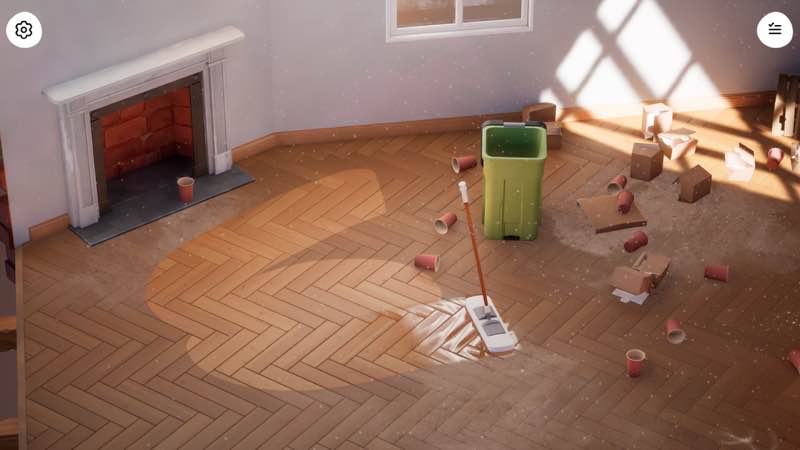
• A wide range of cleaning and renovation tools to use, like a mop, squeege

✓ 出典資料を確認済み

編集部確認情報

編集者: macv.net Editorial Team · 最終確認日: 2026-08-07
macOSOfficial minimum: macOS 14+, Apple M1, 16 GB RAM, M1 integrated GPU and 5 GB free space. Intel Macs are explicitly incompatible.
Apple SiliconRequired. Apple M1 is the official minimum.
Intel Mac非対応
おすすめする理由

Unpacking のような Pressure-free Organization と House Flipper の Cleaning Satisfaction を好み、Money/Client Stress は不要な人に推奨します。最初から Magazine Layout を狙わず、Clutter→Damaged Object→Top-to-bottom Dust→Window→Mop→Paint→Large Furniture→Small Décor の順に進め、最後に Photo Mode で Light を調整します。各 Location 後に一度 Exit/Re-enter して Furniture/Cleaning Save を確認。Story 完了後に Game Plus を別に試し、Original Layout Copy を残します。安全順序は Dual Backup→1.2.1/SHA-256→Tool Test→One Room→Re-entry→Photo Mode→Game Plus→Old Save です。

長所

  • Cleaning、Restoration、Interior Design を Timer/Score/Penalty なしの穏やかな Loop にまとめ、効率より変化を観察できます。Window、Mop、Removal は分かりやすい Physics Feedback を持ちます。9 Location は単なる Template ではなく、Parents’ Home、Artist Workshop、Old Café、Seaside Dream に Resident Story と固有 Object があります。Curated Furniture は Catalogue Fatigue を減らしつつ Free Rotation/Placement を維持。Window、Candle、Shelf、Wall Art、Projector と Photo Mode が生活感と記録性を高め、Game Plus は別の Furniture/Occupant で Replay を支えます。

短所

  • 意図的に Slow な Core のため、Management Number、Budget Pressure、Customer Rating、Timed Challenge を求める人には軽く感じます。Main Story は 9 Location に限られ、Game Plus でも Cleaning の反復があります。Curated Furniture は整えやすい反面、Huge Library、Exact Dimension、Structural Remodeling 向けではありません。Physics Collision で Small Object/Tight Corner が扱いにくく、最後の Cleaning Percentage 探しも必要です。Mac は Apple Silicon、macOS 14+、16 GB が必須で Intel は完全非対応。5 GB 以外に Save/Photo/Update の余裕も必要です。

インストール手順

  1. このページは Hozy 1.2.1 用です。公式 Mac 最小要件は Apple M1、macOS 14 以降、RAM 16 GB、M1 Integrated GPU、空き 5 GB で、Intel Mac は非対応です。完了 Level、9 Location の Cleaning/Renovation、Game Plus Room、Furniture Layout、Photo Mode、9 Achievement、Control を保存し、Installer SHA-256 を記録します。最初は Parents’ Home などで Mop、Squeegee、Crowbar、Window Cleaning、Painting、Furniture Rotation/Free Placement を確認し、Save 後に Room を開き直します。Game Plus は Main Story 完了後に確認し、旧 Layout をすぐ上書きしません。

アンインストール手順

  1. 削除前に Tool 使用と Furniture Drag を終了し、Level Save を待ちます。Cleaning Completion、Room Transition、Photo Save、Game Plus Load 中は強制終了しません。Local/Steam Cloud を別々に保存し、9 Location の Completion、Resident Story、Furniture Layout、Photo、Achievement、1.2.1/SHA-256 を残します。Cloud を切って再導入し、新規 Save で Cleaning、Paint、Placement、Room Re-entry を確認後、旧 Save を戻します。Cloud 復帰前に Location 数、Game Plus Unlock、Furniture Position を照合します。

よくあるエラーと解決策

  1. Tool が効かない場合は Objective に合う Tool か確認し、汚れ/物体の中心へ近づき Camera を調整します。Mop は Floor、Squeegee は Glass、Crowbar は許可された Removal Target 用です。Cleaning Percentage が止まったら Furniture の裏、Corner、Window Frame、高所の反射部分を調べ、Window を開けて光を変えます。Furniture は Drag を一度解除し、再取得・Rotate して Collision Space を空けます。Objective は Animation 完了、Trigger の出入り、Room 再読込で直る場合があります。Photo Mode は Resolution/Depth of Field/Filter を下げます。起動には Apple Silicon、macOS 14+、16 GB が必要で Intel は非対応です。

今回の更新内容

  1. Site Build は 1.2.1 です。この完全な番号と一致する公式公開 Itemized Fix List は確認できないため、Patch Detail を創作せず、上位版も掲載しません。確認可能な内容は 9 Location、Resident Story、Mop/Squeegee/Crowbar、Physics-based Cleaning、自由 Rotate/Placement の Curated Furniture、Photo Mode、Original Soundtrack、Steam Cloud、9 Achievement です。Main Story 後は完了 Room を異なる Furniture/Occupant の Game Plus で再訪できます。Build 表示、Tool、Cleaning Progress、Furniture Save、Room Re-entry、Photo Save、Game Plus Unlock を検収します。

ファイル検証

セキュリティスキャンBack up all nine locations, furniture layouts, Game Plus and photos; record 1.2.1/SHA-256; verify one room save/re-entry before restoring cloud data. レポートを見る

代替ソフト

スクリーンショット

Hozy 截图