Axure RP
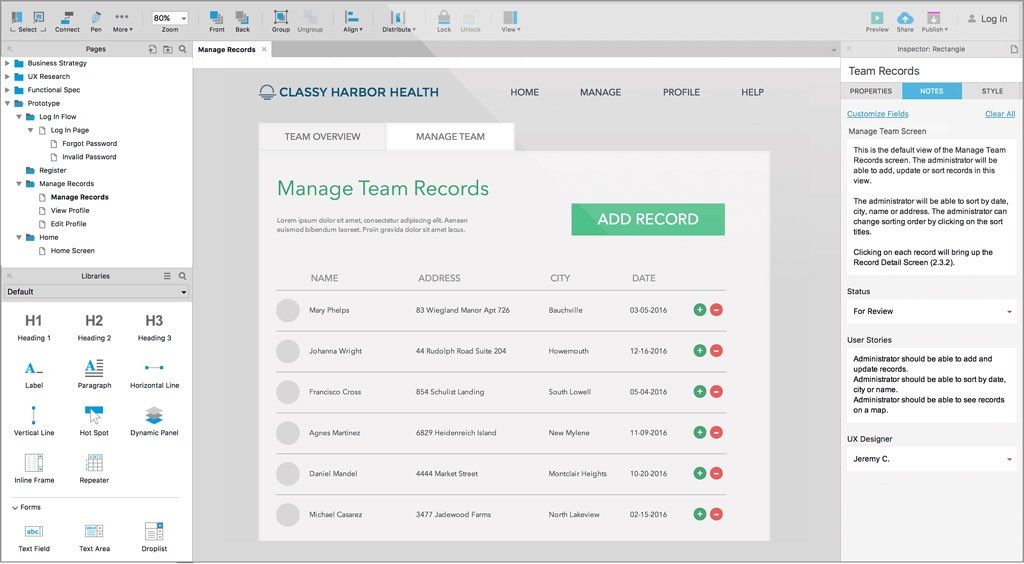
Axure RP brings new diagramming, prototyping, and specification features to help you design the right solution and align your team. For...
Description
Axure RP brings new diagramming, prototyping, and specification features to help you design the right solution and align your team. For teams, take advantage of new collaboration features and an option to install Axure Share on-premises.
PLAN AND PROTOTYPE
Building great business solutions, websites, and applications requires planning before going into production.
With Axure RP, business and UX professionals can analyze problems, design solutions, and create interactive prototypes without code — in one tool.
GET MEANINGFUL FEEDBACK
With Axure RP, you can validate designs early and make changes before starting development.
By giving stakeholders and users a chance to test drive interactive HTML prototypes, you can gather meaningful feedback and make informed decisions.
GIVE DEVELOPERS CLARITY
When everyone from stakeholders to developers are on the same page, your team can confidently deliver the right solution.
Interactive prototypes and specifications created in Axure RP present your solutions in a way that is easy to communicate and understand.
FASTER DIAGRAMMING
Simplified Environment
• New Inspector for editing interactions, notes, and style
• Redesigned toolbars—Consistent across PC and Mac
• Simplified toolbars across all panes
Widget Libraries
• Default library has more styled shapes for quick wireframing and markup
• New Icons library based on Font Awesome
Widget Styles
• Simplified style system to use a single default style
• Widgets in built-in libraries are all assigned a style
• Styles can be easily added and updated from the Inspector
Pen Tool and Custom Shapes
• New pen tool for drawing custom shapes and icons
• Shape widgets can be converted to custom shapes
• Transform custom shapes with flip, unite, subtract, intersect, and exclude operations
Flow Diagrams
• All shape, image, and snapshot widgets have connector points
• Connector points are visible only when using the connector tool and your mouse is over the widget
• C
Related apps






Screenshots