Hozy
After things don’t quite work out in the big city, you return to your small hometown. Once lively, it now feels a little faded...
- Apple M1 chip or later
- macOS 14.0 or later
Description
After things don’t quite work out in the big city, you return to your small hometown. Once lively, it now feels a little faded and forgotten. In that stillness, you discover something unexpected: a new passion. Room by room, space by space, you clean, paint, and gently restore the sense of community that once filled these streets.
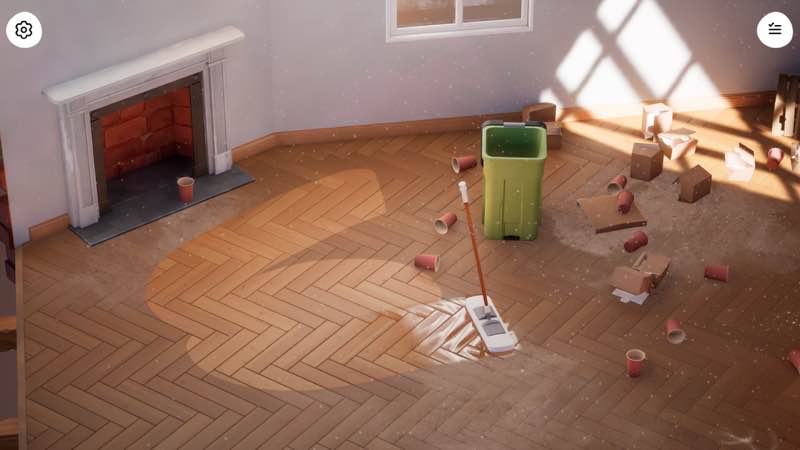
Hozy is about slowing down. There are no timers, scores, penalties, and absolutely no stress or pressure. Just you, your tools, and the simple joy of making spaces beautiful again. Whether you’re wiping windows, repainting walls, or finding the perfect spot for a sofa, everything is designed to keep you in a calm, satisfying flow.
Wrap yourself in a cozy atmosphere where every small action and detail matters. Open a window to let the wind play with floating dust and bring nature’s sounds closer. Light candles, arrange books on shelves, paint a portrait on the wall, or switch on a projector. Everything you touch and every choice you make delivers a sense of satisfaction and a gentle “aha!” moment.
Hozy features nine unique locations to explore and restore. Each space is filled with its residents’ personal stories, as well as unique objects and small details that make every room feel lived in. Begin your journey in your parents’ home, step into an artist’s workshop, then visit an old café full of memories. Explore dreamlike spaces and help fulfil your father’s long-held dream of a peaceful place by the sea.
Skip the endless catalogue overwhelm. Hozy offers a carefully curated selection of furniture and décor for each level that work well together. Place items freely, rotate and arrange them however you like – there is no right or wrong and no room is ever the same. Use the tools at your disposal wisely, and you’ll create spaces worthy of an interior-design magazine!
Features :
• A variety of spaces to restore and furnish at your own pace and with no limits
• A wide range of cleaning and renovation tools to use, like a mop, squeege
Editor-checked details
Recommended for players who enjoy Unpacking-style pressure-free organization and House Flipper’s cleaning satisfaction without money or client stress. Do not chase a magazine layout immediately. Use a stable order: clear clutter, remove damaged objects, dust top-to-bottom, clean windows, mop, paint, place large furniture, then small décor; adjust light in photo mode last. After each location, exit and re-enter once to confirm furniture and cleaning progress saved. Try Game Plus separately only after finishing the story and preserve the original layout copy. Safe order: dual backup; record 1.2.1/SHA-256; fresh-save tool test; complete one room; re-entry check; photo mode; Game Plus; old save.
Pros
- Cleaning, restoration and interior design form an unhurried loop without timers, scores or penalties, letting players observe transformation rather than optimize. Window wiping, mopping and removal have readable physical feedback, so small actions remain satisfying. The nine locations are more than empty templates: the parents’ home, artist’s workshop, old café and seaside dream carry resident stories and distinct objects. Curated level-specific furniture reduces catalogue overload while retaining free rotation and placement. Open windows, candles, shelves, wall art and projectors add lived-in detail, and photo mode preserves results. Game Plus revisits completed rooms with different furniture and occupants, extending replay value.
Cons
- The deliberately slow core will feel light to players seeking management numbers, budget pressure, customer ratings or timed challenges. Nine main-story locations are finite, and even with changed furniture/occupants in Game Plus, repeated cleaning actions can tire. Curated furniture coordinates easily but will not satisfy users wanting huge libraries, exact dimensions or structural remodeling. Physics collisions can make small objects and tight corners awkward, while the final cleaning percentage may demand searching. The Mac threshold is strict: Apple Silicon, macOS 14+ and 16 GB RAM, with Intel entirely unsupported. Five GB is only the minimum free space; saves, photos and updates need margin.
Installation steps
- This page covers Hozy 1.2.1. Official Mac minimums are Apple M1, macOS 14 or newer, 16 GB RAM, the M1 integrated GPU and 5 GB free space; Intel Macs are explicitly incompatible. Back up completed levels, cleaning/renovation progress across nine locations, Game Plus rooms, furniture layouts, photo-mode work, nine achievements and controls, then record the installer SHA-256. On first launch, use an early location such as the parents’ home to test the mop, squeegee, crowbar, window cleaning, painting, furniture rotation and free placement, then save and reopen the room. Check Game Plus only after the main story and do not overwrite an old layout immediately.
Uninstallation steps
- Before uninstalling, leave active tool use and furniture drag mode, then wait for the level save. Do not force-quit during cleaning completion, room transitions, photo saving or Game Plus loading. Back up local data and Steam Cloud separately, retaining nine-location completion, resident-story states, furniture schemes, saved photos, achievements and the 1.2.1/SHA-256 record. Reinstall with cloud sync off and use a fresh save to complete one cleaning, paint, placement and room re-entry. After tools, physics and saving work, copy the old save back. Before restoring cloud sync, confirm the location count, Game Plus unlock and furniture positions; keep the conflict copy with the clearest progress and timestamp.
Common errors and fixes
- If a tool has no effect, confirm the objective calls for that tool, move close to the center of the dirt/object and adjust the camera: the mop serves floors, the squeegee glass, and the crowbar only approved removal targets. If cleaning percentage stalls, inspect behind furniture, corners, window frames and reflective high areas; opening a window can change light and reveal dust. If furniture will not fit, leave drag mode, pick it up again, rotate it and allow collision space. Objectives that fail to advance often recover after the animation finishes, leaving/re-entering the trigger or reopening the room. For photo-mode stutter, reduce resolution, depth of field and filters. Launch failures require Apple Silicon, macOS 14+ and 16 GB RAM; Intel is unsupported. Close memory-heavy apps and reduce resolution, shadows and post-processing for low FPS.
What changed in this version
- The site build is 1.2.1. No public official itemized fix list was found that matches the complete 1.2.1 number exactly, so patch details are not invented and higher versions are not disclosed. Officially verifiable current scope includes nine distinct locations to clean and restore, resident stories, tools such as mop/squeegee/crowbar, physics-based cleaning, curated furniture with free rotation/placement, photo mode, an original soundtrack, Steam Cloud and nine achievements. After the main story, completed rooms can be revisited in Game Plus with different furniture and occupants. Acceptance covers the displayed build, tool response, cleaning progress, saved furniture, room re-entry, photo saving and Game Plus unlock state.
File verification






Alternatives


Screenshots