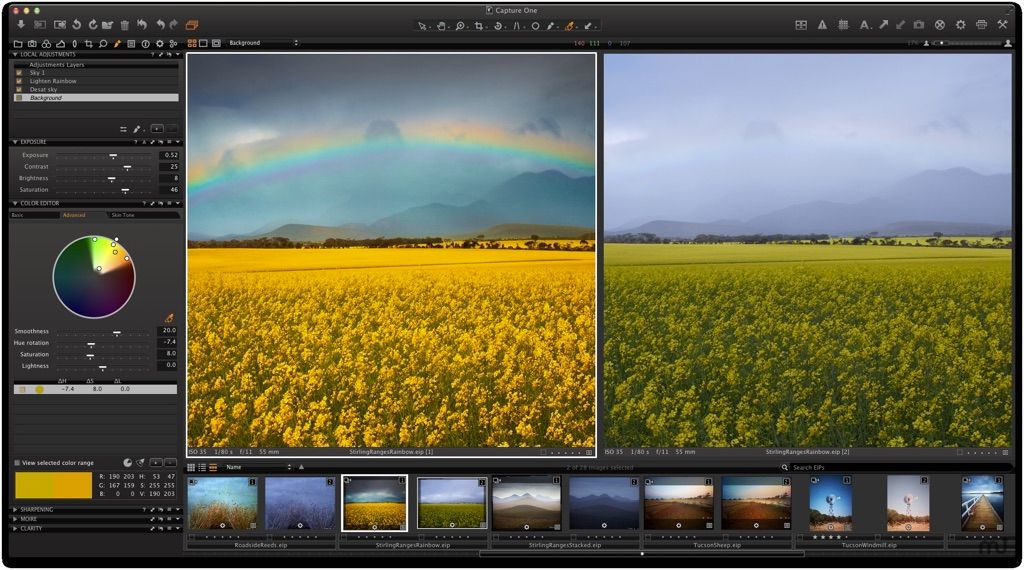
Capture One 23
Capture One Pro is a professional RAW converter offering you ultimate image quality with accurate colors and incredible detail from more...
- Intel, 64-bit processor
- macOS 13.0 or later
Description
Capture One is a professional RAW converter offering you ultimate image quality with accurate colors and incredible detail from more than 300 high-end cameras — straight out of the box. It offers state-of-the-art tethered capture, powerful digital asset management, extensive adjustment tools and a flexible workflow.
With an updated processing engine, market-leading performance and powerful new features, Capture One Pro is the professional choice in imaging software. You get the highly responsive precision tools you need to create stunning images from your camera’s RAW files in a time-saving workflow that can be customized to fit your needs.
MADE FOR PROS. USED BY ALL.
Our Pro plan delivers the speed, control, and color accuracy professionals rely on—so you can always create your best work.
• Advanced editing for complete creative freedom
• Unrivaled color precision to perfect every image
• Industry-leading tethering for a seamless workflow
• Built for pros: fast, reliable, and fully customizable
WHAT’S NEW
Version 23 16.8.5.30:
• Release notes were unavailable when this listing was updated.
REQUIREMENTS
• Intel, 64-bit processor
• macOS 13.0 or later
ScreenShots
If you are using Adblocker!! Please support this website by adding us to your whitelist. Ads are what helps us bring you premium content! Or read this to know how you can support us. Thank you!
•
Size
– 1.8GB
Previous Versions
Editor-checked details
Recommend it first to photographers who prioritize tethering, camera color, consistent skin and high-volume commercial delivery. Use a Session per client shoot: second-copy on import, controlled naming, Next Capture Adjustments, Selects and multiple export recipes; copy the complete Session afterward and verify .cosessiondb plus Settings. Use a Catalog for cross-year work only, and include referenced originals, database, LCC/ICC and masks in a 3-2-1 backup. Compare Adobe Lightroom for cloud/multi-device organization, Lightroom Classic for local folders, print and Adobe workflow, Affinity Photo for subscription-free pixel compositing, and Photomator or Pixelmator Pro for lighter library editing. AI review is a filter hint; inspect eyes, expression, brand details and product defects manually at full size.
Pros
- Detailed RAW rendering and camera/lens color profiles, Skin Tone, Color Editor, ICC and layered local adjustments suit commercial portrait/product work. Sessions create a portable Capture/Selects/Output/adjustment structure for tethering, while Catalogs provide cross-project search, ratings, color tags and Smart Albums. Apple silicon and Metal are native. Enhanced Denoise can process high-ISO Bayer RAW in the background. Professional tethering, Next Capture Adjustments, naming and multiple export recipes shorten studio delivery. Variants preserve alternate treatments without duplicating RAW. Workspaces, shortcuts and AppleScript are customizable.
Cons
- The learning curve and panel density exceed consumer editors. Catalog and Session structures are easy to confuse: Catalog database backup normally is not original backup, and Sessions lack built-in automatic backup. Database upgrades block direct older-version opening, and rollback omits post-upgrade edits. RAW, tether, Live View and wireless support require model-by-model checks. Enhanced Denoise is Bayer-only; Assisted Review remains beta and can misclassify. 4K, high-megapixel RAW, AI masks and denoise stress RAM, GPU and cache. Wireless depends on selected Canon bodies, firmware, memory card and network. Collaboration, Actions and administration vary by subscription tier. Layered PSD/TIFF is mainly view-only; reprocessing creates a flattened file.
Installation steps
- Capture One 16.8.0.32 requires macOS 14–26, a first-generation Intel Core i3 or Apple silicon M1 or newer, 8 GB RAM, 10 GB space and a calibrated 1280×800 24-bit display; Intel needs SSE4.2. For 4K displays, at least double the baseline and use a GPU with ample VRAM. Check RAW, tethering, Live View and wireless support separately for the exact camera—RAW support does not imply every tethering function. First launch into a new test Session, not the only working Catalog. Import 20 copied samples and verify RAW color, lens profile, previews, layer masks, Enhanced Denoise, export and hardware acceleration. Prove tethering with a short USB cable before wireless, disable camera sleep and configure a live second copy outside Capture, Selects and Output. Upgrade an older Catalog/Session only after originals, database and adjustments have an independent backup.
Uninstallation steps
- Before uninstalling or migrating, distinguish Catalog from Session. A Catalog backup saves the database, adjustments, metadata and collections but normally excludes referenced RAW originals; back those up separately. Sessions have no built-in automatic backup: copy the .cosessiondb, Capture, Selects, Output, externally referenced Favorites and each image folder’s CaptureOne/Settings data. Run Verify Catalog or Session, then manually back up the Catalog with integrity test and optimization. Sample 20 images across cameras and years for originals, masks, variants, ratings and exports. Copy the archive to another medium and open it offline. Retain the .backup database after any schema upgrade because older versions cannot directly open the upgraded database. Uninstall officially and remove only reproducible Cache/Previews—never confuse a database backup with an original-image backup.
Common errors and fixes
- Catalog/Session cannot return to an older version after opening: close Capture One, preserve the current database, then restore .cocatalogdb.backup/.cosessiondb.backup or a manual backup; edits made after upgrade will not exist in the old database. Offline images: do not re-import—Locate/Reconnect the originals root and check external-volume name, mount and permissions. Database connection failed/in use: stop concurrent writers and sync tools, copy the library to local SSD, verify/repair, then sync an archive. Enhanced Denoise supports Bayer RAW only, not X-Trans, monochrome, linear RGB RAW or JPEG; use standard reduction at low ISO. Uneven results can follow localized in-camera RAW correction; reduce Impact and inspect at 100%. For wireless tether drops, verify camera support, memory card, network and firmware; retain card RAW and let the full file replace the small RAW. Check dual-card/ReTether queues before deleting duplicates. For color shifts, inspect ICC, proof profile, recipe space and calibrated display.
What changed in this version
- The 16.8 line containing build 16.8.0.32 introduces Enhanced Denoise for ISO 3200+ Bayer RAW, computed in the background with an Impact control to balance cleanup and natural texture; X-Trans, monochrome, linear RGB RAW and JPEG are excluded. Assisted Review is a beta that flags closed eyes, missed eye focus and black frames for filtering or Smart Albums, not a replacement for human culling. Second-generation Canon wireless tethering sends an immediately editable small RAW, then replaces it with the chunked full-resolution RAW. ReTether gains recovery, dual-card deduplication and transfer progress. When Preview Is Ready displays a capture while AI masks/retouching finish. AppleScript Color Editor expands; Actions and the web admin portal require matching Studio team/enterprise tiers. Camera/lens support follows the official matrix.
Related apps






Alternatives





Screenshots