Affinity Photo
The first choice of millions of creative professionals around the world, the award-winning Affinity Photo set a new standard for quality...
Description
The first choice of millions of creative professionals around the world, the award-winning Affinity Photo set a new standard for quality and value in the world of image editing.
The ultra-powerful Affinity Photo 2 takes the experience to a whole new level, thanks to the addition of incredible new features, hundreds of enhancements and a completely redesigned UI for an improved workflow.
REFINED & REDESIGNED WITH POWERFUL NEW FEATURES
• Fully redeveloped UI, tool and button icons
• Completely revamped Layers Panel
• Non-destructive RAW develop
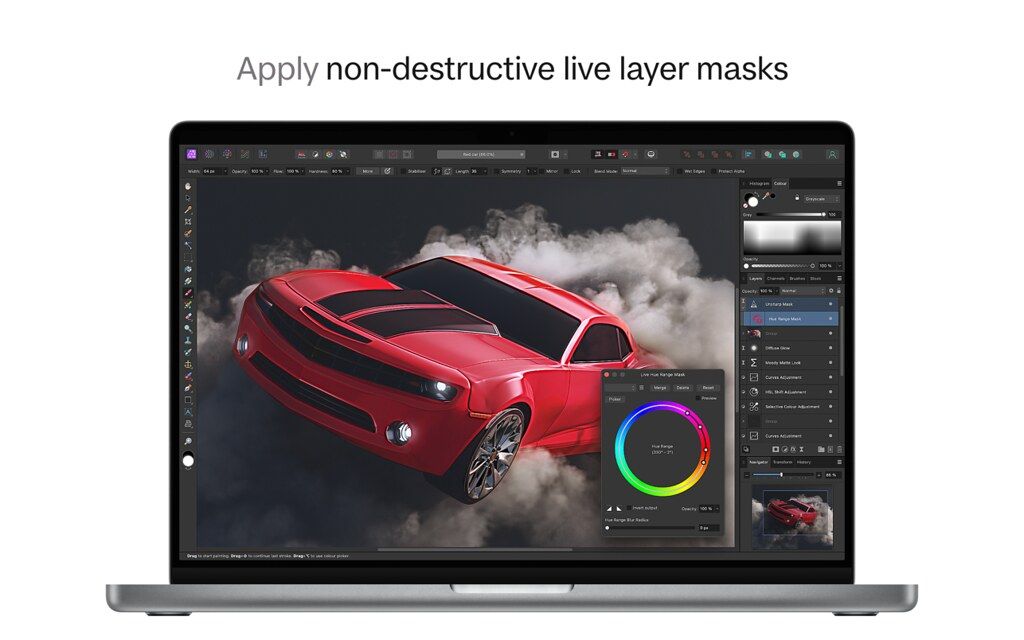
• Luminosity, hue range and band pass live masks
• Compound masks
• Non-destructive Live Mesh Warp filter
• Smart layer states to experiment with design options and versions
• Drag / drop bitmap texture fills
• JPEG XL file import and export
• Force scale everything
• Multiple shadow, outline and overlay layer effects per object
• INCREDIBLE PERFORMANCE
• Massive image support (100+ Megapixels)
• Pan and zoom at maximum refresh rate, with ProMotion support on latest Apple displays
• Open, edit and save Photoshop® PSD files
• RGB, CMYK, Greyscale and LAB colour spaces
• Full 16-bit and linear unbounded 32-bit per channel editing
• Work with all standard formats like PNG, TIFF, JPG, JPEG XL, GIF, SVG, EPS, EXR, HDR and PDF
UNSURPASSED PRODUCTIVITY
• Full support for unlimited layers, layer groups, adjustment layers, filter layers and masks
• Edit live filters, adjustments, effects, blend modes and masks non-destructively
• Saveable undo history
• Record and play macros
• Isolate, edit and duplicate spare channels with a simple click
• Saveable workspace presets for multiple UI layouts
• PDF passthrough, import, edit and export
• Link layers to edit simultaneously
PROFESSIONAL IMAGE PROCESSING
• Open RAW and other images in a 16-bit development workspace
• Adjust exposure, blackpoint, clarity, vibrance, white balance, shadows, highlights and more
• Advanced lens corrections including chromatic aberration, defringe, vignet
Editor-checked details
It suits individual photographers, designers and small teams that avoid long subscriptions but need layered compositing, RAW, retouching, HDR/panorama/stacks and precise export. Structure each job as read-only originals, layered AFPhoto master, Links folder, font/plug-in manifest, sRGB/print deliverables and an archive copy. Use ML selection as a draft, then inspect every edge on solid backgrounds, in the mask and at 100%. Compare Photoshop for industry-standard PSD collaboration, generative services and the largest plug-in ecosystem; Pixelmator Pro or Acorn for lighter macOS pixel editing; Photomator for Apple Photos-centered batch RAW; Lightroom for cataloging and multi-device sync. Reopen deliveries and check alpha, ICC, bit depth, dimensions, text rasterization and edges on dark/light backgrounds.
Pros
- A one-time purchase provides full pixel editing without mandatory ongoing subscription. Native Apple silicon and Metal support large canvases, 16/32-bit and wide gamut. Photo, Liquify, Develop, Tone Mapping and Export Personas separate tasks. Adjustment layers, Live Filters, masks, Blend Ranges and Snapshots enable nondestructive work. Frequency Separation, healing, Inpainting, panorama, HDR, focus merge, astrophotography stacking and batch jobs are built in. PSD, PDF, TIFF and OpenEXR cover common exchange. Select Subject/Object Selection runs locally. Designer and Publisher can edit the same Affinity document directly; macros, brushes, assets and LUTs are reusable.
Cons
- AFPhoto is proprietary and other apps cannot fully preserve its Live Filters, masks and Persona data. PSD/PDF interchange is not layer-for-layer identical; complex smart objects, text, blends and CMYK output need sampling. It lacks Lightroom/Capture One scale cataloging, ratings, tethering and team DAM. ML selection is not final masking—hair, transparency, reflections and similar backgrounds need manual edges. Photoshop plug-in support varies by architecture, sandbox and version. Saved history, embedded resources, large stacks and many Live Filters rapidly increase file/RAM use. Links, fonts, macros, brushes and assets require self-managed archives. RAW color can differ from camera JPEG and other processors. Metal problems may require disabling acceleration at a performance cost.
Installation steps
- Affinity Photo 2.6.5 requires an Intel or Apple silicon Mac, macOS 10.15+, at least 4 GB RAM and 1280×768; Metal acceleration needs a supported GPU. Large 16/32-bit, HDR, panorama, astrophotography-stack and multi-Live-Filter documents benefit from 16 GB+ RAM and ample SSD scratch space. M1/M2/M3 are explicitly covered by the V2 feature documentation; M4 shares the architecture, but fonts, Photoshop plug-ins, RAW engine and export should be checked before production. After installation, duplicate RAW/JPEG/PSD samples and test SerifLabs/Apple Core Image RAW, Select Subject, Object Selection, Live Filters, masks, PSD round-trip, transparent PNG and TIFF/PDF export in sRGB and Display P3. If V1 remains installed, preserve V1 originals; do not assume a document saved by V2 reopens in V1. Export brushes, macros, assets, styles, LUTs and shortcuts individually instead of relying on the app container as their only copy.
Uninstallation steps
- Before uninstalling, open Resource Manager in every AFPhoto document and confirm linked images, documents and cloud files are available. Embed critical links or collect them beside the project in a stable Links structure. Photo lacks Publisher’s complete font-package workflow, so record font names, versions, licenses and substitutions. Archive original RAW, layered AFPhoto, exported master, delivery files, ICC/OCIO/LUT data, macros, brushes, assets and a plug-in list together. Disable Save History with Document to avoid extreme growth, while preserving milestone Save As versions and Snapshots. Copy the archive to another medium, open samples offline and re-export before removing fonts. Uninstall through the original store. Do not remove Group Containers/Application Support until user content is exported. Cache and autosave are temporary recovery aids, not versioned masters.
Common errors and fixes
- Missing Resource on open: do not overwrite immediately. Use Resource Manager Replace/Relink to the originals root, verify dimensions, profile and layout, then save a copy. Select Subject/Object Selection unavailable or poor: install/enable the ML model, target a pixel/image layer rather than an empty group, run at adequate resolution, then refine manually with Refine, brush and mask. RAW differs from camera JPEG because SerifLabs and Apple Core Image use different profiles; standardize one engine, disable automatic tone curve when appropriate and build a color-chart preset. Black canvas, corruption or export artifacts: disable Metal acceleration and restart, then isolate GPU, Live Filter or plug-in with a small sample. PSD round-trips can change smart objects, blends, text, editable filters and CMYK effects; retain the AFPhoto master and inspect layers. For bloated/slow saves, inspect saved history, embedded resources, stack source layers and Live Filters, then Save As a clean copy. Verify PNG alpha with checkerboard or re-import, not only Preview’s dark background. Do not overwrite typography after font substitution.
What changed in this version
- Affinity Photo 2.6’s headline photo feature is on-device machine-learning selection: Select Subject builds a subject pixel selection, while Object Selection uses painted or boxed prompts to identify a chosen object. Models run locally, but results still require Refine and mask review. The 2.6 line also brings suite-wide object-selection, state and workspace improvements into Photo while retaining RAW Develop, nondestructive Live Filters, compound/live masks, HDR/32-bit OpenEXR, panorama, focus merge, astrophotography stacks, frequency separation, macros and batch jobs. Version 2.6.5 is a maintenance point in that feature line, best treated as stability and defect correction rather than a new format promise. Save As a copy of critical older work and inspect PSD/PDF, fonts, links and plug-in output separately.
Related apps






Alternatives





Screenshots