Adobe Lightroom Classic
Adobe Lightroom Classic (was Adobe Lightroom) software helps you bring out the best in your photographs, whether you're...
- Intel, 64-bit processor
- macOS 12.0 or later
Description
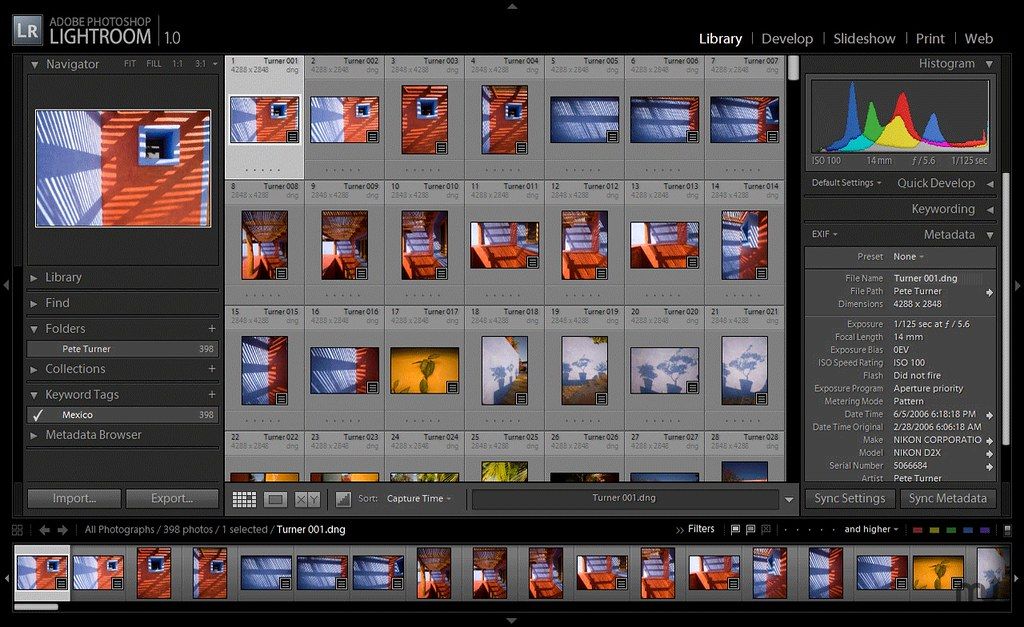
Adobe Lightroom Classic (was Adobe Lightroom) software helps you bring out the best in your photographs, whether you’re perfecting one image, searching for ten, processing hundreds, or organizing thousands.
Create incredible images that move your audience. Experiment fearlessly with state-of-the-art nondestructive editing tools. Easily manage all your images. And showcase your work in elegant print layouts, slide shows, and Web galleries, as well as on popular photo-sharing sites. All from within one fast, intuitive application.
student and teacher discounts on the Creative Cloud service
WHAT’S NEW
Version 14.5.1:
• Release notes were unavailable when this listing was updated.
REQUIREMENTS
• Intel, 64-bit processor
• macOS 12.0 or later
ScreenShots
If you are using Adblocker!! Please support this website by adding us to your whitelist. Ads are what helps us bring you premium content! Or read this to know how you can support us. Thank you!
•
Size
– 2.89GB
Previous Versions
Editor-checked details
Recommended for photographers and studios managing many local/NAS originals and needing mature RAW batching, keyword catalogs, tethering and Photoshop round trips. Compare Capture One for color/tether priorities, Luminar Neo for simpler AI-led creativity, DxO PhotoLab for optical correction and denoise quality, and ON1 Photo RAW for a perpetual-license/plugin-oriented option. Use 3-2-1 original backups, separate catalog backups, restoration drills and an offsite copy; move files inside Lightroom whenever possible. For wedding, journalism, product or evidentiary work using generative removal, preserve untouched originals and edit history and disclose changes according to the assignment's rules.
Pros
- Complete catalog-based asset management, nondestructive RAW editing, batch adjustment, keywords/ratings/collections and export; broad camera/lens coverage and mature Camera Raw/Photoshop round trips; masks, Denoise, Generative Remove and Lens Blur accelerate high-volume work; Smart Previews allow editing away from originals; print, book, slideshow, map, tether and plug-in workflows suit studios.
Cons
- Subscription-based, with a complex relationship among catalog, originals, previews, AI data and cloud sync; catalog backup excludes originals by default and is easily mistaken for a complete backup; large catalogs, high-resolution previews and AI consume SSD, memory and GPU; Finder moves, renames or permission changes can break many links; generative tools depend on network/account and can invent detail; sync is not a complete bidirectional backup and Classic differs from cloud Lightroom in original-storage behavior; video and pixel compositing need other tools.
Installation steps
- Lightroom Classic 14.5.1 requires macOS Ventura 13.1 or later, at least 8 GB RAM (16 GB recommended), 8 GB installation space and a Metal GPU with at least 2 GB graphics memory. Full GPU acceleration and AI features such as Denoise, Lens Blur and Reflection Removal favor Apple silicon with 16 GB unified memory. Intel Macs need a 2 GHz multicore 64-bit SSE 4.2/AVX2 CPU. Version 14 does not support Rosetta, so Apple silicon must run natively. Install through Creative Cloud. Keep the `.lrcat` catalog, previews and Camera Raw cache on a fast internal SSD; originals may live on reliable storage/NAS, but catalog backup does not contain the only copy of originals. Before upgrading, separately back up the catalog, `.lrcat-data`, originals, presets and plug-ins, and let v14 create an upgraded catalog copy. Check GPU, cache, backup schedule and import destination/rename/metadata/second-copy settings, then validate camera, lens, tether and Photoshop round trips with a small RAW set.
Uninstallation steps
- Before uninstalling, run a catalog backup in Catalog Settings and test that it opens. Separately protect originals, `.lrcat-data` (AI edit data), previews/Smart Previews, export and Develop presets, keywords, metadata templates, watermarks, print/book templates, plug-ins and tether settings. Keep catalog and originals on different physical backup devices; Optimize Catalog is not a backup and cloud sync is not complete Classic disaster recovery. Resolve every missing-photo `!`, write critical metadata to XMP where appropriate, and export final deliverables as another safeguard. Uninstall the app through Creative Cloud without deleting catalogs or photos. For troubleshooting, reset preferences, disable plug-ins and GPU before reinstalling. Reopen a verified catalog copy and confirm folders, edits, collections, keywords, AI masks and sync before clearing old caches.
Common errors and fixes
- If a catalog cannot open, is already in use or appears corrupt, ensure no Lightroom process remains; only remove a stale `.lock` after confirming a complete exit. Test the latest catalog backup and built-in integrity check rather than repeatedly repairing the sole copy. For missing-photo `!`, use Find Missing Folder/Locate to reconnect originals instead of reimporting duplicates. Denoise Unknown error can involve corrupted `.lrcat-data`; fully back up catalog/data, update to a fixed build, compare GPU settings and test a small set—do not casually delete the only AI data. For AI “Something went wrong,” update macOS/GPU, verify network/account and compare GPU modes. If Edit in Photoshop fails, align Photoshop/Camera Raw, permissions and filenames; v14.5.1 fixes special-character RAW filenames, while Super Resolution files can still fail. Inspect Sync Activity and isolate individual bad assets after backup rather than wiping all sync data. Before export sample color space, bit depth, dimensions, sharpening, location/privacy metadata, watermark and names.
What changed in this version
- Lightroom Classic 14.5.1 (August 2025) fixes Edit in Photoshop for RAW filenames containing special characters, failure to relaunch after File > New Catalog/catalog switching or with certain plug-ins, Leica tether plug-in crashes, deletion jumping to the first rather than next selected photo, and the down-arrow destroying a Compare selection. Version 14.5 adds GPU preview generation, faster/better Generative Remove and Distracting People Removal, reusable Copy/Paste subsets including only modified Develop settings, and tether support for more Fujifilm and Sony cameras. Before AI removal or large synchronized edits, duplicate the catalog and sample edges, repeated textures, unintended person removal and batch consistency.






Alternatives




Screenshots