Master of Realms
Unleash your creativity with Master Of Realms, the revolutionary 3D Smart Hex Map Making Tool designed for tabletop RPG enthusiasts...
- Intel, 64-bit processor
- macOS 13.0 or later
軟體介紹
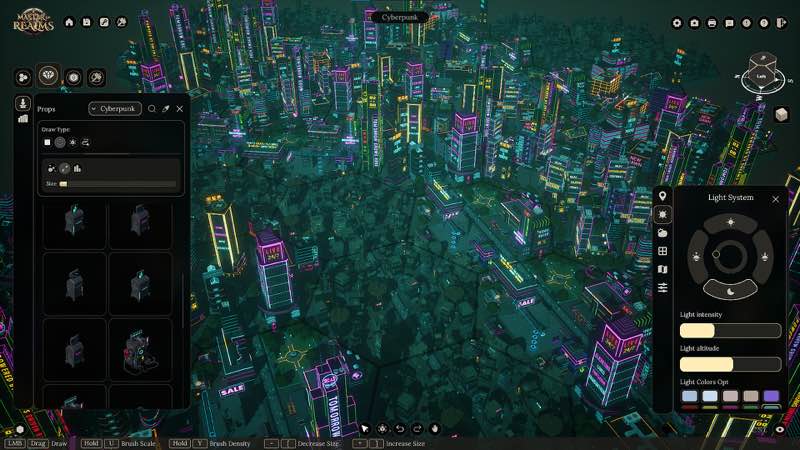
Unleash your creativity with Master Of Realms , the revolutionary 3D Smart Hex Map Making Tool designed for tabletop RPG enthusiasts! Dive into immersive worldbuilding and craft world maps, regional maps, and city or town maps with ease.
Master Of Realms lets you create stunning hex-based maps effortlessly, and you can bring them to life with 3D printing, 2D export for beautiful paper maps, or VTT export for your favorite online platforms.
Bring your creations to life on virtual tabletops! Export maps in 2D formats like JPG, PNG, or VTT, with full support for FoundryVTT and other platforms. Customize your grid overlay in Hex or Square style to match your campaign needs.
Go beyond the map—bring your realms to life in stunning 3D! Export fully detailed STL files for immersive gameplay, epic 3D prints, or jaw-dropping displays that showcase your world like never before.
Master of Realms gives you full flexibility to bring your imagination to life. Craft custom tiles from scratch, add objects of any shape,
size
, or style, and place them exactly where you want to create a world that’s truly your own.
Step into your world through your heroes’ eyes! Master of Realms introduces Character Tokens that let you explore your maps and scenes from a character’s point of view. Scale your tokens up or down to match any setting—perfect for tactical encounters or immersive storytelling. Plus, bring your characters to life in the real world with 3D-printable tokens, fully compatible with the 3D export system for STL files.
WHAT’S NEW
Version 1.12.1:
• Release notes are available here .
REQUIREMENTS
• Intel, 64-bit processor
• macOS 13.0 or later
ScreenShots
If you are using Adblocker!! Please support this website by adding us to your whitelist. Ads are what helps us bring you premium content! Or read this to know how you can support us. Thank you!
•
Size
– 28.98GB
Previous Versions
編輯核對資料
推薦給需要同時交付螢幕地圖、VTT 資源與 3D 列印地形的桌遊 GM、世界觀設計者及小工作室。第一張圖不要直接做大陸,先以 12–20 個六角驗證 Smart Tile、Hex/Square、命名、圖層及每格距離。按地形→道路/河流→城鎮→獨立資產→Token→標註分層,每階段另存。先匯出低解析 PNG/VTT 查格線,再做高解析/STL;先印單瓦片測比例。1.9.0 大圖啟用 TileForge LOD,Photo Mode 只作展示。安全順序:雙備份→1.9.0/SHA-256→小圖→VTT→單 STL→LOD/Photo→Workshop→舊專案。
優點
- 它把世界、區域、城市和城鎮地圖統一到 Smart Hex 流程,方便 GM 從大尺度地理落到遭遇場景。Hex/Square 與 JPG/PNG/VTT 可進 FoundryVTT、Roll20;STL 把瓦片、物件和 Character Tokens 變成可列印地形,連接數位與桌面流程。可從零製作自訂瓦片,自由改物件大小/位置,Steam Workshop 擴充社群資產。1.9.0 的 Photo Mode、Dark Land、4K 清晰度及 TileForge LOD 同時改善展示、題材和大型工程效能。
不足
- 渠道套件約 22.11 GB,解壓、Workshop、自訂資產及高解析/STL 匯出會再佔大量空間。3D 地圖與龐大瓦片庫有學習成本,若只要簡單戰鬥格,2D 工具更快。大型地圖、密集物件及高細節 TileForge 即使有 1.9.0 LOD 仍有載入、記憶體與匯出壓力,需控制圖層。STL 不代表可直接列印,仍要查壁厚、支撐、比例、切片與印表機限制。VTT 需手動匹配格線。官方與渠道 Mac 要求表達不一,22.11 GB 套件也遠大於基本商店資訊,需謹慎規劃。
安裝步驟
- 本頁對應 Master of Realms 1.9.0。渠道要求 Intel 64 位元、macOS 13+,套件約 22.11 GB;官方 Mac 參考包含第九代 Core i5、Apple M1 GPU/AMD Radeon Pro 5500M。需額外預留解壓、專案、2D/VTT/STL 匯出及 Workshop 空間。備份世界/區域/城市地圖、Hex/Square、Smart Tiles、TileForge、自訂 Token、物件庫、Workshop 與匯出預設,記錄 1.9.0/SHA-256。新建小型六角地圖,放道路/地形/城市,測 Photo Mode、Dark Land、JPG/PNG/VTT、單一 STL,再重載。
解除安裝步驟
- 移除前儲存並關閉地圖,等待自訂瓦片及 Workshop 載入;不要在生成、批量替換、2D/VTT/STL 匯出或 Photo Mode 擷取時強制退出。分別備份專案、TileForge 資產、訂閱、匯出範本及已生成 PNG/JPG/VTT/STL,保留 1.9.0/SHA-256。重裝時先停用 Workshop,以小專案測儲存、Photo Mode、Dark Land 及各類匯出,再分批恢復資產。舊地圖缺瓦片時不要覆蓋,先恢復訂閱和原始 TileForge。
常見錯誤及解決方法
- 建立地圖崩潰時先用小尺寸、內建瓦片與停用 Workshop 測試,確認路徑可寫,再分批加入自訂資產。大型地圖卡頓可減少同時可見物件,使用 1.9.0 的 TileForge LOD,避免一次載入全部高細節資產。4K 介面仍小時調系統縮放並重啟;此版已改善清晰度。VTT 格線錯位時核對 Map Settings 與 FoundryVTT/Roll20 的 Hex/Square、單格尺寸及邊距。STL 先匯出單瓦片檢查閉合、比例和單位。Photo Mode 不代替正式高解析匯出,22.11 GB 套件需大量暫存空間。
本次版本更新內容
- 有完整官方重大更新:新增 Cinematic/Photo Mode 調視角、構圖與截圖;新音效改善回饋與氛圍;Dark Land 主題含城牆 16、牆交叉 19、城市道路 18、森林小徑 15、熔岩湖 52、熔岩河 18、城市地面 1、地面 1,共 140 個基礎瓦片,另有 50 個獨立資產;改善 4K/大螢幕文字與介面;為 TileForge 自訂瓦片生成 LOD 以提升大型複雜地圖效能。逐項驗收 Photo Mode、聲音、Dark Land、4K UI 與 LOD,不加入未列變化或更高版本。
檔案校驗與安全資訊






截圖預覽