Master of Realms
Unleash your creativity with Master Of Realms, the revolutionary 3D Smart Hex Map Making Tool designed for tabletop RPG enthusiasts...
- Intel, 64-bit processor
- macOS 13.0 or later
소개
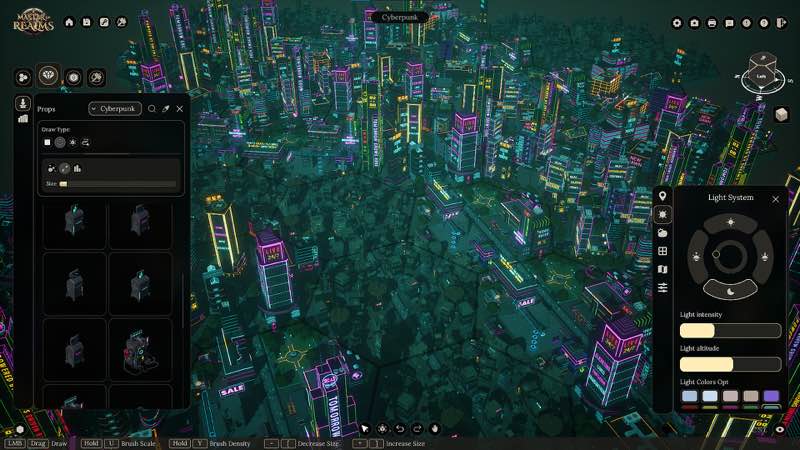
Unleash your creativity with Master Of Realms , the revolutionary 3D Smart Hex Map Making Tool designed for tabletop RPG enthusiasts! Dive into immersive worldbuilding and craft world maps, regional maps, and city or town maps with ease.
Master Of Realms lets you create stunning hex-based maps effortlessly, and you can bring them to life with 3D printing, 2D export for beautiful paper maps, or VTT export for your favorite online platforms.
Bring your creations to life on virtual tabletops! Export maps in 2D formats like JPG, PNG, or VTT, with full support for FoundryVTT and other platforms. Customize your grid overlay in Hex or Square style to match your campaign needs.
Go beyond the map—bring your realms to life in stunning 3D! Export fully detailed STL files for immersive gameplay, epic 3D prints, or jaw-dropping displays that showcase your world like never before.
Master of Realms gives you full flexibility to bring your imagination to life. Craft custom tiles from scratch, add objects of any shape,
size
, or style, and place them exactly where you want to create a world that’s truly your own.
Step into your world through your heroes’ eyes! Master of Realms introduces Character Tokens that let you explore your maps and scenes from a character’s point of view. Scale your tokens up or down to match any setting—perfect for tactical encounters or immersive storytelling. Plus, bring your characters to life in the real world with 3D-printable tokens, fully compatible with the 3D export system for STL files.
WHAT’S NEW
Version 1.12.1:
• Release notes are available here .
REQUIREMENTS
• Intel, 64-bit processor
• macOS 13.0 or later
ScreenShots
If you are using Adblocker!! Please support this website by adding us to your whitelist. Ads are what helps us bring you premium content! Or read this to know how you can support us. Thank you!
•
Size
– 28.98GB
Previous Versions
편집자 확인 정보
화면 지도, VTT 자산과 3D 출력 지형을 함께 만드는 GM, 세계관 설계자와 소규모 작업실에 추천합니다. 바로 대륙을 만들지 말고 12–20개 육각으로 Smart Tile, Hex/Square, 이름, 레이어와 칸당 거리를 확인합니다. 지형→도로/강→정착지→독립 자산→Token→표시 순으로 레이어를 나누고 단계별 복사본을 둡니다. 저해상도 PNG/VTT로 격자를 확인한 뒤 고해상도/STL로 가며 타일 하나를 먼저 출력해 비율을 봅니다. 큰 1.9.0 프로젝트는 TileForge LOD를 쓰고 Photo Mode는 표현용입니다. 안전 순서: 이중 백업→1.9.0/SHA-256→작은 지도→VTT→단일 STL→LOD/Photo→Workshop→기존 프로젝트.
장점
- 세계, 지역, 도시와 마을 지도를 Smart Hex 흐름으로 묶어 GM이 큰 지리에서 조우 장면으로 내려갈 수 있습니다. Hex/Square와 JPG/PNG/VTT는 FoundryVTT, Roll20에 연결되고 STL은 타일, 물건과 Character Token을 출력 지형으로 만들어 디지털과 테이블을 잇습니다. 사용자 타일을 처음부터 만들고 물건 크기/위치를 자유롭게 바꾸며 Steam Workshop이 자산을 늘립니다. 1.9.0의 Photo Mode, Dark Land, 4K 선명도와 TileForge LOD가 표현, 테마와 대형 프로젝트 성능을 함께 개선합니다.
단점
- 약 22.11 GB 채널 패키지 외에도 압축, Workshop/사용자 자산, 고해상도/STL 출력이 공간을 더 씁니다. 3D 지도와 큰 타일 목록은 학습이 필요하고 단순 전투 격자는 2D 도구가 빠릅니다. 큰 지도, 많은 물건과 상세 TileForge는 1.9.0 LOD 뒤에도 로딩, 메모리와 출력 부담이 있어 레이어를 관리해야 합니다. STL은 바로 출력 가능하다는 뜻이 아니며 두께, 지지대, 배율과 슬라이싱을 확인해야 합니다. VTT 격자도 수동으로 맞춥니다. 공식/채널 Mac 요구와 패키지 크기 차이도 큽니다.
설치 방법
- 이 페이지는 Master of Realms 1.9.0 기준입니다. 채널은 Intel 64비트, macOS 13+, 약 22.11 GB 패키지를 요구하며 공식 Mac 참고는 9세대 Core i5와 Apple M1 GPU/AMD Radeon Pro 5500M입니다. 압축 해제, 프로젝트, 2D/VTT/STL 내보내기와 Workshop 여유가 필요합니다. 세계/지역/도시 지도, Hex/Square, Smart Tile, TileForge, Character Token, 물건 라이브러리, Workshop과 내보내기 설정을 백업하고 1.9.0/SHA-256을 기록합니다. 새 작은 육각 지도에서 도로/지형/도시, Photo Mode, Dark Land, JPG/PNG/VTT와 STL을 시험하고 재로드합니다.
제거 방법
- 삭제 전 지도를 저장/닫고 사용자 타일과 Workshop 로딩을 기다립니다. 자동 생성, 일괄 교체, 2D/VTT/STL 내보내기나 Photo Mode 캡처 중에는 강제 종료하지 않습니다. 프로젝트, TileForge 자산, 구독, 내보내기 템플릿과 생성된 PNG/JPG/VTT/STL, 1.9.0/SHA-256을 따로 백업합니다. Workshop을 끄고 재설치한 뒤 작은 프로젝트로 저장, Photo Mode, Dark Land와 내보내기를 확인하고 사용자 자산을 단계적으로 복원합니다. 타일이 누락된 기존 지도는 덮지 않습니다.
자주 발생하는 오류와 해결 방법
- 지도 생성이 충돌하면 작은 지도, 내장 타일, Workshop 끔 상태와 쓰기 가능한 경로로 시험한 뒤 사용자 자산을 단계적으로 넣습니다. 큰 지도 끊김은 보이는 물건을 줄이고 1.9.0의 TileForge LOD를 쓰며 고해상도 자산 전체 로딩을 피합니다. 4K UI가 작으면 시스템 배율을 조정하고 재시작합니다. VTT 격자 오차는 Map Settings와 FoundryVTT/Roll20의 Hex/Square, 셀 크기, 여백을 맞춥니다. STL은 타일 하나로 폐쇄성, 배율과 단위를 확인합니다. Photo Mode는 정식 고해상도 출력 대체가 아니며 22.11 GB 패키지는 임시 공간이 많이 필요합니다.
이번 버전 변경 사항
- 공식 주요 업데이트: 시점/구도/스크린샷 Cinematic/Photo Mode, 편집 피드백용 새 사운드, Dark Land 테마(도시 벽 16, 벽 교차 19, 도시 도로 18, 숲길 15, 용암 호수 52, 용암 강 18, 도시 지면 1, 지면 1로 기본 타일 140개와 독립 자산 50개), 4K/대형 화면 UI 선명도 개선, TileForge 사용자 타일 LOD 생성입니다. Photo Mode, 소리, Dark Land, 4K UI와 LOD를 검수하며 목록 밖 변경과 상위 버전은 공개하지 않습니다.
파일 검증






스크린샷