Master of Realms
Unleash your creativity with Master Of Realms, the revolutionary 3D Smart Hex Map Making Tool designed for tabletop RPG enthusiasts...
- Intel, 64-bit processor
- macOS 13.0 or later
概要
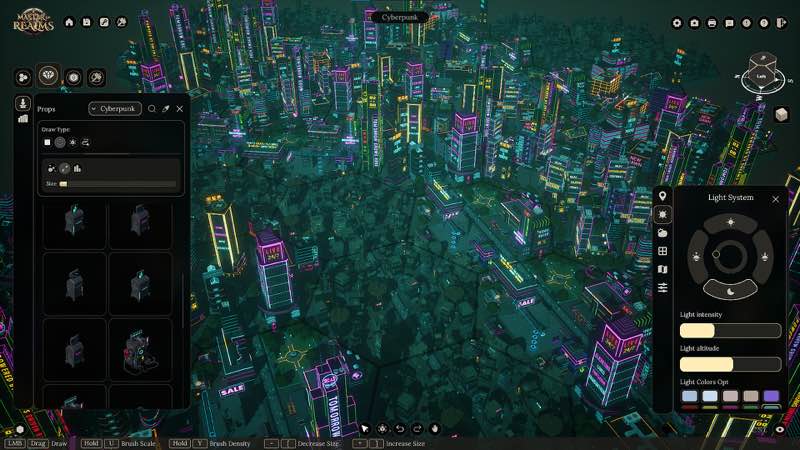
Unleash your creativity with Master Of Realms , the revolutionary 3D Smart Hex Map Making Tool designed for tabletop RPG enthusiasts! Dive into immersive worldbuilding and craft world maps, regional maps, and city or town maps with ease.
Master Of Realms lets you create stunning hex-based maps effortlessly, and you can bring them to life with 3D printing, 2D export for beautiful paper maps, or VTT export for your favorite online platforms.
Bring your creations to life on virtual tabletops! Export maps in 2D formats like JPG, PNG, or VTT, with full support for FoundryVTT and other platforms. Customize your grid overlay in Hex or Square style to match your campaign needs.
Go beyond the map—bring your realms to life in stunning 3D! Export fully detailed STL files for immersive gameplay, epic 3D prints, or jaw-dropping displays that showcase your world like never before.
Master of Realms gives you full flexibility to bring your imagination to life. Craft custom tiles from scratch, add objects of any shape,
size
, or style, and place them exactly where you want to create a world that’s truly your own.
Step into your world through your heroes’ eyes! Master of Realms introduces Character Tokens that let you explore your maps and scenes from a character’s point of view. Scale your tokens up or down to match any setting—perfect for tactical encounters or immersive storytelling. Plus, bring your characters to life in the real world with 3D-printable tokens, fully compatible with the 3D export system for STL files.
WHAT’S NEW
Version 1.12.1:
• Release notes are available here .
REQUIREMENTS
• Intel, 64-bit processor
• macOS 13.0 or later
ScreenShots
If you are using Adblocker!! Please support this website by adding us to your whitelist. Ads are what helps us bring you premium content! Or read this to know how you can support us. Thank you!
•
Size
– 28.98GB
Previous Versions
編集部確認情報
Screen Map、VTT Asset、3D Print Terrain を同時納品する GM、Worldbuilder、Small Studio に推奨。最初から Continent にせず 12–20 Hex で Smart Tile、Hex/Square、Naming、Layer、Distance per Cell を確認。Terrain→Road/River→Settlement→Standalone Asset→Token→Label と Layer 分けし Phase ごとに Copy。Low-resolution PNG/VTT で Grid 後 High-resolution/STL、Single Tile Print で Scale を確認。Large Project は TileForge LOD、Photo Mode は Presentation 用。安全順序は Backup→1.9.0/SHA-256→Small Map→VTT→Single STL→LOD/Photo→Workshop→Old Project です。
長所
- World、Region、City、Town を Smart Hex Workflow で統一し GM が Geography から Encounter へ移れます。Hex/Square、JPG/PNG/VTT は FoundryVTT/Roll20、STL は Tile/Object/Character Token を Physical Terrain に接続。Custom Tile をゼロから作り Object を Resize/Place、Steam Workshop で Community Asset を追加できます。大規模 Built-in/Printable Library もあり、1.9.0 の Photo Mode、Dark Land、4K Clarity、TileForge LOD が Presentation/Theme/Performance を同時強化します。
短所
- 約 22.11 GB Channel Package に加え Extract、Workshop、Custom Asset、High-resolution/STL Export が容量を消費。3D Mapping と Large Tile Catalog は Learning Curve があり Simple Combat Grid は 2D Tool が速いです。Large Map、Dense Object、Detailed TileForge は 1.9.0 LOD 後も Loading/Memory/Export 負荷があり Layer 管理が必要。STL は Print-ready ではなく Wall Thickness、Support、Scale、Slicing を確認。VTT は Grid Match が必要。公式/Channel Mac Requirement と Package Size の差にも注意します。
インストール手順
- このページは Master of Realms 1.9.0 用です。Channel は Intel 64-bit、macOS 13+、約 22.11 GB Package。公式 Mac Reference は 9th-gen Core i5、Apple M1 GPU/AMD Radeon Pro 5500M。Extract、Project、2D/VTT/STL Export、Workshop 用の追加容量が必要です。World/Region/City Map、Hex/Square Grid、Smart Tile、TileForge、Character Token、Object Library、Workshop、Export Preset を保存し 1.9.0/SHA-256 を記録。新規 Small Hex Map で Road/Terrain/City、Photo Mode、Dark Land、JPG/PNG/VTT、STL Export、Reload を確認します。
アンインストール手順
- 削除前に Map を Save/Close し Custom Tile/Workshop Load を待ちます。Generation、Batch Replace、2D/VTT/STL Export、Photo Mode Capture 中は強制終了しません。Project、TileForge Asset、Subscription、Export Template、生成 PNG/JPG/VTT/STL、1.9.0/SHA-256 を別保存。Workshop を切って再導入し Small Project で Save、Photo Mode、Dark Land、各 Export を確認後 Custom Asset を Batch 復帰。Missing Tile の旧 Map は上書きせず Subscription/Original TileForge を戻します。
よくあるエラーと解決策
- Map Creation Crash は Small Map、Built-in Tile、Workshop Off、Writable Path で確認後 Custom Asset を Batch 追加。Large Map Stutter は Visible Object を減らし、1.9.0 の TileForge LOD を使い High-detail Asset 全読込を避けます。4K UI が小さい場合は System Scaling 後 Restart(本 Build は Clarity 改善)。VTT Grid Offset は Map Settings と FoundryVTT/Roll20 の Hex/Square、Cell Size、Margin を一致。STL は Single Tile で Manifold/Scale/Unit を確認。Photo Mode は正式 High-resolution Export の代替ではなく、22.11 GB Package は Temporary Space が必要です。
今回の更新内容
- 公式 Major Notes:Cinematic/Photo Mode(Camera/Framing/Screenshot)、Sound Effect、Dark Land Theme(City Wall 16、Wall Intersection 19、City Road 18、Forest Path 15、Lava Lake 52、Lava River 18、City Ground 1、Ground 1=140 Base Tile、Standalone Asset 50)、4K/Large Screen UI Clarity、TileForge Custom Tile の LOD Generation を追加・改善。Photo Mode、Sound、Dark Land、4K UI、LOD を検収し、未記載 Change や上位版は掲載しません。
ファイル検証






スクリーンショット