Master of Realms
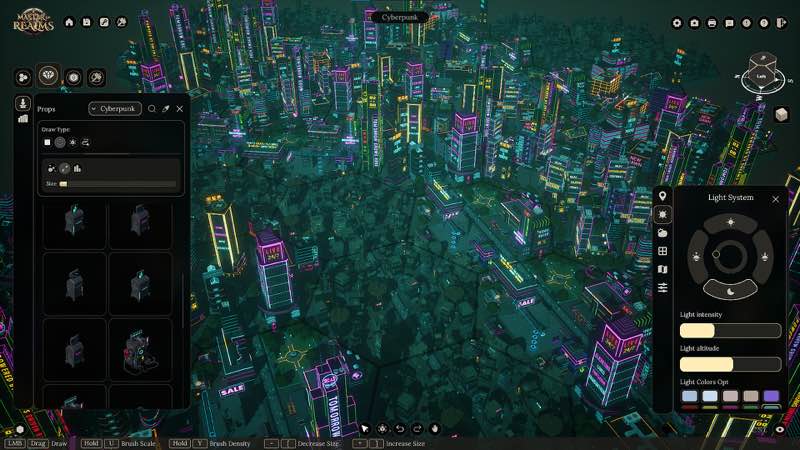
Unleash your creativity with Master Of Realms, the revolutionary 3D Smart Hex Map Making Tool designed for tabletop RPG enthusiasts...
- Intel, 64-bit processor
- macOS 13.0 or later
Description
Unleash your creativity with Master Of Realms , the revolutionary 3D Smart Hex Map Making Tool designed for tabletop RPG enthusiasts! Dive into immersive worldbuilding and craft world maps, regional maps, and city or town maps with ease.
Master Of Realms lets you create stunning hex-based maps effortlessly, and you can bring them to life with 3D printing, 2D export for beautiful paper maps, or VTT export for your favorite online platforms.
Bring your creations to life on virtual tabletops! Export maps in 2D formats like JPG, PNG, or VTT, with full support for FoundryVTT and other platforms. Customize your grid overlay in Hex or Square style to match your campaign needs.
Go beyond the map—bring your realms to life in stunning 3D! Export fully detailed STL files for immersive gameplay, epic 3D prints, or jaw-dropping displays that showcase your world like never before.
Master of Realms gives you full flexibility to bring your imagination to life. Craft custom tiles from scratch, add objects of any shape,
size
, or style, and place them exactly where you want to create a world that’s truly your own.
Step into your world through your heroes’ eyes! Master of Realms introduces Character Tokens that let you explore your maps and scenes from a character’s point of view. Scale your tokens up or down to match any setting—perfect for tactical encounters or immersive storytelling. Plus, bring your characters to life in the real world with 3D-printable tokens, fully compatible with the 3D export system for STL files.
WHAT’S NEW
Version 1.9.0:
• Release notes are available here .
REQUIREMENTS
• Intel, 64-bit processor
• macOS 13.0 or later
ScreenShots
If you are using Adblocker!! Please support this website by adding us to your whitelist. Ads are what helps us bring you premium content! Or read this to know how you can support us. Thank you!
•
Size
– 22.11GB
Previous Versions

Editor-checked details
Recommended for tabletop GMs, worldbuilders and small studios delivering screen maps, VTT assets and printable terrain together. Do not start with a continent: use 12–20 hexes to validate Smart Tiles, Hex/Square, naming, layers and distance per cell. Layer terrain, roads/rivers, settlements, standalone assets, Tokens and labels, saving a copy after each phase. Export a low-resolution PNG/VTT and verify grid alignment before high-resolution/STL; print one tile to confirm scale first. Enable TileForge LOD on large 1.9.0 projects and reserve Photo Mode for presentation. Safe order: dual backup; 1.9.0/SHA-256; small map; VTT; single STL; LOD/Photo; Workshop; old projects.
Pros
- It unifies world, region, city and town mapping under a Smart Hex workflow, letting GMs move from geography to encounters. Hex/Square grids and JPG/PNG/VTT exports integrate with FoundryVTT, Roll20 and similar platforms, while STL turns tiles, objects and Character Tokens into printable terrain, joining digital and tabletop workflows. Custom tiles can be built from scratch and objects freely resized/placed; Steam Workshop expands community assets. The official catalog includes a large built-in and printable library. Version 1.9.0 improves presentation, theme breadth and large-project performance together through Photo Mode, Dark Land, 4K clarity and TileForge LOD.
Cons
- The approximately 22.11 GB channel package is only the start; extraction, Workshop/custom assets and high-resolution/STL exports consume much more. 3D mapping and a large tile catalog have a learning curve, while a simple combat grid is faster in a dedicated 2D tool. Large maps, dense objects and detailed TileForge content can still strain loading, memory and exports despite 1.9.0 LOD, so layers must be controlled. STL does not mean print-ready: wall thickness, supports, scale, slicing and printer limits remain. VTT exports need manual grid matching. Official and channel Mac requirements are not expressed consistently, and the channel package is much larger than basic store information, requiring cautious bandwidth/disk planning.
Installation steps
- This page covers Master of Realms 1.9.0. The channel requires Intel 64-bit, macOS 13+ and an approximately 22.11 GB package; official Mac references include 9th-gen Core i5 and Apple M1 GPU/AMD Radeon Pro 5500M. Reserve space beyond the package for extraction, projects, 2D/VTT/STL exports and Workshop assets. Back up world/region/city maps, Hex/Square grids, Smart Tiles, TileForge custom tiles, Character Tokens, object libraries, Workshop subscriptions and export presets, then record 1.9.0/SHA-256. Build a small fresh hex map, place roads/terrain/city assets, test Photo Mode, Dark Land, JPG/PNG/VTT and one STL export, then reload.
Uninstallation steps
- Before uninstalling, save/close the map and let custom tiles/Workshop content finish loading. Do not force-quit during generation, batch replacement, 2D/VTT/STL export or Photo Mode capture. Separately back up projects, TileForge custom assets, subscriptions, export templates and generated PNG/JPG/VTT/STL, retaining 1.9.0/SHA-256. Reinstall with Workshop off and use a small project to test save, Photo Mode, Dark Land tiles and all three export workflows. Restore custom assets in batches only after that. If an old map has missing tiles, never overwrite it before restoring subscriptions and original TileForge files.
Common errors and fixes
- If map creation crashes, test a small map with built-in tiles and Workshop disabled, and confirm the project name/path is writable; add custom assets in batches afterward. For large-map stutter, reduce visible objects, use the 1.9.0 LOD generation for TileForge custom tiles and avoid loading every high-detail asset at once. If 4K UI remains small, adjust system scaling and restart; this build improves large-screen clarity. For VTT grid offset, match Hex/Square, cell size and export margins in Map Settings and FoundryVTT/Roll20. For missing/scaled STL parts, export one tile first and check manifold, scale and print units. Photo Mode is not a substitute for formal high-resolution export. The 22.11 GB package needs substantial temporary space.
What changed in this version
- Version 1.9.0 has complete official major-update notes: Cinematic/Photo Mode adds camera framing/screenshots; new sound effects improve feedback/atmosphere; the Dark Land theme adds 16 city-wall, 19 wall-intersection, 18 city-road, 15 forest-path, 52 lava-lake, 18 lava-river, one city-ground and one ground variation—140 base-tile variations total—plus 50 standalone assets; text/UI clarity improves on 4K/large screens; and LOD generation for TileForge custom tiles improves larger/complex map performance. Validate Photo Mode, sound, Dark Land content, 4K UI and custom-tile LOD. No unlisted change is added and higher versions are not disclosed.