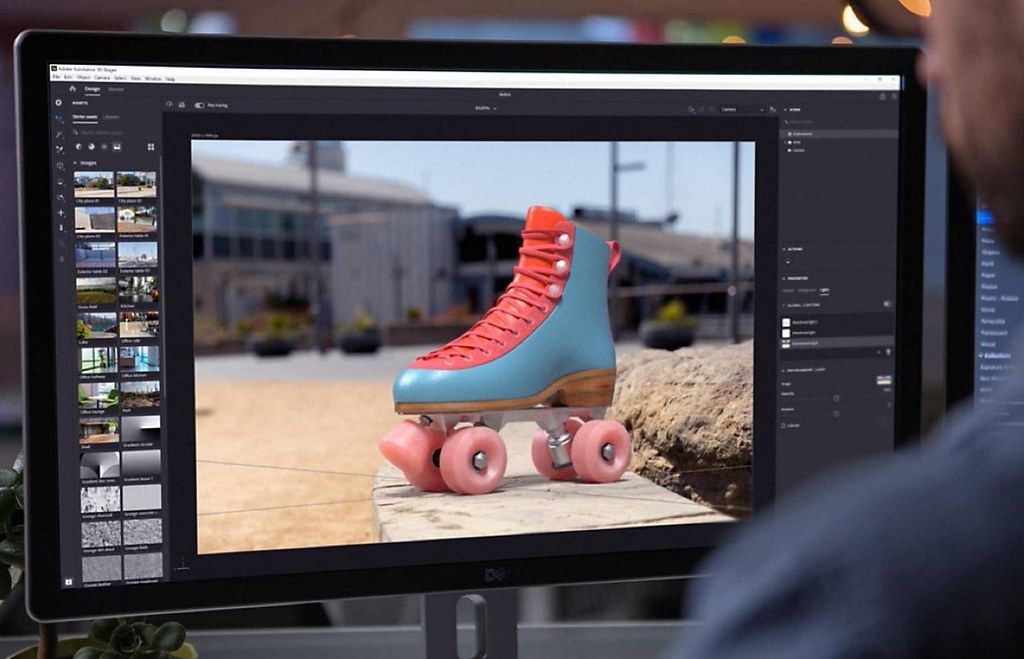
Adobe Substance 3D Painter
Substance 3D Painter 提供您為 3D 資產繪製紋理所需的一切工具,從進階筆刷到可自動適應模型的智慧材質(Smart Materials)……
軟體介紹
Substance 3D Painter 提供您為 3D 資產繪製紋理所需的一切工具,從進階筆刷到可自動適應模型的智慧材質(Smart Materials)。 為您的藝術創作注入生命力。 業界標準。 Substance 3D Painter 廣泛應用於遊戲與電影製作,以及產品設計、時尚與建築領域,是全球各地創意專業人士首選的 3D 紋理繪製應用程式。 完全的創作自由。 Painter 協助您實現理想視覺效果——無論是產品設計、寫實風格遊戲、視覺特效,還是風格化動畫等專案。 提升藝術表現力的智慧工具。 運用可自動適應任何物件的智慧材質,呈現逼真的表面細節或磨損與損耗效果;探索可自動適應各種形狀的遮罩預設,並以高效、動態的繪圖工具進行創作。 所見即所得。
Painter 採用先進的檢視視窗,所有藝術創作決策皆能即時呈現。 透過先進的光影與陰影功能,反覆調整複雜材質,讓紋理繪製更具創意且更輕鬆。 您甚至可於內建的路徑追蹤(path tracing)模式中預覽模型。 非破壞性工作流程。 在 Painter 中,每個操作與筆觸皆會完整記錄,並可隨時重新運算。 這代表您可隨時變更專案解析度,卻完全不會降低品質,甚至還能修改既有的繪圖筆觸。
編輯核對資料
推薦遊戲/VFX/產品的 model-specific PBR 材質師。Maya/Blender/ZBrush 固定 low/high 命名、unit、tangent、hard edge、triangulation、UV/UDIM、slot→備份 mesh→在 1K/2K Baking Mode 查 cage/Matching/map→建立語義 folder/layer/mask/anchor,Smart Material 只作起點→以多 HDRI、roughness/normal/seam 檢查→設定目標 preset 的 normal/packing/bit/padding→測試回讀→final 4K/8K/UDIM→封存 .spp、mesh、cage、resource、preset、master、target、manifest、SHA-256。程序材質用 Designer,替代可看 ArmorPaint,sculpt 用 ZBrush,render 回 Blender/Maya/Stager。
優點
- 以模型為核心的非破壞 layer、mask、generator、anchor、Smart Material、brush 可同時繪製 Base Color、Roughness、Metallic、Normal、Height。AO、Curvature、Position、Thickness、ID bake 驅動磨損/灰塵/區域,8.3 Baking Mode 改善 cage/name match 診斷。3D/2D view、path tracing、UDIM/Texture Set、export template、Physical Size UV、USD 適合遊戲/VFX/產品流程。Apple M 原生與 Intel 支援也便於混合 Mac 團隊。
不足
- 高解析、多 UDIM、generator、anchor 很耗記憶體/SSD,8 GB Mac 容易卡頓或當機。Mesh/UV 修改和 rebake 可能破壞 mask/projection/paint,必須版本化。Bake 對 naming、cage、hard edge、tangent、triangulation、UV、distance 敏感,有些問題只在引擎顯現。USD 並非所有 node 都 lossless,需回讀;Iray 僅適合預覽。Subscription/login/resource/Engine compatibility 增加管理成本;程序材質宜用 Designer,sculpt/topology 用 ZBrush/Blender/Maya。
安裝步驟
- 站內版本為 Adobe Substance 3D Painter 8.3.0,來源標示 macOS 10.14+、約 2.44 GB;Adobe 在此時期已宣布 Painter 原生支援 Apple M 系列,Intel 亦適用。備份 .spp、mesh、high/low、cage、map、SBSAR、Smart Material、brush、alpha、filter、shader、shelf、export preset。DCC 固定 unit、axis、normal、tangent、UV/UDIM、material slot→匯入 low→Baking Mode(F8)→設定 high/cage、Matching by Name、distance、解析度、AA,檢查 cage/error→烘焙 Normal/AO/Curvature/Position/Thickness/ID→以 layer/mask/anchor/Smart Material 繪製→測 physical size UV 與 USD 往返。依目標選 Metallic/Roughness、OpenGL/DirectX normal、packing、位深、padding,先 2K 回讀再做最終輸出。
解除安裝步驟
- 移除前保存 final .spp/version、mesh/resource/font 路徑與 custom Smart Material/brush/alpha/filter/shader/plugin/preset。逐 Texture Set/UDIM 輸出目標貼圖及未打包 Base Color、Roughness、Metallic、Normal、Height、AO、ID 母版,記錄 normal、packing、色彩空間、位深、padding、解析度、命名。USD/mesh 只是交換副本,需在 Blender/Maya/Unreal/Unity 回讀。建立 manifest、SHA-256、preview,結束 Painter/Creative Cloud 後移除。確認依賴前不刪共享 Substance asset;修復重裝前備份 user Library 的 app data/log/shelf。
常見錯誤及解決方法
- 黑/空烘焙要查 high/low 重疊、normal、UV、slot、selection、path 及 Matching by Name suffix。Bleed/seam 要調 name match、cage、front/rear distance、AA、padding,避免意外 UV overlap。彩色/折面/黑十字法線要統一 smoothing/hard edge、tangent、triangulation、OpenGL/DirectX normal。Export crash 改短本機路徑,查權限/空間,隔離 Texture Set/filter,先測 2K/8-bit。Open/save crash 或 low memory 應版本保存、減少 UDIM/resolution/filter/Iray、關閉 GPU 程式、保留 SSD scratch。USD 不支援 shape/shader 可用 FBX/OBJ 對照;Base Color/Emissive 與 non-color map 要正確分流。
本次版本更新內容
- Adobe 8.3.0 於 2023-01-10 發布,是主要版本。舊 bake window 改成 Baking Mode(F8),加入 viewport cage/error、Start/Cancel、Texture Set 選擇、Mesh Map Bakers/Settings,以及 Baking Log 的 Matching by Name checker。新增 USD 匯入/輸出與 UV Projection Physical Size,改善 DCC 交換和材質比例。本頁只對應 8.3.0,不提前混入後續 patch 的 GLB 等功能。






同類替代軟體

截圖預覽