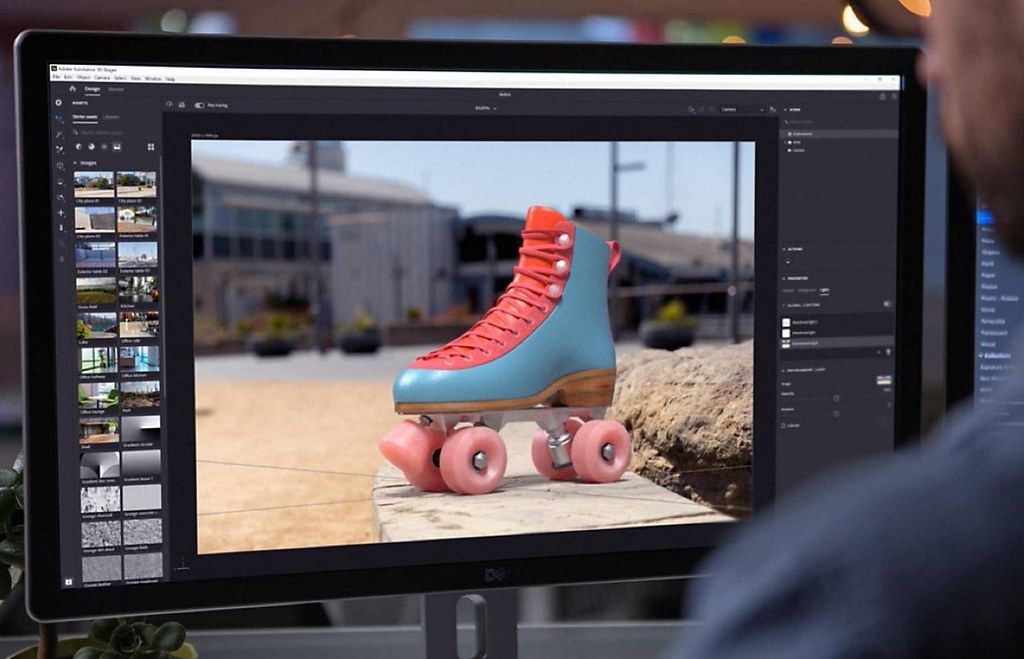
Adobe Substance 3D Painter
Substance 3D Painter has the tools you need to texture your 3D assets, from advanced brushes to Smart Materials that automatically adapt...
Description
Substance 3D Painter has the tools you need to texture your 3D assets, from advanced brushes to Smart Materials that automatically adapt to your model. Breathe life into your art.
The industry standard.
Substance 3D Painter is widely used in game and movie production as well as in product design, fashion, and architecture. It’s a go-to 3D texturing app for creative professionals everywhere.
Full creative freedom.
Painter helps you achieve the look you want, from product design to realistic games and visual effects to projects such as stylized animation.
Smart tools for enhanced artistry.
Use Smart Materials that adjust to any object to show realistic surface detail or wear and tear. Explore mask presets that adapt to any shape, and paint with efficient, dynamic tools.
What you see is what you get.
The state-of-the-art viewport in Painter shows all your artistic decisions in real time. Iterate on complex materials with advanced lighting and shadows, making texturing even more creative and painless. You can even preview your model in the included path tracing mode.
It’s nondestructive.
In Painter, every action and stroke is recorded, and can be recomputed at any time. This means you can change the resolution of your project at any time without ever decreasing quality, or even modify existing paint strokes.
WHAT’S NEW
Version 8.3.0:
• Release notes were unavailable when this listing was updated.
REQUIREMENTS
• Intel, 64-bit processor
• macOS 10.14 or later
ScreenShots
If you are using Adblocker!! Please support this website by adding us to your whitelist. Ads are what helps us bring you premium content! Or read this to know how you can support us. Thank you!
Size
– 2.44GB
Previous Versions
Editor-checked details
Recommended for game, VFX and product-visualisation material artists texturing specific models. Stable workflow: freeze low/high names, units, tangents, hard edges, triangulation, UV/UDIM and material slots in Maya/Blender/ZBrush; preserve untouched meshes; create the project and inspect cage, Matching by Name and every mesh map in dedicated Baking Mode at 1K/2K; organise semantic folders/layers/masks/anchors and use Smart Materials only as a starting point; review under several HDRIs, solo roughness/normal and seam views; configure the Unreal/Unity/Arnold target preset for normal convention, packing, bit depth and padding; export a test and round-trip; freeze final 4K/8K/UDIM output; archive .spp, meshes, cage, resources, presets, unpacked masters, target maps, manifest and SHA-256. Compare Designer for procedural nodes, ArmorPaint as a lighter alternative, ZBrush for sculpting, and Blender/Maya/Stager for final rendering.
Pros
- Its model-centric non-destructive layers, masks, generators, anchors, Smart Materials and brushes paint Base Color, Roughness, Metallic, Normal and Height together. Baked AO, Curvature, Position, Thickness and ID drive wear, dust and material regions; the 8.3 dedicated Baking Mode substantially improves cage and name-match diagnosis. Live 3D/2D views expose seams, projection and channels, while path tracing previews complex lighting. UDIM/Texture Sets and rich export templates suit games, VFX and product pipelines. Physical-size UV projection keeps texel scale consistent and USD adds exchange flexibility. Native Apple M-series support plus Intel compatibility serves mixed Mac teams.
Cons
- High resolution, many UDIMs, generators and complex anchors rapidly consume unified/graphics memory and SSD; 8 GB-class Macs can stall or crash. Non-destructive is not free: mesh/UV changes or rebakes can invalidate masks, projections and hand paint, requiring versioning. Bake quality depends on high/low naming, cages, hard edges, tangent basis, triangulation, UVs and distances, with failures sometimes appearing only in-engine. USD material/geometry round trips are not lossless for every node and need downstream validation. Iray/path tracing is a preview, not a final animation renderer. Subscription, sign-in, resource versions and Substance Engine compatibility add pipeline overhead. Designer remains stronger for procedural authoring, while sculpt/topology belong in ZBrush, Blender or Maya.
Installation steps
- The site build is Adobe Substance 3D Painter 8.3.0; its source lists macOS 10.14+ and about 2.44 GB. Adobe had announced native Apple M-series support for Painter by this period, while Intel remains supported. Back up .spp files, meshes, high/low poly, cages, maps, SBSAR, Smart Materials, brushes, alphas, filters, shaders, shelves and export presets; verify Adobe licensing and ample SSD/unified or graphics memory. Validate one standard asset end-to-end: lock units, up axis, normals, tangents, UV/UDIM and material slots in the DCC; import the low mesh; enter dedicated Baking Mode (F8); configure high mesh/cage, Matching by Name, frontal/rear distance, resolution and antialiasing; inspect cage and red matching errors; bake Normal, AO, Curvature, Position, Thickness and ID. Paint with layers, masks, anchors and Smart Materials; test physical size in UV projection and USD round-trip. Choose Metallic/Roughness, OpenGL/DirectX normal, packing, bit depth and padding for the target, export at 2K first and validate downstream before final resolution.
Uninstallation steps
- Before uninstalling, save the final .spp and versioned copies with explicit paths for meshes, resources and fonts. Export custom Smart Materials, brushes, alphas, filters, shaders, plugins and export presets into the project library. For every Texture Set/UDIM, export target-engine maps plus unpacked masters for Base Color, Roughness, Metallic, Normal, Height, AO and ID; record normal convention, packing, colour space, bit depth, padding, resolution and names. USD/mesh exports are exchange copies and must be reopened in Blender/Maya/Unreal/Unity. Generate a manifest and SHA-256 for .spp, meshes, resources and deliveries, with previews. Quit Painter/Creative Cloud and uninstall through Creative Cloud. Do not remove shared Substance assets until checking Designer/Sampler/Stager dependencies. Before a repair reinstall, preserve Painter application data, logs and shelves under the user Library.
Common errors and fixes
- Black/empty bakes require checking high/low overlap, normals, UVs, material slots, bake selection and output path; Matching by Name suffixes must agree. Bleeding/seams call for name matching, cage and frontal/rear distance tuning, antialiasing/padding, and no unintended overlapping UVs. Rainbow/faceted normals or black crosses require consistent smoothing/hard edges, tangent basis and triangulation, plus the same OpenGL/DirectX normal convention downstream. For export crashes, use a short local path, verify write access/disk, disable suspect Texture Sets/filters, test 2K/8-bit, then restore incrementally and retain logs. Open/save crashes or low memory require versions, fewer 4K/8K UDIMs and expensive filters, disabling Iray/path tracing, closing GPU-heavy apps and preserving SSD scratch. Unsupported USD shapes/shaders may need FBX/OBJ comparison. Colour mismatch requires Base Color/Emissive display colour treatment and non-colour Normal/Roughness/Metallic/AO/Height without duplicate conversion.
What changed in this version
- Adobe released 8.3.0 on 10 January 2023 as a major release. A dedicated Baking Mode replaces the old bake window and is accessible with F8. The viewport visualises cages and matching errors; Start/Cancel, Texture Set bake selection, new Mesh Map Bakers/Settings and a Baking Log with Matching by Name checking make diagnosis more direct. USD import and export add another DCC/engine exchange route. Physical Size support in UV Projection helps Substance materials carrying real dimensions maintain consistent scale. This page is strictly scoped to 8.3.0 and does not pull later patch additions such as GLB support forward.






Alternatives

Screenshots