ZBrush
ZBrush 是一款數位雕刻與繪畫軟體,憑藉其強大功能與直覺式操作……
- Intel, 64-bit processor
- macOS 10.14 or later
軟體介紹
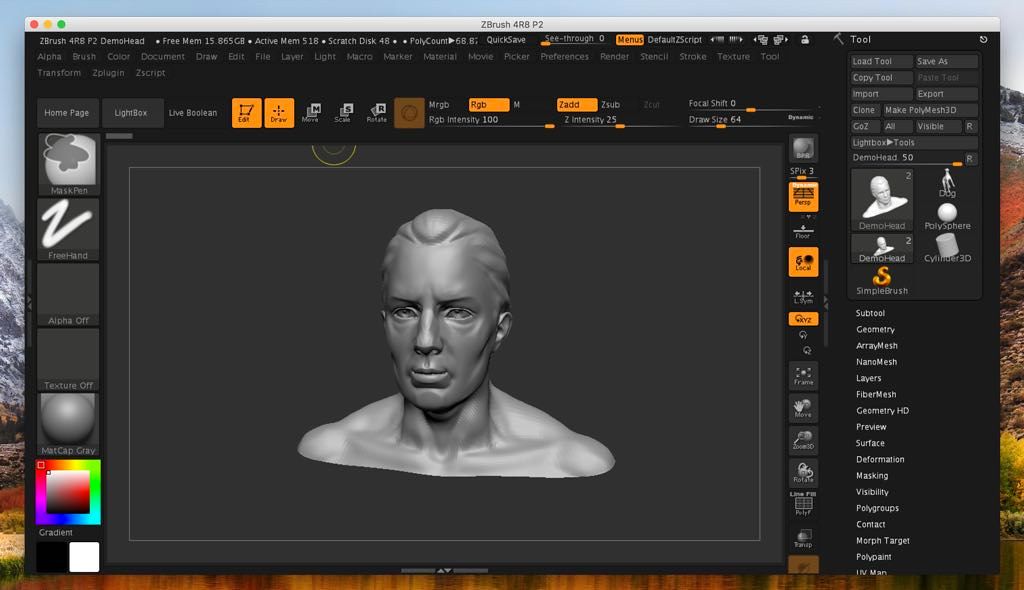
ZBrush 是一款數位雕刻與繪圖軟體,憑藉其強大功能與直覺式工作流程,徹底革新了 3D 產業。 它建構於優雅的介面之上,為當今數位藝術家提供全球最先進的工具。 ZBrush 各項功能皆以易用性為核心開發,創造出極為自然的使用者體驗,同時激發您內在的藝術潛能。 ZBrush 支援高達十億個多邊形的雕刻能力,讓您的創作僅受限於想像力。 ZBrush 的選單設計圍繞「循環性」原則,以非線性、無模式的方式協同運作,從而以前所未有的獨特方式實現 3D 模型、2D 影像與 2.5D Pixol 的互動。 ZBrush 提供您所需的一切工具,助您快速勾勒出 2D 或 3D 概念,並一路將創意完整實現。 您可直接在 ZBrush 中產生逼真的渲染效果,支援燈光與大氣環境特效。
透過眾多強大的匯出選項,您能輕鬆將模型準備就緒,用於 3D 列印,或導入至任何其他數位應用程式中。 由於 ZBrush 具備強大的軟體級處理能力,使用者無需購置昂貴的顯示卡,即可順暢地對數百萬多邊形進行雕刻與繪圖。 正因如此,ZBrush 被從藝術愛好者到大型電影與遊戲工作室等各類使用者廣泛採用。 拋開技術障礙與陡峭的學習曲線,運用您熟悉的筆刷與工具盡情雕刻與繪圖吧。
最新資訊(版本 2026.2.0):本項目更新時,官方尚未發布該版本的更新說明。
系統需求:Intel 64 位元處理器;macOS 10.14 或更新版本
截圖
若您正在使用廣告攔截器,請透過將本網站加入白名單來支持我們!廣告收入是我們持續為您提供高品質內容的重要保障!或閱讀此說明了解如何支持我們。感謝您的支持!
檔案大小:2.86GB
舊版下載
編輯核對資料
推薦 character/creature、collectible、film/game high-poly、concept、3D print。流程:unit/scale → reference/name → blockout → SubTool/Polygroups → Dynamesh/Sculptris → primary/secondary → Subdivision/Layer → detail/Polypaint → retopo → UV/bake → decimation/print check → GoZ/OBJ/FBX round trip → ZTL+ZPR+open format+map+manifest/hash archive。destructive step 前保存 increment。free 比較 Blender,character 比較 Maya,scene/render 比較 Cinema 4D,material 比較 Substance Painter,voxel/print 比較 Nomad/3DCoat。
優點
- 擅長 dense sculpt、concept、character/creature detail、hard surface、3D print。Subdivision、Dynamesh、Sculptris Pro、ZRemesher、Live Boolean、ZModeler、IMM/VDM、Layer、Morph、Brush 支援 blockout 至 detail。SubTool、Polygroups、Mask、PolyPaint、UV Master、Decimation、Scale/Print、OBJ/FBX/GoZ 串接 film/game/render/print workflow。以 CPU/RAM 為主,支援 Apple silicon/Intel;2026.2 改善 Mac camera、UV/ZModeler、Substance Bridge。
不足
- UI 與 2.5D/Tool/Document 不同於一般 DCC,hotkey、canvas state、SubTool、transform 學習量高。animation、scene assembly、precision CAD、node material、team asset、composite 仍需其他工具。multi-million poly、Subdivision、HD Geometry、large map、Undo 消耗 RAM/scratch/save。ZTL/ZPR、plugin/brush 是 proprietary dependency,需 open format/manifest。GoZ、plugin、Redshift、license 各有相容性;auto retopo/UV/decimation 仍要檢查 topology、stretch、normal、scale、printability。
安裝步驟
- 站內要求 macOS 10.14+、64-bit Intel,Apple silicon 亦獲官方支援。4 GB RAM/8 GB disk 僅適合輕量,multi-million poly 建議 8–16 GB+、SSD/scratch、pressure tablet。備份 ZTL/ZPR、brush、alpha、texture、material、light、macro、hotkey、UI、plugin、GoZ target。以代表副本測試 SubTool、Subdivision、Dynamesh/Sculptris Pro、Polypaint、UV Master、ZModeler、Boolean、BPR、OBJ/FBX/GoZ,plugin 個別驗證。GoZ installer 需另取,Redshift 有獨立要求。
解除安裝步驟
- 移除前保存 incremental read-only ZTL、full ZPR、重要 model 的 OBJ/FBX/USD/STL、高低 mesh、Subdivision、UV、Polygroups、Polypaint、maps、scale。收集 custom brush/alpha/IMM/VDM/material/LightCap/macro/hotkey/UI/plugin/GoZ/font/reference/license;記錄 build、unit、SubTool hierarchy、poly count、colour space、axis、plugin version、manifest、SHA-256。於其他 DCC/slicer 檢查 scale、normal、UV、map、parts、watertight,確認 account/seat 後移除。Undo/QuickSave 不是唯一 backup。
常見錯誤及解決方法
- memory/crash 時減少 visible SubTool、preview subdivision,使用 Decimation/HD Geometry、SSD scratch、stage save。pen pressure 檢查 permission、tablet driver/settings、default brush。2026.2 修正 document export、weld、ZModeler crash;仍有問題時隔離 third-party plugin/UI。以副本重測 UV Master+Polygroups、Bevel/Unweld、PolygroupIt。Mac Universal Camera banding 是本版修正。GoZ 查 separate installer/path/permission,export 查 unit/axis/normal/SubTool,Redshift 依自身 requirement。
本次版本更新內容
- 於 2026-04-15 發布。新增 Substance Bridge 的 Send to Adobe Painter、desktop/iPad hotkey import、PolygroupIt polypaint intensity。修正 PolygroupIt launch、Mac Universal Camera banding、UV Master+Polygroups、Save As filename、document export/weld crash、ZModeler Unweld/Bevel/preset crash、LightBox HDR、Timeline audio。GoZ installer 改由 Maxon support 另取,多款 utility plugin 更新支援 2026.1+。






同類替代軟體

截圖預覽