VectorStyler
VectorStyler is an advanced illustration and drawing software. Create illustrations, logos, icons, drawings, typography, and vector...
Description
VectorStyler is an advanced illustration and drawing software.
Create illustrations, logos, icons, drawings, typography, and vector art for the screen, print, and web.
All the drawing tools without subscriptions
VectorStyler provides a complete set of drawing, design, and illustration tools necessary for modern design. With its numerous new features, VectorStyler redefines and extends the tools available for illustrators and designers, improving the creation of complex illustrations and designs.
Shape Effects
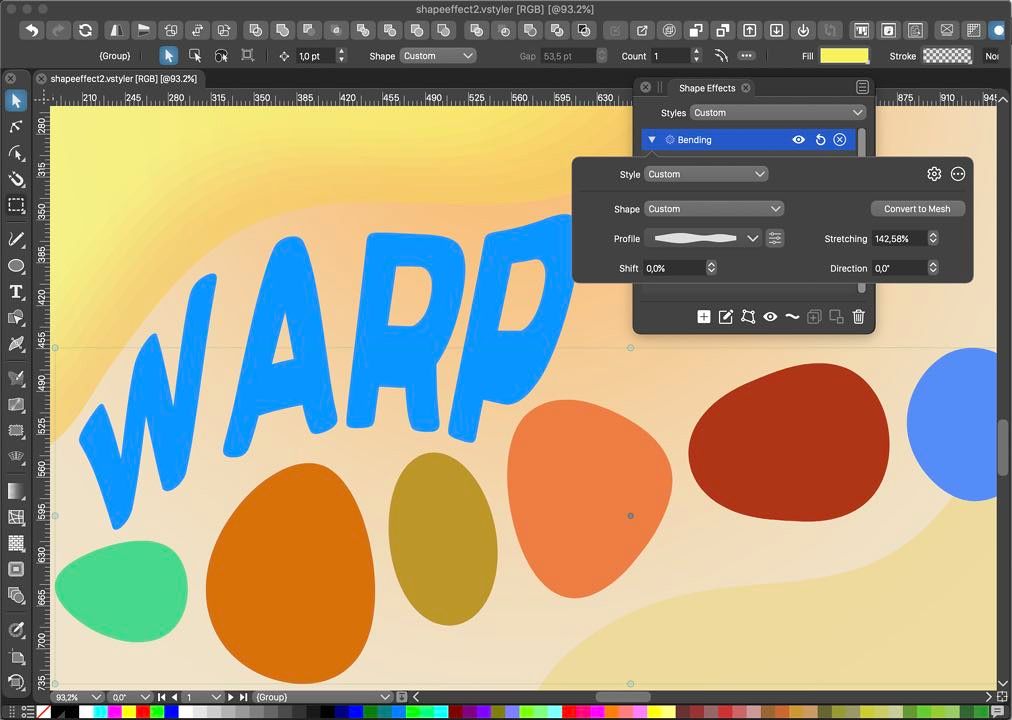
Create and edit non-destructive shape effects on objects or groups of objects. Shape effects can be used to adjust the shape of objects, creating various distortions or adding detail to shapes. Shape effect parameters can be edited interactively on the canvas. Use parametric distortion effects to change the shape of objects.
Create mesh, envelope, or elastic warp effect for fine-tuned warp distortions. Create dynamic offsets of shapes and edit the offset distances interactively on canvas. Use the Shape Effects panel to create and edit multiple effects on selected objects.
Image Effects
Add live image effects to vector objects and groups. Select from over 100 image effects, each with multiple options. Image effects are non-destructive, and can be changed or removed at any time. Adjust image effect parameters interactively on canvas, for better visual control. Image effects can be created and edited using the Image Effects panel.
All image effects are live, with the vector objects and shapes remaining editable. Combine multiple image effects to create custom filter compositions. Import and use SVG filter compositions directly from the Image Effects panel.
WHAT’S NEW
Version 1.1.094:
• Release notes were unavailable when this listing was updated.
REQUIREMENTS
• Intel, 64-bit processor
• OS X 10.11 or later
ScreenShots
If you are using Adblocker!! Please support this website by adding us to your whitelist. Ads are what helps us bring you premiu
Editor-checked details
Recommended for illustrators, logo and print designers who value non-destructive deformation, advanced strokes/brushes, live filters and a perpetual licence. Workflow: define colour mode, ICC, units and bleed; import a representative AI/SVG copy; inspect fonts, links and artboards; keep Shape/Image Effects parametric; save repeated appearances as styles; retain native milestones; duplicate before expanding required effects/text; export PDF/SVG/PNG; round-trip in receiving/preflight tools; document fonts, spots, overprint and expansions; archive native file, links, font inventory, manifest and SHA-256. Choose Illustrator for Adobe-centric teams; compare Affinity Designer, Pixelmator Pro or Amadine for other Mac workflows.
Pros
- Its non-destructive appearance system is deep: Shape Effects can stack, group, become presets/styles and remain editable above original paths; mesh, envelope, bend and offset suit complex logos and illustration. Live image effects operate on vector objects while retaining editable source geometry. Typography, brushes, strokes, gradients, colour, symbols, repetition and multi-artboard tools cover icons through print illustration. It supports common PDF/SVG interchange and provides Intel, Apple-silicon and Universal builds. A one-time licence rather than mandatory subscription appeals to stable long-term workstations.
Cons
- The many tools and panels create a learning curve around non-destructive effects, appearance, styles, presets and object hierarchy; Illustrator migrants must also adapt terminology and shortcuts. Complex effect stacks, large bitmaps and many artboards pressure RAM/GPU, and older graphics may need OpenGL/OpenCL. AI/PDF/SVG are not the same native object model, so filters, meshes, text, spot colour and overprint cannot be assumed to round-trip losslessly. Build 1.1.094 is old and should be validated with later macOS, fonts and receiving apps. Its ecosystem, templates, plug-ins, training and hiring pool are smaller than Illustrator’s.
Installation steps
- The site package is VectorStyler 1.1.094. Official support covers macOS 10.11+, Intel and native Apple silicon; at least 8GB RAM is recommended for comfortable use, with more memory and a fast GPU for complex art. Back up AI/SVG/PDF/EPS originals, fonts, linked images, palettes, brushes, styles, presets and workspaces. Drag the app to Applications and benchmark a small file containing text, gradients, transparency, clipping, linked images and spot colours. Save a native VectorStyler copy, export PDF, SVG and PNG, then round-trip them in the receiving apps. Inspect artboards, dimensions, text reflow, font substitution, strokes, blends and colour. On M-series Macs prefer the matching Apple-silicon or Universal build. Never overwrite the only master during migration.
Uninstallation steps
- Before removal, save editable projects in the native format and freeze delivery PDF/SVG/EPS plus high-resolution PNG. For complex effects, brushes, repeaters, mesh gradients or variable fonts, create an additional expanded/outlined exchange copy while retaining the editable master. Collect linked images, font-licence inventory, palettes, ICC profiles, styles/presets and export settings; create a manifest and SHA-256. Reopen PDF/SVG in receiving software and inspect text, spot colours, transparency and page bounds. Record licence details, quit, then remove the app. Back up the workspace before resetting it: deleting NumericStyle/VectorStyler support data removes preferences, presets and panel layouts.
Common errors and fixes
- For files that fail or shift on import, test copies and verify units, artboards, crop boxes, links and fonts. AI/PDF/SVG use different appearance models, so complex appearances may expand or rasterise. If text reflows, compare font versions, OpenType/variable axes, tracking and frame size; outline only a delivery copy, never the editable master. For flicker, blur or crashes, switch Metal/OpenGL/OpenCL in Settings > Performance, disable expensive live effects and reduce canvas complexity. If panels/layers fail to refresh, switch documents or reopen the panel; persistent workspace faults can be reset by launching with Shift+Option+Command after backing up settings. Round-trip SVG/PDF filters, blends, masks, spot colours and overprint in the receiving/print workflow. Split artboards, link large images and reduce live-effect stacks when memory is tight.
What changed in this version
- The source listing for VectorStyler 1.1.094 did not provide itemised release notes, and the developer’s current public log no longer retains a verifiable entry for this old build, so no specific fixes are inferred. Confirmed 1.1-era capabilities include stackable non-destructive Shape Effects, mesh/envelope/bend and dynamic offsets, more than 100 live image effects, SVG filter compositions, extensive strokes/brushes, typography and multi-artboard work, plus PDF/SVG interchange. Intel, native Apple-silicon/Universal builds and Metal rendering were supported.






Alternatives


Screenshots