Adobe Illustrator 2026
Adobe Illustrator is the industry standard vector-drawing environment for designing across media. Express your creative vision with...
- Intel, 64-bit processor
- macOS 11.0 or later
Description
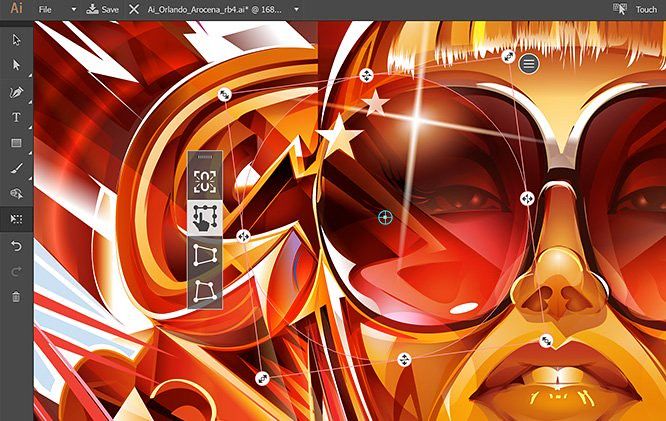
Adobe Illustrator is the industry standard vector-drawing environment for designing across media. Express your creative vision with shapes, color, effects, and typography. Work with speed and stability on large, complex files, and move designs efficiently among Adobe’s creative applications.
Deploy your brightest ideas on canvas and make dare experiments in the latest version of Illustrator.
Express your art in digital illustration
Design heart-winning digital illustration, create beautiful logotypes, typefaces, and memorable icons with Illustrator for Mac. This graphics editor has gained the glory of the vector design classics and still evolves, bringing new amazing features to its users.
Join a global creative community with Illustrator
Thousands of talented designers worldwide use Adobe Illustrator to create a variety of designs ranging from icons and product packaging to website illustrations and even billboards.
Create an artwork of any
size
Download Adobe Illustrator for Mac to access a set of handy drawing tools that will help you visualize your amazing ideas of logos, typography, and graphics. This software is vector-based, so you can design objects that will be easily scalable on different types of screens and even billboards.
Say more with gorgeous typography
Design the company’s name as a logo, create a flyer or a website with the convenient type tools in a full version of Adobe Illustrator. Shape a general typeface style or enhance individual characters to create a visual mood of the message that says even more than the words themselves.
Use the illustration to draw attention
Create freehand sketches or recolor uploaded images to transform them into real artworks. An appealing illustration can create a particular style for any website, presentation, mobile app, or blog.
WHAT’S NEW
Version 2026 30.0:
• Release notes were unavailable when this listing was updated.
REQUIREMENTS
• Intel, 64-bit processor
• macOS 11.0 or later
Scree
Editor-checked details
Recommended for brand systems, logos/icons, packaging, print illustration, infographics, type and teams that must deliver standard AI/PDF files. Compare Affinity for a non-subscription vector/pixel/layout suite, CorelDRAW for print/sign workflows, Pixelmator Pro for Mac-centric image design with photo work, and InDesign for long-form layout. Deliver an editable AI, packaged links/licensed fonts, a preflighted PDF and a screen-preview copy, then validate fonts, links, spot colors, overprint, bleed and SVG rendering on another machine.
Pros
- Industry-standard vector drawing, Bézier paths, typography, color, patterns, brushes, symbols and prepress control; broad AI/PDF/SVG/EPS exchange for branding, icons, packaging, illustration and infographics; artboards, Asset Export, Actions and scripts scale multi-output work; deep Photoshop, InDesign, After Effects, Adobe Fonts and Libraries integration; mature complex appearances, live effects and spot-color workflows.
Cons
- Ongoing subscription and a steep learning curve; complex files demand memory, GPU, font and link discipline and deep effect stacks can still lag; AI format and new effects may lose editability in older or non-Adobe apps; pixel photo editing, long-document layout and UI prototyping are not its strongest roles; generative tools depend on network, account, credits and region and still require rights/brand review; plug-ins, scripts, fonts and print configurations make upgrades expensive to validate.
Installation steps
- Illustrator 30.0 supports macOS Ventura 13, Sonoma 14, Sequoia 15 and Tahoe 26. It requires 8 GB RAM (16 GB recommended), 3 GB installation space and a Metal-capable GPU. Intel Macs need a 64-bit multicore SSE 4.2 processor; Apple silicon runs natively. Install and activate through Creative Cloud. Keep the app and recovery data on a fast internal SSD and linked images, fonts and delivery packages on reliable project storage. Before upgrading, duplicate `.ai`/PDF files, links, font inventory, swatches, brushes, Actions, workspaces and plug-ins, and retain the previous app. Configure scratch disk, recovery, GPU Performance, color settings and units, then test a complex representative file for fonts, transparency, spot colors, links, scripts, tablet input and PDF/SVG/EPS output. Intel-only plug-ins cannot load in native Apple-silicon mode; update them first and consider Rosetta only when genuinely required.
Uninstallation steps
- Before uninstalling, use Package to collect `.ai` files, linked assets and licensed fonts, save a compatible PDF, and back up workspaces, shortcuts, Actions, scripts, brushes, swatches, graphic styles, symbols, color settings and plug-in inventory. Confirm cloud-document sync and export local copies; an `.ai` file does not guarantee every external link is embedded. Uninstall through Creative Cloud rather than deleting the app. For troubleshooting, back up `Adobe Illustrator 30 Settings`, reset preferences and test without third-party plug-ins; use Cleaner Tool only if a normal reinstall still fails. Remove old preferences, caches and plug-ins only after representative files open, save, recover, package and export correctly.
Common errors and fixes
- For launch crashes, broken tools or shortcuts, back up and reset preferences under Preferences > General or hold Option+Command+Shift at launch, then isolate fonts, plug-ins, scripts and tablet drivers in groups. For jagged, flickering, slow artwork or unavailable GPU features, compare CPU Preview, reset the v30 Settings folder and verify Metal/macOS updates. Window managers such as Magnet can cause pan, zoom and object-move lag on macOS. Sampling an external color with Eyedropper may request screen-recording access; grant only what the workflow needs. In v30, Home > Your files may falsely deny a recent cloud document; open it from Home > Recent, and reinstall CoreSync with Cleaner Tool only if the issue persists. For failed saves/exports, Save As locally, shorten paths, check permissions/free space and bad links, then copy layers into a new document to isolate corruption. Before delivery inspect Outline, Overprint Preview and PDF preflight for fonts, spot colors, bleed, transparency, image resolution and links.
What changed in this version
- Illustrator 30.0 (October 2025) focuses on complex-document workflow. Quick Save writes only the changes instead of rewriting the entire document each time; crash recovery is more reliable; and on-canvas move, scale, rotate and duplicate operations are smoother. The redesigned font browser adds clearer sections and filters and brings Adobe Fonts and Creative Cloud Libraries into font discovery/organization. Before production adoption, validate Quick Save, recovery, font substitution and legacy plug-ins with real print/export files rather than judging stability from a small new document.






Alternatives




Screenshots