Rip Studio
2 years in development, 3 years prototyping, and thousands of hours in the art department, Rip Studio redefines everything...
Description
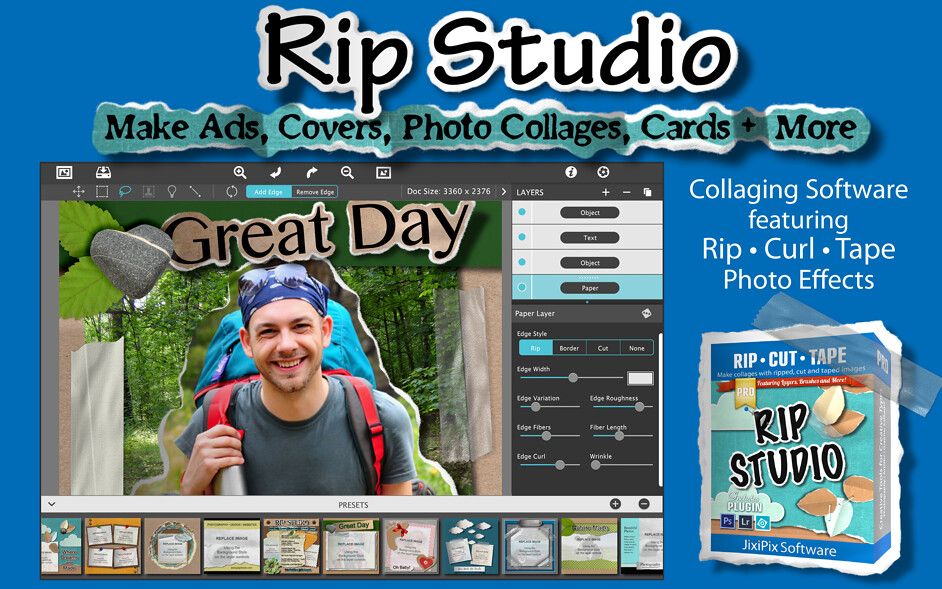
2 years in development, 3 years prototyping, and thousands of hours in the art department, Rip Studio redefines everything you know about a photography and collaging app. It offers super realistic ripped and cut borders, tape, creased and folded images, curled edges with fully 3D shadowing. All with an incredible interface that seamlessly handles layers while maintaining an easy to use workflow.
Designed and engineered for all types of creative professionals and scrap-bookers.
• Create Ads, Music Covers & Collages with Ripped, Cut and Taped Edges
• Comes with a multitude of existing projects to get you started
• Create projects that span a single layer or more
Rip Studio gives you control over every element created inside the app. Rip, tear, or cut edges by drawing around the image. Curl up the edges and wrinkle the surface by simply adjusting a slider.
Behind the scene a powerful 3D light engine works to make surface wrinkles and creases look realistic; this adjustable light source will have shadows popping off the page. Finish your creative composition with a tape effect, or choose from a library of objects like stickpins, staples, rusty nails and gems.
Every rip you make or tape you place is unique and one-of-a-kind!
Created for professionals who want eye-catching elements for their designs and compositions. Quickly rip out shapes and letters by drawing around on your image. Create paper objects for Ads, Music covers, Art Collages and Scrapbook pages with one-of-a-kind cutout, ripped out, taped and pinned shapes made from images or other clipart.
With Rip Studio you can throw out those boring overused templates and create a custom piece with complete control over shape, width, fiber, texture and curl.
Built with PRO features Rip Studio easily creates a single incredible piece or a whole collage right inside the app! Built with a powerful workflow, you can add images quickly simply selecting them from your library and dropping them—all at once—on the open
Editor-checked details
Recommended for photographers and designers making music covers, social ads, cards and digital scrapbooks quickly. Workflow: define output pixels/print size and bleed; gather licensed photos, fonts and objects; establish layer hierarchy; draw rips/cuts around key images; standardise fibre and paper texture; set one primary light direction before curls/creases; use multi-select to align spacing; test the template by replacing an image; inspect edges and alpha at 100%; export PNG/TIF master plus JPEG proof; archive project, assets, manifest and SHA-256. Choose Photoshop, Affinity Photo or Pixelmator Pro for precision compositing, and Affinity Publisher for freer page layout.
Pros
- It concentrates ripped/cut fibres, curls, creases, tape and dimensional shadows in a layered workflow, faster than manually assembling masks and textures. Edge width, roughness, fibre length and lights are adjustable, and replacing an image can preserve the shape for reusable cover, ad and scrapbook templates. Multiple selection, text, system fonts, high-resolution output and transparent PNG/TIF are supported, with host plug-ins and batch workflows beyond the standalone app.
Cons
- Its style centres on paper collage and physical embellishments; it is not a general photo editor, vector layout or publishing system. Automatic rips are quick but offer less path/mask precision and brand consistency than manual Photoshop/Affinity work. Large high-resolution layers, 3D shadows and textures increase memory use and export time, and raster masters limit later enlargement. Older host plug-ins, Apple silicon/Rosetta combinations and App Store distribution differences require machine-by-machine testing. Asset and font licensing still matters.
Installation steps
- Rip Studio 1.1.23 officially requires macOS 10.9 or later and a 64-bit processor. Intel is supported directly; on Apple silicon, prepare Rosetta 2 and validate the plug-in separately in each host. Back up projects, layer presets, papers, textures, fonts and custom objects. Build a test with transparent PNG, JPEG and high-resolution TIFF, then check rip/cut edges, fibre length, curl, crease, tape, 3D lights, text and multi-object transforms. Define canvas pixels, print dimensions, resolution and colour space before production, and test PNG/TIF transparency. For Photoshop, Elements, Lightroom or Affinity Photo integration, validate 16-bit data, alpha, blending, batch processing and returned layers on copies. The Mac App Store edition does not include the plug-in.
Uninstallation steps
- Before removal, copy editable projects, source images, papers/textures, objects, a font list, layer presets and plug-in workflow notes into an independent archive. Export transparent PNG/TIF, a review JPEG and the print master. Create a manifest and SHA-256 for sources and deliverables, recording canvas size, resolution, colour space, lights, curl/fibre settings and font licences. Reopen an offline copy and replace one image to prove template reuse, then remove the plug-in from each host and uninstall the app.
Common errors and fixes
- Dropping a new image on the document creates a layer; to retain rip, curl and lighting settings, drop it on the Background Style thumbnail to replace the image. Black transparency usually means JPEG export or lost alpha: use PNG/TIF and inspect the background. Reverse the rip tool to restore an over-torn area. For jagged fibres, increase document/output resolution and avoid undersized edge detail. Standardise the 3D light before judging inconsistent shadows. If a high-resolution layered project slows down, reduce preview size and hide groups while checking memory. A missing plug-in may indicate the plug-in-free App Store edition, an incompatible host/architecture or wrong plug-in folder; Apple silicon hosts may need a Rosetta compatibility test.
What changed in this version
- The channel build is 1.1.23. The official product page does not map a detailed changelog specifically to 1.1.23, so no patch claims are invented. Verifiable update features on that page include drag-selection of multiple objects, rollover preset previews and saved layer presets. Rip/cut, tape, curl, crease, 3D lighting, smart layers, transparent PNG/TIF and plug-in workflows are established capabilities.






Alternatives




Screenshots