Adobe Photoshop 2026

Adobe Photoshop 2026

· v27.6.0 Free

Adobe Photoshop is a recognized classic of photo-enhancing software. It offers a broad spectrum of tools that can turn your...

 System Requirements
  • Intel, 64-bit processor
  • macOS 11.0 or later

Description

Adobe Photoshop is a recognized classic of photo-enhancing software. It offers a broad spectrum of tools that can turn your inspiration into incredible images, photos, composites, 3D artwork, paintings, and graphics on any device.


Photoshop has become the choice of thousands of creative professionals around the world. First introduced in 1988, it still is the world’s leading image-editing software.


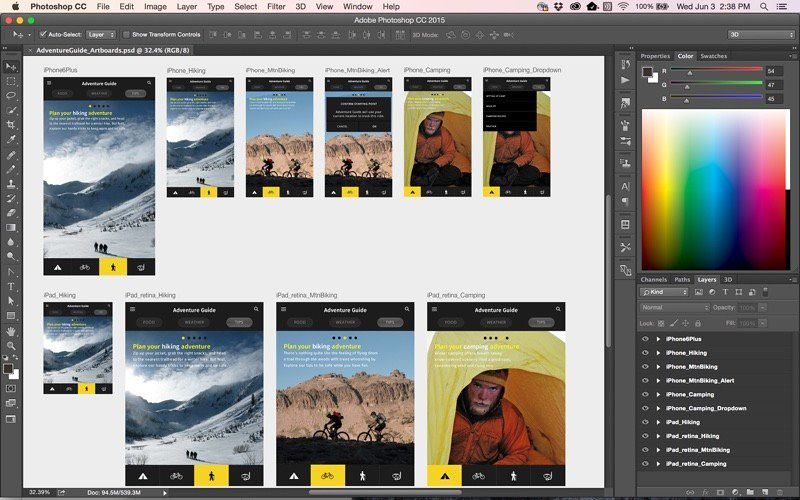
Intuitive and clean user interface

Although Photoshop for Mac is the most comprehensive graphics and image-editing software available in the market today, it has a very intuitive and easy-to-navigate interface.


With recently improved usability, this photo-editor has become even more enjoyable to use. The interface loads as soon as you decide to use Photoshop.


A user-friendly interface updates you about new features, suggests learning content, and allows you to quickly access recent files. You can easily pick up where you left or create a new project, access cloud and desktop pictures, and open an existing document.


Convenient content-aware fill workspace

Adobe has recently announced the launch of its new Content-Aware Fill workspace. It allows you to remove objects or distracting elements from your images easier than ever before.


This new option offers an interactive editing experience. Now, you can take full Control over which “good” parts of the picture to use to replace the undesired areas. It allows resizing the initial selection, rotating, scaling, and mirroring content.


Enjoy a range of new tools

The latest version of the software provides a new Frame Tool that allows you to enjoy much simpler masking. Now, you can place shapes and text into placeholder frames and fill them with pictures. To create elliptical or rectangular forms, you only need to select the Frame Tool and press “K.”


There is also a new default feature of multiple undo. If you want to view an object before changes are applied, just click Control + Z (for Windows OS) and Command + Z (


✓ Checked against source material

Editor-checked details

Editor: macv.net Editorial Team · Last reviewed: 2026-09-02
Apple SiliconM1 / M2 / M3 / M4
Intel MacCompatible
Why we recommend it

Best for complex PSD work, professional retouching, compositing, print and cross-team delivery. For lighter editing, compare Affinity Photo, Pixelmator Pro and Photomator. Maintain a dedicated scratch disk, autosave and preset backups; duplicate critical projects and check plug-ins before upgrades.

Pros

  • Mature professional workflows combine layers, masks, selections, Smart Objects, RAW and color management. PSD collaboration is widespread, with extensive actions, scripts and plug-ins. Native Apple silicon plus Intel support covers complex compositing, retouching, print and team delivery.

Cons

  • Subscription cost continues over time, and Creative Cloud/background services manage installation and updates. Large documents consume RAM, GPU and scratch space, while plug-ins may lag releases. Some generative tools require connectivity, entitlement and credits; teams must align fonts, ICC profiles, versions and linked assets.

Installation steps

  1. This page covers channel version 27.6.0. Confirm macOS 11.0+, sufficient RAM/GPU and scratch-disk space, and record installer SHA-256. Install or update through Creative Cloud, sign into Adobe, then test color settings, scratch disks, GPU acceleration, fonts, plug-ins and PSD open/save. Apple silicon uses the native path and Intel is supported; use a fast internal disk as the first scratch disk for large PSD files.

Uninstallation steps

  1. Save documents, quit Photoshop and allow cloud documents to sync. In Creative Cloud > Apps > All Apps, choose More actions beside Photoshop, then Uninstall, deciding whether to retain preferences and plug-ins. Back up actions, brushes, presets, workspaces, plug-in list, the 27.6.0 installer and SHA-256. After reinstalling, test layers, masks, export and scratch disk with a new document before restoring personal assets.

Common errors and fixes

  1. For unsupported OS errors, confirm macOS and 27.6.0; Photoshop cannot install on a case-sensitive file-system volume. For scratch-disk full, free space or select a fast disk in preferences. On launch crashes, hold Shift to skip third-party plug-ins, then reset preferences. For GPU black screens or unavailable filters, change GPU mode and update macOS. Generative Fill or activation failure requires connectivity, Adobe sign-in, entitlement and credits. Font/color faults require font-cache and document ICC checks.

What changed in this version

  1. Version 27.6.0 adds on-canvas object rotation, a Generative Credits Usage panel, an updated Firefly Fill & Expand model, plus layer cleanup for empty layers and content-based renaming. Validate rotation preview, credit reporting, fill/expand resolution, layer cleanup and PSD round-tripping.

Screenshots

Adobe Photoshop 2026 截图 Adobe Photoshop 2026 截图