Affinity Publisher
A next-gen version of the Mac App of the Year software, Affinity Publisher 2 delivers an incredible design experience. Whether you’re...
Description
A next-gen version of the Mac App of the Year software, Affinity Publisher 2 delivers an incredible design experience. Whether you’re creating a book, magazine, marketing materials, social media template or something else, it has everything you need to make beautiful layouts ready for publication.
And with the ground-breaking ability to fully integrate with other Affinity apps, it’s completely revolutionising the way creatives work.
REFINED & REDESIGNED WITH POWERFUL NEW FEATURES
• Fully redeveloped UI, tool and button icons
• Completely revamped Layers Panel
• Book creation and management – combine multiple Affinity Publisher files as chapters, with linked text styles, table of contents and indexes
• Footnotes, sidenotes and endnotes via new Notes panel
• Style Picker Tool
• Quick grid
• Autoflow of multiple images and multi-page PDFs
• Layer visibility override for placed linked files (PDF/DWG/DXF and Affinity files)
• AutoCAD DWG/DXF import, place and edit
• Place linked web images using their URLs
• Resave packages with auto-update of resources
• Force scale of stroke, effect and fills on object resize
PROFESSIONAL LAYOUT TOOLS
• Facing page spreads
• Live master pages, including nested master pages
• Image frames with intelligent scaling options
• Advanced guides, grids and snapping
• Tables and custom table formats
• Wrap text around any object or image with fine padding control
• Create text frames of any shape
• Link multiple text frames together across your document
• Text column dividing lines
ADVANCED TYPOGRAPHY
• Full control over character and paragraph styles
• Comprehensive OpenType support
• Text decorations, drop caps and initial words
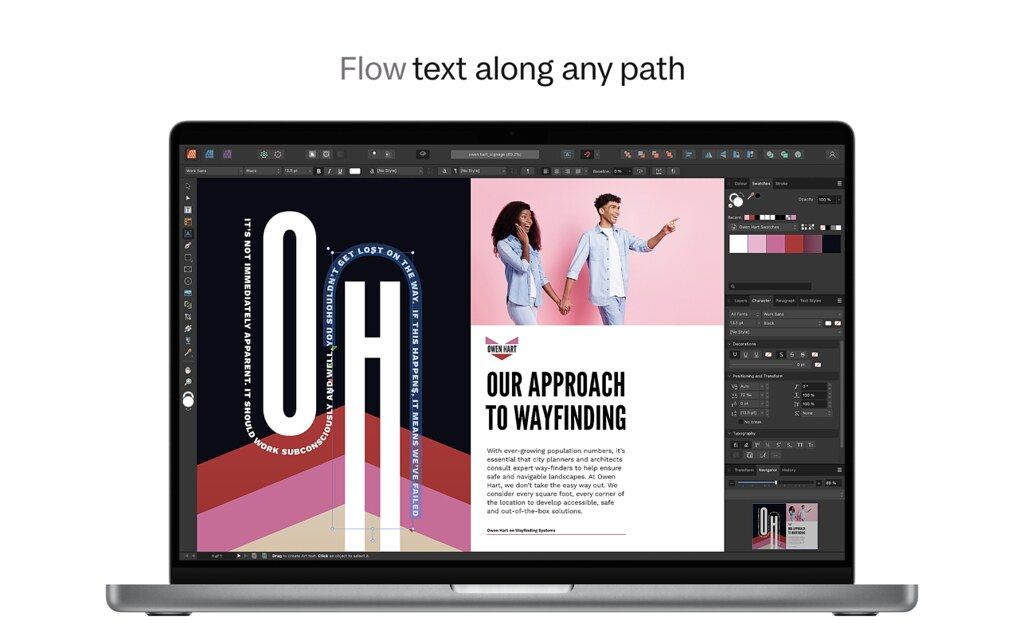
• Flow text along any path
• Advanced flow options and hyphenation
• Baseline grid and text frame rulers
PERFECT IMAGES & GRAPHICS
• Link or embed images in your document
• Place PSD, AI, PDF, JPG, TIFF, PNG, DWG or Affinity files
• Correct and enhance images with non-destructive adjustment layers
• Precis
Editor-checked details
Recommended for independent designers, small publishers and teams needing professional print output without an InDesign plug-in ecosystem. Use: obtain printer specifications; define trim/bleed/ICC; build masters and paragraph/character styles; plan chapters, fields and cross-references; link large art; run continuous Preflight; freeze copy; update TOC/index/references; package; export PDF/X and review PDF; soft-proof and inspect a physical proof; archive sources, manifest and SHA-256. InDesign suits large collaborative, scripted and plug-in workflows; Scribus suits open-source needs; Pages suits simple documents; Designer and Photo complement Publisher for integrated creative work.
Pros
- It covers magazines, books, reports and print collateral in one desktop-publishing workflow. Masters, spreads, styles, baseline grids, wrapping, notes, TOC, indexes and cross-references suit long documents. Linked/embedded resources, Resource Manager, packaging and Preflight expose delivery risks early. StudioLink can invoke vector and pixel Personas when the corresponding V2 apps are installed, reducing round trips. Professional colour, bleed, overprint, PDF/X and interactive PDF are supported. The Universal build serves Intel and Apple silicon.
Cons
- Complex publishing still depends on font licences, ICC profiles, printer presets and resource paths; the app cannot make editorial decisions. InDesign collaboration often relies on PDF, IDML or intermediate formats, and complex styles, notes, scripts, plug-ins or interactivity may not round-trip perfectly. StudioLink requires the matching V2 apps. Long books, huge images and many embedded resources increase memory and save pressure. Automated TOC, indexes and cross-references still need proofreading, and a clean Preflight does not prove content, spelling, accessibility or a physical proof.
Installation steps
- The official Affinity Publisher 2.6.5 macOS installer is Universal for Intel and Apple silicon. Keep several times the installer size free and duplicate each .afpub project before upgrading. Audit font licences, linked images, ICC profiles and the printer’s PDF specification. Open a small copy first and verify masters, text styles, notes, TOC, index, cross-references and StudioLink; Designer and Photo Personas require the corresponding V2 apps. Repair missing resources, then use Preflight for low-resolution images, overflow text, colour spaces and fonts. Set trim, bleed, marks and PDF/X to the printer’s requirements. For a long book, migrate one chapter and validate numbering, TOC and cross-references before the complete publication.
Uninstallation steps
- Do not preserve only the .afpub file. Before removal, package the document, all linked resources, legally distributable fonts, ICC profiles, PDF presets, data-merge sources and StudioLink dependencies. Save final press and low-resolution review PDFs. Create a manifest and SHA-256 and record app version, export preset, bleed, colour space, font status and review date. Reopen an offline copy and run Preflight to catch missing art, overflow text, wrong numbering or broken cross-references. Unlink unused cloud services, prove the backup restores, then remove the app and optional preferences.
Common errors and fixes
- For missing artwork, relink in Resource Manager rather than replacing every page and preserve relative paths when packaging. Font substitution or reflow requires checking family, version, OpenType features and licence, followed by page-by-page line-end and overflow review. For wrong PDF colour or black plates, inspect document ICC, object CMYK/RGB, overprint and the requested PDF/X preset; do not convert blindly. Separate source pixels from effective DPI. If numbering, TOC, index or cross-references are stale, update fields and inspect anchors and chapter order. A master object may need detaching/overriding. For huge or slow files, inspect embedded resources and save a copy. For crashes, test suspicious fonts, Metal acceleration and a recovered copy. Resolve Preflight warnings before export.
What changed in this version
- The 2.6 line added advanced page management to Publisher: cross-reference targets can be paragraphs, anchors or index marks and can become links in interactive PDFs; it also added custom text variables, configurable date/time formats, Find and Replace scope/count, return to the previously viewed spread, richer index separators, guide colours, hide-effects/greyscale views and decimal-accuracy preferences. Version 2.6.5 is the maintenance endpoint of that line. Books, notes, masters, StudioLink and PDF output predate it and are not mislabelled as 2.6.5 additions. Regress chapter references, TOC/index, fields, resources, font reflow, Preflight and PDF/X.






Alternatives



Screenshots