PhotoLine
PhotoLine is an image processing utility, image browser, layout program, vector editor, batchconverter and Web editor with a...
- Intel, 64-bit processor
- OS X 10.9 or later
Description
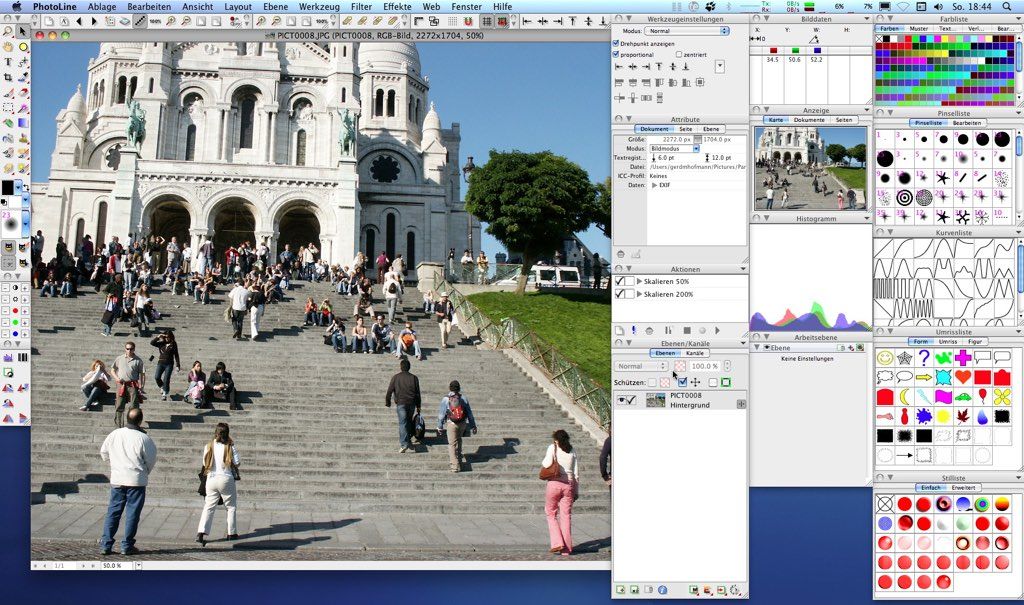
PhotoLine is an image processing utility, image browser, layout program, vector editor, batchconverter and Web editor with a multitude of powerful functions. It is available as 32- or 64-bit application. Imaging functions supported are Lab, CMYK, 16 bit channels, ICC profiles, and raw data profiles for digital cameras.
PhotoLine offers all the tools you need: painting, cloning, filtering, blending and flood fill, special effects like squirl, shadow, glowing, distorb, morphing, 3d projection. Also supports, working layers, clipping layers, dynamic layer effects. EXIF digital camera data and IPTC data are also supported.
Multiple undo/redo levels, plugin filters and much more.
Save and read your PDF files with PhotoLine. Create vector graphics, add, remove, move vector points. Convert lines to beziers, fill with pattern, etc.
PhotoLine also has an action recorder. You can record your jobs and use the batch converter to convert them into an animated gif. Do all your work for the Web with PhotoLine. Transparent and animated GIFs, animations, JPEG2000, HD-Photo, Flash format (swf). Create animated buttons, image maps, and more with PhotoLine!
WHAT’S NEW
Version 25.01:
• Release notes were unavailable when this listing was updated.
REQUIREMENTS
• Intel, 64-bit processor
• OS X 10.9 or later
ScreenShots
If you are using Adblocker!! Please support this website by adding us to your whitelist. Ads are what helps us bring you premium content! Or read this to know how you can support us. Thank you!
•
Size
– 55.6MB
Previous Versions
Editor-checked details
Recommended for individual designers, photographers and small prepress teams willing to learn color management and wanting one local tool for retouching, vector composition, multipage layout, print PDF and web export—especially users avoiding subscriptions or supporting older Macs. Use: read-only source; PLD working copy; lock ICC/bit depth/dimensions; nondestructive working layers; inspect at 50%/100%; independent PDF or sRGB web output; external Acrobat/browser preflight; retain PLD, open deliverables and manifest. Build a reference document with gradients, transparency, spot/CMYK, fine text, vectors, placed images and high-bit-depth imagery; re-export and compare pixels/objects after upgrades, migration or plug-ins. Compare Capture One or Photomator for a mature RAW catalog, Pixelmator Pro or Acorn for a more modern approachable raster workflow, and Affinity Photo or Photoshop for intensive compositing/industry exchange. PDF export never replaces printer specifications and preflight, and PLD should not be the only client delivery.
Pros
- PhotoLine combines high-bit-depth raster editing, vectors, text and multipage DTP in a compact desktop app. Raster, vector and text layers can share one stack, with many operations applied nondestructively as working layers. Up to 32 bits/channel, CMYK/Lab and ICC management serve both web imagery and print PDF; PDF import/export attempts to preserve text/vector structure rather than flattening whole pages. Actions, scripting and batch conversion support repeat production, while the browser handles IPTC/EXIF, keywords, search, lossless rotation and catalogs. A Universal Intel/Apple-silicon package and an older macOS minimum extend hardware coverage. One-time licensing, a 30-day trial and no cloud subscription appeal to individual designers, small prepress shops and users who want local file control. Combining raster, vector, layout and Web Export also reduces color, alpha and metadata losses from round-tripping among apps.
Cons
- The dense, traditional professional interface requires users to understand image/document modes, layer types, working layers, color policies and output semantics; its learning curve is steeper than template or single-purpose apps. PSD/PDF/SVG/RAW import cannot guarantee exact exchange of smart objects, complex blending, variable fonts, plug-in effects or proprietary RAW profiles, so collaborators need reference proofs. RAW management/camera profiles are weaker than Lightroom/Capture One, vector collaboration has less ecosystem than Illustrator/Affinity Designer, and large publishing teams may prefer dedicated DTP; all-in-one does not mean deepest in every domain. Tutorials, templates, plug-ins and available team expertise form a smaller ecosystem, and localization/handoffs can be harder. Broad legacy support also raises mixed plug-in/font architecture risk, with Intel-only extensions potentially forcing Rosetta. Automation can replicate mistakes quickly, and color/PDF output still needs external preflight. Native PLD should never be the sole archival format; retain open deliverables.
Installation steps
- PhotoLine 25.01 requires macOS 10.13+; the Mac package is a Universal bundle containing Intel and Arm code. Put it in Applications and create a separate test workspace rather than editing production originals. Use copies covering ICC-tagged RGB/CMYK/Lab TIFF, 16/32-bit images, transparent PNG, PSD, SVG, PDF, RAW/CR3, long text and multipage documents; exercise raster, vector, text and adjustment/working layers. Confirm display, working and output ICC policies before opening files and do not casually discard embedded profiles. For print, obtain the printer’s CMYK/PDF specification and proof bleed, fonts, transparency, overprint and trim. For web, export a separate sRGB derivative and inspect size, sharpness, alpha and metadata. Migrate actions/scripts, shortcuts, workspace and plug-ins one at a time, reopening a reference document and comparing an export after every addition.
Uninstallation steps
- Before removal, preserve editable work as native PLD and export every critical result to independent PDF/TIFF/PNG/SVG deliverables. Package linked/placed images, original RAW, font inventory and licenses, ICC profiles, actions/scripts, plug-ins, brushes, color lists, shortcuts and workspace. For print, retain printer presets, bleed/trim, spot/overprint settings and PDF preflight; for web, retain sRGB outputs and dimension/compression settings. A manifest should record PhotoLine version, macOS/architecture, input/output files, SHA-256, color space/bit depth, export settings and review date. Open one PLD on another Mac or clean account and regenerate key pages to prove text, vectors, adjustment layers and color appearance survive. Back up preferences before full cleanup and delete only confirmed PhotoLine preferences, Application Support and caches; do not mistake project assets or adjacent browse/catalog data for disposable cache.
Common errors and fixes
- Unexpected color: verify embedded ICC, open policy, calibrated display and whether proof/output conversions are being applied twice; never assign a wrong profile merely to force a visual match. Dull or incorrect black in print PDF requires the printer’s CMYK ICC, ink limit and PDF standard plus checks for transparency, overprint, spot colors and rich black; preflight the exported PDF independently. PSD/PDF layers or fonts can change because complex blending, smart objects, variable fonts and PDF features are not perfectly interchangeable; keep sources and compare representative pages to reference renders. RAW import is not the same as a camera-vendor or dedicated developer profile, so render critical files to 16-bit TIFF upstream. For AVIF/PNG/web color or alpha halos, convert to sRGB, inspect premultiplication and compare Safari/Chrome/Firefox. Disable plug-ins/scripts when diagnosing crashes and verify architecture; Intel-only add-ons may require Rosetta and affect the whole app. For huge files, save layered versions, limit oversized working copies/history and test actions on a reduced duplicate. Install and license matching fonts; retain editable files before outlining.
What changed in this version
- PhotoLine 25.01 belongs to the official version 25 generation. Verifiable generation-25 changes include better PSD extra-channel and high-bit-depth brush reading; better CR3 EXIF, faster import of PDFs with many objects and more tolerant damaged-PNG reading; AVIF export on macOS; more background formats and embedded-profile names in the image browser; optional original dates in batch conversion; Base64 image paste; and broader formats for Save Page(s). Version 25 also advances painting, layers/compositions, vectors, text, selections/masks and PDF/PSD/SVG workflows. Only these explicitly documented generation-25 items are attributed here; later branch-specific features are not presented as part of 25.01. Core capabilities remain up to 32 bits/channel, CMYK/Lab, ICC color management, nondestructive working layers, mixed raster/vector, multipage DTP, structured PDF import/export, actions/scripts and batch conversion.






Alternatives





Screenshots