Glyphs
Glyphs smart and simple approach helps you draw new typefaces, modify existing fonts, and sculpt your letterforms hassle-free...
- Intel, 64-bit processor
- OS X 10.11 or later
Description
Glyphs 3 is a Mac font editor that puts you in control: quickly draw high-precision vectors, efficiently reuse shapes, and easily manage any number of letters, figures and symbols.
Build, edit and manage fonts on your Mac
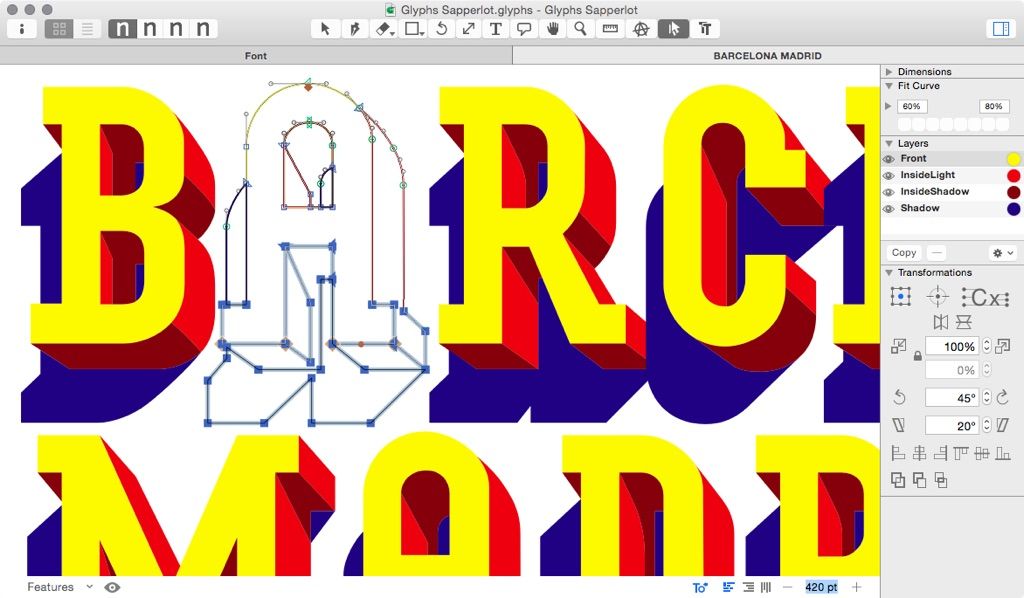
Design letter shapes in a word context
Paint and export letterings on your Mac
Sculpt your shapes with high-end vector tools
Design responsive icons on your Mac
Manage and export multiple variants of your symbols
WHAT’S NEW
Version 3.5:
• Fix Help Menu search item in Traditional Chinese localization
• Fix python access to active tool
• Update interpolation for “Disable Masters” parameter
REQUIREMENTS
• Intel, 64-bit processor
• OS X 10.11 or later
ScreenShots
If you are using Adblocker!! Please support this website by adding us to your whitelist. Ads are what helps us bring you premium content! Or read this to know how you can support us. Thank you!
•
Size
– 33.7MB
Previous Versions
Editor-checked details
Recommended for independent type designers, foundries, custom brand type, variable fonts, icons and multilingual glyph sets. Use: glyph-set/language requirements; naming/version policy; UPM/vertical metrics; axes/master design space; compatible outlines/components; anchors/diacritics; spacing; kerning groups; OpenType features; instances/STAT/avar; OTF/TTF/VF/webfonts; FontTools/Fontbakery; browser/Windows/macOS/Adobe/Office tests; archive sources, UFO, binaries, proofs, manifest and hashes. Freeze the source commit and export environment for each release. Compare FontForge for cross-platform open source, RoboFont for UFO/designspace engineering, Glyphs Mini for beginners, and Illustrator/Affinity Designer for logo drawing only. Native-language review remains essential.
Pros
- Glyphs unifies glyph drawing, component reuse, spacing/kerning, OpenType programming, multiple-master interpolation, instances and variable-font export in a Mac workflow that understands font structure better than general vector tools. Word-context editing exposes shapes and spacing; anchors/components scale diacritics and multilingual sets, while brace/bracket/intermediate layers handle local design changes. Axes, instances, STAT, custom parameters and feature automation span static families and variable fonts. Colour fonts, icons/symbols, Python API, scripts and plug-ins extend production. Text-structured Glyphs files, .glyphspackage and UFO suit version control/team work, with strong learning material for naming, hinting, OpenType and complex scripts.
Cons
- It is a professional font editor, not complete typography/layout, illustration or a text renderer; final behaviour in browsers, Adobe, Office, CoreText/DirectWrite requires external tests. Interpolation demands strict master compatibility, where small node/component/start-point differences cause export failure or variable kinks. OpenType, Unicode, naming tables, vertical metrics, hinting, STAT/avar and cross-platform menus require standards knowledge beyond automation. Plug-ins/scripts depend on Glyphs/Python APIs and may break on upgrades. This older Intel build relies on Rosetta on Apple silicon and future macOS support is uncertain. Commercial fonts require provenance, licensing, trademarks and language review. Installed OTF/TTF alone loses masters, axes, components and source editing data.
Installation steps
- The listed Glyphs 3.5 requirement is 64-bit Intel and macOS 10.11+; validate it as a Rosetta 2 app on Apple silicon. Back up .glyphs/.glyphspackage, UFO, sketches, Features/Classes/Prefixes, instances, axes, custom parameters, plug-ins, scripts and licence. Build a minimal proof on a copy: lock UPM, ascender/descender, naming, Unicode, glyph set, masters and axis coordinates; verify compatible node counts, path direction, start points, components and shape order. Export OTF/TTF plus a variable font and inspect STAT/fvar/name tables, OpenType features, kerning, vertical metrics, hinting and webfonts. Validate each plug-in/Python script for 3.5 and never overwrite a released production font.
Uninstallation steps
- Before removal, preserve .glyphs sources and readable .glyphspackage/UFO exchange copies, including all masters, brace/bracket/intermediate layers, backgrounds, components, features, classes, kerning, axis mappings, instances and variable-font settings. Archive released OTF/TTF/WOFF/WOFF2, proof PDF/HTML, Fontbakery/FontTools logs, specimens, version history, licences/glyph sources and plug-in/script inventory. Record exact Glyphs build, UPM, vertical metrics, glyph set, OpenType tables, axis tags/internal/external coordinates, default master and export parameters; create manifest/SHA-256. Test installation, menu names, kerning, features, diacritics, fallback, variable axes and print across macOS/Windows, browsers and target apps. Confirm licence recovery before deleting app/plug-ins. Installed fonts are not source backups.
Common errors and fixes
- For incompatible interpolation, use Show Master Compatibility and align path/component count, node type, direction, start points and shape order across masters—visual similarity is insufficient. If a variable glyph stays static or kinks, compare browsers/FontTools and inspect default master, axis locations/mappings, brace/bracket layers, components and outline compatibility; app renderers can differ. On export failure inspect Macro/errors for duplicate glyphs, empty/open paths, invalid feature code, Unicode/production names, custom parameters and instances. Missing kerning requires group names/sides, pairs across masters and GPOS checks. Menu conflicts require family/style names, style linking, PostScript names, version and a distinct variable-family name. Bad diacritics need anchors/auto alignment. For plug-in crashes launch safely, disable plug-ins and verify Python/API; 3.5 fixes active-tool Python access.
What changed in this version
- The listed Glyphs 3.5 notes contain three explicit fixes: Help-menu search in Traditional Chinese localisation, Python access to the active tool, and interpolation for the “Disable Masters” parameter. These affect interface discoverability, script/plug-in automation and consistency of multi-master/instance exports. Multiple-master interpolation, variable fonts, OpenType features, kerning, colour fonts, reusable components, Python/plug-ins and OTF/TTF/webfont export are Glyphs 3 generation capabilities, not mislabelled as new in 3.5. After upgrading, export static and variable fonts from the same source and compare outlines, axes, tables and validation logs.






Alternatives

Screenshots