Glyphs
Glyphs 智慧又簡潔的操作方式,協助您輕鬆設計全新字型、修改既有字型,並無痛精雕細琢字形……
- Intel, 64-bit processor
- OS X 10.11 or later
軟體介紹
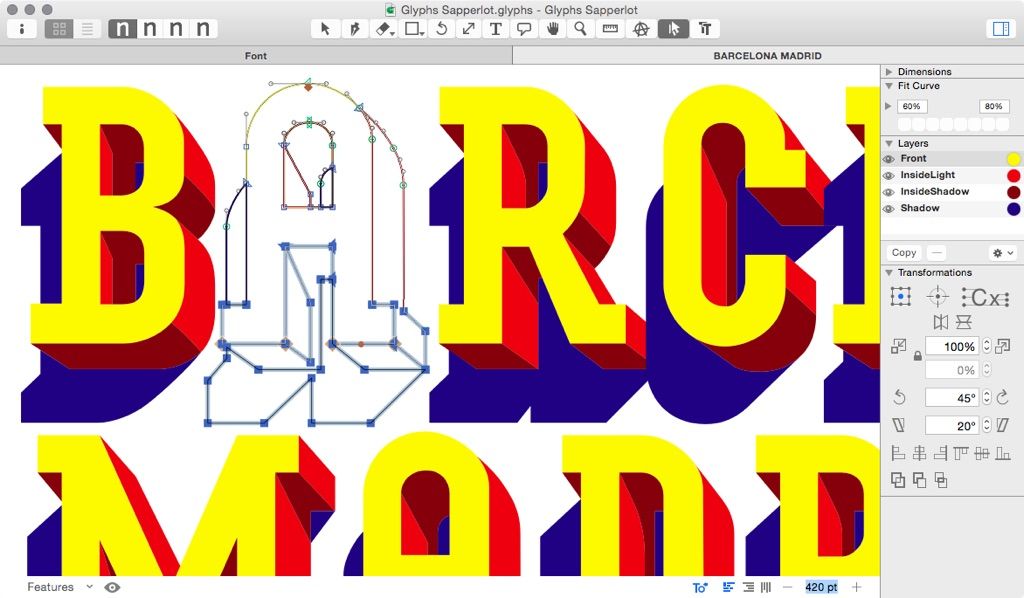
Glyphs 3 是一款適用於 Mac 的字型編輯器,讓您完全掌握設計主導權:快速繪製高精度向量圖形、高效重複利用字形,並輕鬆管理任意數量的字母、數字與符號。在 Mac 上建構、編輯與管理字型;於單字語境中設計字形;於 Mac 上繪製並匯出文字設計;運用頂級向量工具精雕細琢字形;於 Mac 上設計響應式圖示;管理並匯出符號的多種變體。
版本 3.5 新增功能:
• 修正繁體中文本地化下「說明」選單中的搜尋項目錯誤
• 更新 Python 存取目前啟用工具的功能
• 改善「停用母版」參數的內插運算
系統需求:Intel 64 位元處理器;macOS 10.11 或更新版本
螢幕截圖
若您正在使用廣告攔截器,請將本網站加入白名單以示支持。正是廣告收入,讓我們得以持續為您提供高品質內容!或閱讀此說明,了解如何支持我們。
謝謝您!
檔案大小:33.7 MB
舊版本
編輯核對資料
推薦 independent type designer、foundry、brand font、Variable Font、icon、multilingual project。流程:glyph set/language → naming/version → UPM/vertical metrics → axis/master → compatible outline/component → anchor/diacritic → spacing → kerning group → OpenType → instance/STAT/avar → OTF/TTF/VF/webfont → FontTools/Fontbakery → platform/app test → source+UFO+binary+proof+manifest/hash archive。每次 release freeze source/export environment。cross-platform 比較 FontForge,UFO 比較 RoboFont,beginner 比較 Glyphs Mini,logo drawing 比較 Illustrator/Affinity,並做 native review。
優點
- 將 glyph drawing、component reuse、spacing/kerning、OpenType、Multiple Master、instance、Variable Font 整合為 font-aware Mac workflow。word context、anchor/component、brace/bracket/intermediate layer、axis/STAT/custom parameter/feature automation 支援 multilingual/static/variable production。Color Font、icon、Python API、script/plugin 可擴展;text-based .glyphs、.glyphspackage/UFO 適合 version control/team,並有 naming/hinting/OpenType/complex script 資料。
不足
- 是 font editor,不是 layout/illustration/text renderer;browser、Adobe、Office、CoreText/DirectWrite 需外部 test。interpolation 要 strict master compatibility,細微 node/component/start-point 差異會造成 failure/kink。OpenType、Unicode、name table、vertical metrics、hinting、STAT/avar、menu rule 需要規範知識。另注意 plugin/script API、old Intel/Rosetta、future macOS、provenance/license/language review。僅保存 installed OTF/TTF 會遺失 source data。
安裝步驟
- 站內 3.5 要求 Intel 64-bit、macOS 10.11+;Apple silicon 以 Rosetta 2 App 驗證。備份 .glyphs/.glyphspackage、UFO、sketch、Feature/Class/Prefix、instance、axis、custom parameter、plugin、script、license。固定 UPM、vertical metrics、name、Unicode、glyph set、master/axis,檢查 node count、path direction、start point、component、shape order compatibility。輸出 OTF/TTF/Variable Font,驗證 STAT/fvar/name、OpenType、kerning、metrics、hinting、webfont;plugin/Python 個別確認 3.5。
解除安裝步驟
- 移除前保存 .glyphs、.glyphspackage/UFO、全部 master/layer/background/component/feature/class/kerning/axis/instance/VF setting。封存 OTF/TTF/WOFF/WOFF2、PDF/HTML proof、Fontbakery/FontTools log、specimen、version、license/source、plugin/script。記錄 exact build、UPM、vertical metrics、glyph set、OpenType table、axis tag/coordinate、default master、export、manifest/SHA-256;於 macOS/Windows/browser/target app 檢查 install、menu、kerning、feature、diacritic、fallback、axis、print。installed font 不是 source backup。
常見錯誤及解決方法
- interpolation incompatible 用 Show Master Compatibility 統一 path/component count、node type、direction、start point、shape order。variable glyph static/kink 比較 browser/FontTools,檢查 default master、axis mapping、brace/bracket、component/outline。export failure 從 Macro 查 duplicate glyph、empty/open path、feature code、Unicode/name、parameter/instance。kerning 查 group/pair/GPOS;menu conflict 查 family/style/linking/PS name/version/VF family;diacritic 查 anchor。plugin crash 用 safe start/API;3.5 修正 active-tool Python access。
本次版本更新內容
- 明確修正 Traditional Chinese Help search、Python active tool access、“Disable Masters” interpolation,影響 UI discoverability、script/plugin automation、multi-master/instance export consistency。Multiple Master、Variable Font、OpenType、Kerning、Color Font、component、Python/plugin、OTF/TTF/webfont 是 Glyphs 3 generation feature,不誤列為 3.5 新增。upgrade 後以同一 source 輸出 static/variable,比較 outline、axis、table、validation log。






同類替代軟體

截圖預覽