CleanShot X
Capture your Mac’s screen like a pro. Take your screenshots to the next level! Quick AccessOur overlay makes sharing a breeze...
- Intel, 64-bit processor
- macOS 13.0 or later
Description
Capture your Mac’s screen like a pro. Take your
screenshots
to the next level!
Quick Access
Our overlay makes sharing a breeze. Instantly save, copy or drag & drop
screenshots
or screen recordings to other apps. Whatever your workflow looks like, it’s going to fit.
Annotate
In a matter of seconds highlight important parts of your
screenshot
with our annotation tool. Loved by our users, it beats any other annotation app.
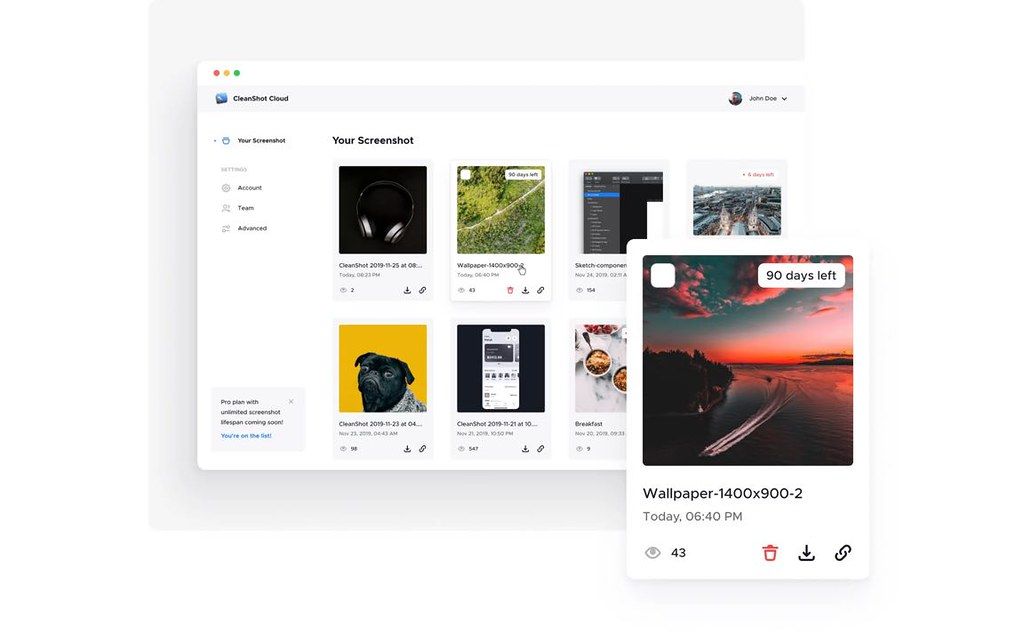
CleanShot Cloud
Upload your captures to our blazing-fast Cloud and instantly get a shareable link.
• Upload & get a link in a single click
• Tag
screenshots
for better organization
• Self destruct control (Pro)
• Custom domain & branding (Pro)
• Team management (Pro)
Scrolling capture
Need to capture something that doesn’t fit on your screen? Maybe you want to save a chat history or a larger chunk of code? We got you covered!
• Capture any scrollable content
• Works in every app
Screen recording
It’s all about making things easier. In a few clicks, record your screen and save it as a video or an optimized GIF file.
• Show your webcam in recordings (NEW)
• Record microphone & macOS audio
• Highlight mouse clicks & keystrokes
• Automatically hide notifications
• Built-in trimming tool
Background tool
Need to create a beautiful social media post? It’s now easier than ever to make your
screenshots
pop with just a few clicks, right inside CleanShot!
• Perfect for social media
• 10 beautiful backgrounds included
• Add your own background
BText recognition
Need to copy text from an image or from a scanned document? CleanShot can do it for you!
• Easily copy non-selectable text
• OCR technology
• Super fast on-device recognition
Pin
screenshots
Keep a reference of anything you need always visible. It will float above all windows.
• Adjust
size
& opacity
• Always on top
Hide icons
Take a
screenshot
or record your screen without icons on your Desktop. You can even hide them permanently so they don’t distract you.
• Hide clutter on your
Editor-checked details
A strong fit for users who regularly create tutorials, product documentation, feedback screenshots and demo recordings. Its post-capture overlay is more efficient than the built-in tool for repeated workflows; occasional users may be satisfied with macOS Screenshot or Shottr. Compatibility and update details were checked against CleanShot’s FAQ, changelog and security page.
Pros
- Combines screenshots, scrolling capture, recording, OCR and annotation in one native Mac tool.
- The Quick Access Overlay suits frequent copy, drag-and-drop and sharing workflows.
- Supports Apple Silicon and receives ongoing compatibility updates for new macOS releases.
- A cloud account is not required for local capture features.
Cons
- Costs extra compared with the built-in macOS screenshot tool.
- Advanced cloud features use an ongoing subscription.
- The large feature set takes time to configure, including shortcuts and permissions.
- Scrolling capture can still be affected by dynamic webpage layouts.
Installation steps
- Installation steps:
- Download CleanShot X from your account or the official site and open the DMG.
- Drag CleanShot X to Applications and launch it.
- Enter the license key or sign in to CleanShot Cloud Pro.
- Grant Screen Recording permission in Privacy & Security; enable microphone access when recording audio.
Uninstallation steps
- Quit CleanShot X and confirm its menu-bar item has closed.
- Move CleanShot X from Applications to the Trash.
- If it is no longer used, remove its Screen Recording and microphone permissions in System Settings.
- Empty the Trash; manage uploaded captures separately in the CleanShot Cloud account.
Common errors and fixes
- Blank capture or no selectable window: re-enable Screen Recording under Privacy & Security, then fully quit and reopen the app.
- No microphone audio: check microphone permission and the recording input selected in CleanShot.
- Shortcuts do not respond: check for conflicts with macOS shortcuts or another capture utility.
- OCR language unavailable: CleanShot notes that some OCR languages require a newer macOS release.
- Misaligned scrolling capture: dynamic pages, fixed overlays and auto-loading content can disrupt stitching; pause page animation first.
What changed in this version
- CleanShot X 4.8.10 was released on July 21, 2026.
- The developer labels it an important security update recommended for all users.
- Capture History performance was improved.
- A focus bug in the “Ask for Name after every capture” dialog on macOS Tahoe was fixed.






Alternatives

Screenshots