Cascadeur
Cascadeur is a standalone 3D software that lets you create keyframe animation, as well as clean up and edit any imported ones...
- M-series ARM-based processor
- macOS 13.3 or later
Description
Cascadeur is a standalone 3D software that lets you create keyframe animation, as well as clean up and edit any imported ones. Thanks to its AI-assisted and physics tools you can dramatically speed up the animation process and get high quality results. It works with .FBX, .DAE and .USD files making it easy to integrate into any animation workflow.
RIG YOUR MODELS EASILY
Drag-and-drop joints of your character with the Quick Rigging Tool to generate the rig automatically. One-click rig standard skeletons from Daz3d, Character Creator, Mixamo, Unreal Engine, Metahuman, Player.me, etc.
MAKE ANY ANIMATION EDITABLE
Animation Unbaking turns any baked animation, where each frame is keyframe, into an editable one. It automatically selects the keyframes and interpolation intervals with the desired precision making the animation ready for editing
HANDY CONTROLLERS FOR FINGERS
Control fingers with intelligent AutoPosing controllers. Dramatically speed up the process of animating hand behaviour and gestures
EASY TO PHYSICS
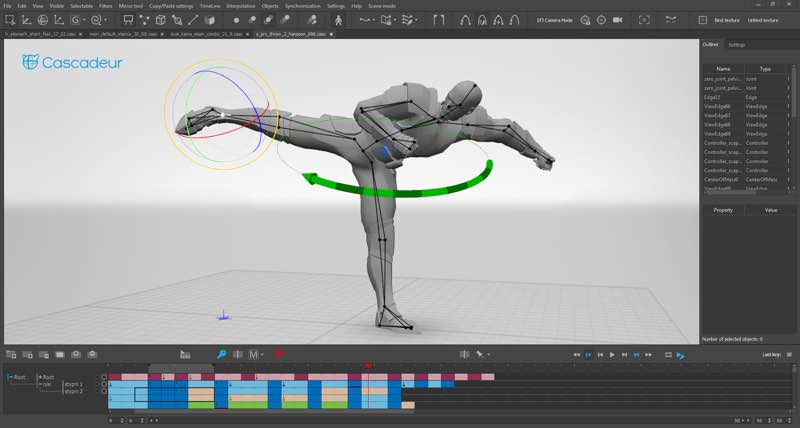
AutoPhysics allows you to achieve realistic and natural motion, while altering your animation as little as possible. The suggested animation is displayed on a green double of your character
ADD LIFE WITH SECONDARY MOTION
Adjust the slider to shake, bounce and overlap them body parts to make your animation come alive. Very useful for idles, action moves, etc.
TURN VIDEOS INTO ANIMATION
Use Video Mocap along with Animation Unbaking and Fulcrum Motion Cleaning to clean up and edit the animation to get a high quality result
COPY/PASTE RETARGETING
Transfer animations between characters with only two clicks. Works for any humanoid characters of different proportions regardless of their skeletal structure
WHAT’S NEW
Version 2026.1:
• Release notes are available here .
REQUIREMENTS
• M-series ARM-based processor
• macOS 13.3 or later
ScreenShots
If you are using Adblocker!! Please support this website by adding us to your whitelist.
Editor-checked details
Recommended for game, previs and indie-animation teams creating or cleaning humanoid/quadruped motion before returning it to Blender, Maya, Unreal or Unity. Use: export the canonical engine skeleton; lock centimetres/up axis/frame rate/T-pose; preserve raw import; Quick Rig/controllers; blocking; AutoPosing; Root Motion; AutoPhysics/penetration cleaning; manual polish; separate animation/scene FBX; target-engine round trip; archive .casc plus sources, preview, manifest and hashes. Prove root motion, foot contact, loops and LiveLink on a short clip first. Compare Blender for free general production, Maya for film/complex rigs, Unreal for real-time delivery and MotionBuilder for mocap cleanup. Physics suggestions do not replace performance judgement.
Pros
- Cascadeur focuses keyframing, physics assistance and AI posing on character motion rather than being a general DCC. AutoPosing, AutoPhysics, ballistic trajectories, centre of mass and fulcrums help reveal imbalance, foot sliding and implausible landings; Animation Unbaking turns per-frame baked motion into a more editable structure. Root Motion and collision cleaning reduce common game-animation rework, Filament improves viewing and rebuilt LiveLink accelerates Unreal iteration. Quick Rig, retargeting and FBX/DAE/USD/GLB connect Blender, Maya, Unreal and Unity. Physics suggestions appear as a comparison double instead of immediately replacing the authored motion.
Cons
- It is not a modeller, sculptor, texture authoring suite, complete rigging DCC, final renderer or game engine; production still depends on other tools. Mac support is M-series/macOS 13.3+ only. Physics and AI are suggestions and do not understand acting, stylised timing, prop weight or direction; animators must review every result. Scale, up-axis, root, T-pose, namespace, Euler and baking problems remain across DCCs despite LiveLink. Complex multi-character timelines, large textures and Filament lighting need more RAM/GPU; 4 GB is only a light minimum. Legacy scenes need rig regeneration for new penetration cleaning, adding upgrade cost.
Installation steps
- Cascadeur 2026.1 for Mac officially requires M-series Apple silicon and macOS 13.3+, not Intel Mac; 4 GB RAM is minimum and 8 GB+ is prudent for long/multi-character scenes. Back up .casc/.csc, FBX/DAE/USD/GLB, textures, reference video/audio, rig notes and export presets. Validate one character first: scale (one Cascadeur unit is one centimetre), Y/Z-up, root bone, T-pose, frame rate, joint names/namespaces, then Quick Rig, AutoPosing, AutoPhysics, Filament viewport and an FBX round trip. Preserve a copy before Fix Scene on legacy files; regenerate the character rig before using 2026.1 Collision Penetration Cleaning on old scenes.
Uninstallation steps
- Before removal, save incremental scene versions and export hand-off FBX files for animation and full scene, plus DAE or USD; render critical motion as video/image-sequence reference. Archive source models, rigs, textures, audio, reference video, selection-group JSON, Python scripts, LiveLink/engine plug-in versions and presets. Record frame rate, units, up axis, root motion, skeleton hierarchy, bake and Euler-filter settings; create a manifest and SHA-256. In Blender/Unreal/Unity inspect first/last frames, foot contacts, root displacement, rotations, scale, materials and loop seams. Confirm account/licence recovery before deleting the app and expendable caches. LiveLink, recent projects and engine references are not source backup.
Common errors and fixes
- Intel Mac cannot install: 2026.1 Mac requires M-series and Rosetta is not a workaround. If collision cleaning is unavailable in an old scene, preserve a copy and regenerate the rig; Fix Scene repairs only some legacy structure. Wrong FBX scale requires centimetre/metre conversion, applied transforms, up axis and global scale. For rotation, bone-length or motion offsets, verify T/model pose, root, hierarchy and namespaces; do not enable Blender Automatic Bone Orientation. On export failure inspect Event Log for duplicate roots/names, hidden tracks, disabled Is Exported or multiple root bones. For jitter/flips compare Euler Filter or DAE/USD; baking keys every frame. For Filament/material trouble simplify lights/textures and verify macOS. Foot sliding and penetration need fulcrum/centre-of-mass, Root Motion and collision-shape checks.
What changed in this version
- moves viewport visualisation to Filament real-time rendering, adds scene lights/look controls and fixes quad-mesh display on macOS. Unreal Engine LiveLink is rebuilt for real-time animation streaming. Root Motion generates a draft from character trajectory and at least start/end keys. Collision Penetration Cleaning analyses and removes intersections; legacy scenes require rig regeneration. Quadruped AutoPosing, Point Constraints, multi-character behaviour and direction-vector scaling improve, with constraints considered by AutoPhysics/Ragdoll. It also adds neck Spline IK, meshy.ai/Auto Rig Pro quick-rig templates, removes texture-size limits, and fixes constraint-scene import, Inbetweening and a macOS option-button issue.






Alternatives

Screenshots