Adobe Prelude CC 2021
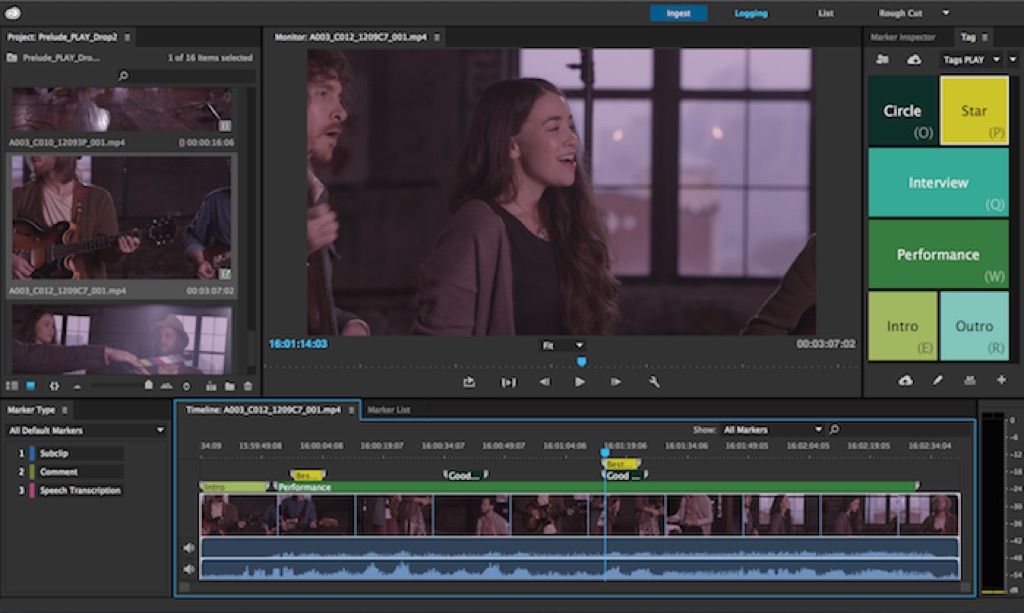
Adobe Prelude CC software streamlines your production tasks. Ingest nearly any file-based format and begin logging immediately, creating...
Description
Adobe Prelude CC software streamlines your production tasks. Ingest nearly any file-based format and begin logging immediately, creating searchable markers and other temporal metadata that flow through post-production, so you can work faster and stay organized. Adobe Prelude is included in Production Premium, Master Collection, and Creative Cloud.
Ingest and log footage quickly and easily – Get to work faster with easy ingest of file-based footage, including the ability to transcode to nearly any file-based format. Tag footage with searchable temporal metadata that is carried through your workflow.
Integrate into virtually any workflow – Connect directly to existing media asset management systems and workflows with Prelude, an open platform that supports customized integration with third-party technologies.* Create custom markers to capture data specific to your production and view it in Adobe Premiere® Pro software.
WHAT’S NEW
Version 10.1:
• Security fixes.
REQUIREMENTS
• Intel, 64-bit processor
• macOS 10.14 or later
ScreenShots
:
If you are using Adblocker!! Please support this website by adding us to your whitelist. Ads are what helps us bring you premium content! Or read this to know how you can support us. Thank you!
Size
– 1.44GB
Previous Versions
Editor-checked details
Recommend it only to open, audit and migrate existing Prelude 10.1 work, or temporarily sustain a proven ingest process in a frozen isolated environment—not as the sole entry point for a new production. Adobe recommends moving basic ingest/logging/markers into Premiere Pro and advanced transcoding into Media Encoder. Compare Hedge for professional checksum offload, EditReady for normalization/batch transcoding, and Final Cut Pro or DaVinci Resolve Studio for full editing. Pilot migration with a representative project containing spanned clips, multichannel audio, unusual frame rates, subclips, Rough Cuts, custom XMP and proxies. Compare clip count, checksums, duration, timecode, channels, markers, naming and relink results between Prelude and the target. Define card/volume IDs, naming, dual verified copies, read-only originals, proxy rules, color/audio metadata, retry handling, untrusted-media isolation and daily logs. A “copy complete” message never replaces an independent hash manifest plus sampled playback.
Pros
- The interface prioritizes ingest and logging rather than editing effects, making it approachable for assistant editors; Ingest can copy, verify, rename and transcode together; markers, subclips, Rough Cuts and XMP metadata travel with media into Premiere Pro; keyboard-oriented batch logging suits interviews, documentary, news and multicamera triage; metadata templates and naming standards improve search and handoff; direct Adobe workflow with Premiere Pro and Media Encoder; selects, notes and rough assemblies do not alter source pictures.
Cons
- The discontinued product has no official technical support and is unsuitable as a new mission-critical long-term workflow. Version 10.1 is Intel-era software; Apple silicon depends on Rosetta 2, while modern macOS, codec, camera-format and permission changes can cause compatibility gaps. Future security remediation cannot be relied upon, increasing risk with unknown media. It is not a full editor, grading system or DAM, so advanced work moves elsewhere. XMP/sidecar/project metadata locations are easy to confuse and incomplete copies lose markers. Full card structures, cache, proxies and transcodes consume substantial storage. Collaboration relies on conventions/shared storage rather than modern cloud review and governance. Rough Cut/custom-field migration requires manual verification.
Installation steps
- Prelude 10.1 is an Intel-era 64-bit preproduction tool. It runs directly on Intel Macs; treat M1/M2/M3/M4 as a Rosetta 2 translation workflow and validate with real camera media—it is not a native Apple-silicon app. Use a period-appropriate Catalina 10.15 or Big Sur 11 environment, 16 GB RAM (32 GB for batch transcodes), 4 GB+ VRAM, a 1920×1080 display, fast internal SSD cache and separate high-speed source/copy storage. Deploy from a controlled source, then configure Media Cache, Ingest, file renaming, metadata, markers and transcode presets. Preserve full camera-card structure and follow 3-2-1: make at least two checksum-verified copies before ingesting from a copy; a Prelude project/cache is not a camera-original backup. With short media, test copy/transfer, checksums, rename, transcode, Rough Cut, XMP markers, audio channels, timecode and Premiere Pro/Media Encoder handoff. Confirm frame rate, color, proxies and metadata before a batch.
Uninstallation steps
- Before uninstalling, stop every Ingest/Transcode/Transfer queue and verify at least two independent, checksum-recorded copies of each camera card. Preserve Prelude projects, Rough Cuts, subclips, XMP/sidecars, markers, comments, metadata templates, ingest/transcode/rename presets, keyboard shortcuts, Media Encoder presets and logs. For workflows that do not migrate cleanly, also export reference XML/projects, low-bitrate review media and a report with burned-in timecode/clip names. Before clearing cache, prove it is not the only proxy or transcode copy. Spot-check size, duration, start/end timecode, audio channels, frame rate, checksum and Premiere relinking. Prelude is discontinued and has no technical support, so rehearse migration before removal: validate ingest/markers in Premiere Pro and transcoding in Media Encoder. Retain camera originals, checksum manifests, projects and preset archives; delete only reproducible cache and record exactly what was removed.
Common errors and fixes
- If Apple silicon will not launch or is abnormally slow, confirm Rosetta 2, reset damaged Preferences/Media Cache and test short media in a new user account; do not treat 10.1 as native ARM. If ingest loses files or breaks card structure, stop and make a new verified full-directory copy from the read-only card. Never copy only visible video files—spanned clips and AVCHD/P2/XDCAM structures must remain intact. For checksum/copy failure, change reader, cable, power and destination; inspect APFS, permissions and free space, preserve the failure log, and never replace hash verification with a few seconds of playback. For offline media/Premiere relink failure, restore volume name, relative folders, clip names, timecode and sidecars; do not rename later in Finder and relink through Media Browser. Missing markers/metadata require checking whether data writes to clip XMP, sidecar or project and verifying it in Premiere. For A/V sync/channel faults, inspect variable frame rate, source timecode, channel mapping, sample rate and preset with a small batch. Version 10.1 fixed input-validation/buffer-overrun security issues, but the unsupported discontinued app is not a security boundary; isolate untrusted media copies.
What changed in this version
- Adobe Prelude 10.1 (July 2021) is a security maintenance release that addresses improper input validation and access past the end of buffers in 10.0 and earlier, issues that could allow arbitrary code execution in the current-user context. It continues camera-media ingest, verified copying, renaming, transcoding, thumbnail/list filtering, subclips, Rough Cuts, speech/comment/Flash Cue and other markers, XMP metadata, team logging and handoff to Premiere Pro/Media Encoder. Adobe subsequently discontinued Prelude; it is no longer offered on Adobe.com and has no technical support. Existing users can continue running it, but new workflows need a migration plan. Version 10.1 is most useful for reading and handing off legacy Prelude work, not for building a new long-lived media-asset platform.






Alternatives






Screenshots