Adobe Premiere Pro 2026
Adobe Premiere Pro CC lets you edit video faster than ever before. Dozens of brand-new features include a redesigned timeline, improved...
- Apple Silicon
- macOS 12.0 or later
Description
Adobe Premiere Pro lets you edit video faster than ever before. Dozens of brand-new features include a redesigned timeline, improved media management, and streamlined color grading. And it’s just the beginning: You’ll get access to new features the moment they’re released. Your entire creative world, together in one place. Only in Creative Cloud.
Premiere with AI. Faster, smarter, and easier than ever.
Quickly mask anything across every frame with Object Mask in Premiere (beta). Magically extend clips for the perfect cut. Search hours of footage in seconds. Auto-translate your captions. Speed through edits with the latest in Premiere.
Craft the perfect story.
Use industry-standard video editing tools and timesaving AI features to get to the right cut fast. Hone your narrative with three-point editing. Try Text-Based Editing to refine, reorder, and trim clips just like you’d edit a text doc. And quickly search your footage with AI-powered Media Intelligence to identify objects, locations, framing, spoken words, sound effects, visually similar clips, and other details.
Balance color and set the tone.
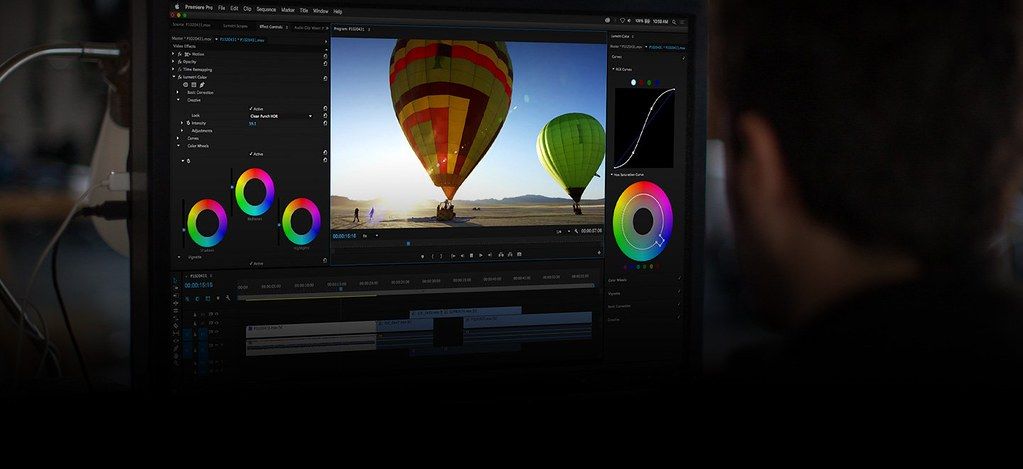
Get the right look for your video with powerful color correction and grading tools. Drop footage from nearly any camera into your timeline instantly and transform your raw and log footage on import without LUTs. Balance color fast with AI, use professional color wheels and curve controls, and check your results with built-in video scopes.
Mix audio for a memorable soundtrack.
Reduce noise and enhance dialogue with pro audio tools, and add advanced effects as you master sound design. Browse music tracks, use AI to auto-fit them to your clips, and license them — all within Premiere.
Add eye-catching effects.
Choose from hundreds of cinematic effects and transitions — or get started with professionally designed templates, then adjust them to create looks that are all your own. And with redesigned shape masks in Premiere (beta), you can easily tackle precise effect
Editor-checked details
Recommended for professional editors, content teams and organizations needing industry-standard interchange, cross-platform collaboration, Adobe Dynamic Link, complex captions/multicam and multi-format delivery. Compare Final Cut Pro for a fast Mac-only magnetic timeline, DaVinci Resolve for color, Fairlight, Fusion and free-edition value, or CapCut for social templates and rapid short-form work. Before production, run one real project through ingest, proxies, Dynamic Link, color, captions, review and final delivery, and retain a rollback build. Sourced from Adobe's v26.0 requirements, features, known issues and official troubleshooting
Pros
- Widely adopted with strong Mac/Windows collaboration and format coverage; complete editing, captions, color, audio, proxy, multicam and delivery workflows; deep integration with After Effects, Audition, Photoshop, Media Encoder, Frame.io and Creative Cloud; mature team, shared-project and plug-in ecosystem.
Cons
- Ongoing subscription cost; complex interactions among app, Creative Cloud, plug-ins, OS and hardware can disrupt production after upgrades; high-resolution long-GOP, denoise and effects-heavy timelines are demanding; cache, proxies, previews and autosaves require active management; some AI/cloud functions involve uploads, connectivity, credits or regional limits.
Installation steps
- Premiere Pro 26.0 requires macOS Sonoma 14 or later. Intel Macs need an 8th-generation or newer AVX2 CPU; Apple silicon is supported, with M1 Pro/Max/Ultra or newer recommended for HD/4K work. The 8 GB RAM and 8 GB installation minimum suits only basic HD; use 16 GB+ unified memory for 4K, a fast internal SSD for app/cache, and a separate high-speed media drive. Activation requires an Adobe ID, internet and a valid license.
- After Creative Cloud installation, assign explicit locations for projects, media, previews, autosaves and Media Cache. Set sequence frame rate, color space, audio sample rate and hardware decoding. Test real camera media, GPU acceleration, plug-ins, fonts, LUTs, control surfaces and Media Encoder before production. Duplicate old projects and retain the current Premiere build before upgrading.
Uninstallation steps
- Back up .prproj files, Productions, local Team Project copies, autosaves, proxies, captions, Motion Graphics templates, shortcuts, workspaces, export presets, LUTs, plug-in inventory and fonts. Project files do not contain all source media; verify linked video/audio, Dynamic Link assets and external drives. Use Project Manager when a collected handoff is required.
- Uninstall Premiere through Creative Cloud rather than deleting the app bundle. Export custom settings before deciding whether to remove preferences. Media Encoder, After Effects, plug-ins and shared Media Cache are separate components and should not be deleted blindly. For troubleshooting, retain the previous app and project copies until the replacement opens, plays and exports correctly.
Common errors and fixes
- If launch hangs at permissions, allow Desktop, Documents and Downloads under Privacy & Security > Files and Folders, then relaunch. If the splash screen stops at a plug-in, note its name and temporarily move it out of `/Library/Application Support/Adobe/Common/Plug-ins/7.0/MediaCore`, then install a compatible update.
- For dropped frames or slow export, verify sequence frame rate and color management, use proxies, lower playback resolution, clear Media Cache, and test hardware decode/encode and GPU. Transcode difficult H.264/HEVC long-GOP footage to an editing codec. Avoid crowding OS, cache and media onto one nearly full disk.
- Preserve folder structure and use Link Media for offline assets. Version 26.0 could save autosaves to the wrong location when multiple projects from different parents were open; isolate important projects and verify the autosave path (fixed later in 26.2). Duplicate projects before major upgrades and validate every plug-in and Dynamic Link.
What changed in this version
- Premiere Pro 26.0 (January 2026) adds a searchable spreadsheet-style Sequence Index, smarter cross-drive/platform relinking, Global Audio Mute, marker search and export Content Credentials; AI Object Masking and redesigned shape/pen masks; Firefly Boards transfer, GPU-accelerated thumbnails, OpenTimelineIO import/export and R3D NE support. The macOS minimum moves to Sonoma 14.
Related apps






Alternatives

Screenshots