Adobe Media Encoder 2026
Adobe Media Encoder software automates the process of creating multiple encoded versions of source files, Adobe Premiere Pro sequences...
- Apple Silicon
- macOS 12.0 or later
Description
Adobe Media Encoder software automates the process of creating multiple encoded versions of source files, Adobe Premiere Pro sequences, and Adobe After Effects compositions. An intuitive interface, background encoding, and convenient presets help you quickly output for virtually any screen. Adobe Media Encoder is included in Adobe Premiere Pro, After Effects, and Adobe Prelude software.
Features
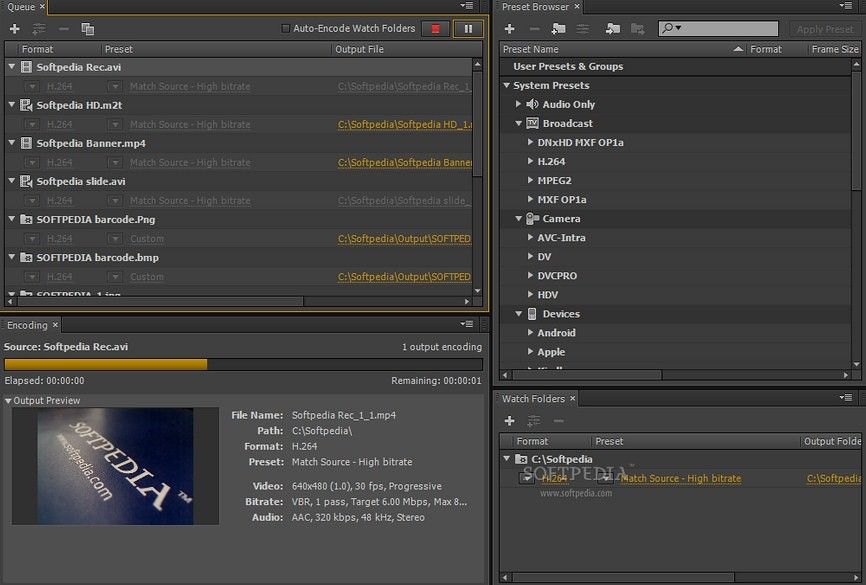
• Preset Browser – Access commonly used settings immediately using the Preset Browser. Organize presets by category, set favorites, and customize your most frequently used encoding presets.
• Fast, sure output to virtually any screen – Quickly and easily output your work for virtually any video or device format. Customize, set, and organize your favorite presets in the Preset Browser for fast export and batch encoding in the background.
• Performance and stability – Use Watch Folders to quickly encode video from a single source to multiple output formats.
• ARRIRAW, RED EPIC, and RED Scarlet-X support – Import your ARRIRAW, 5K RED EPIC®, and RED Scarlet-X footage directly into Adobe Media Encoder CS6 for transcoding to HD and SD formats.
WHAT’S NEW
Version 26.0.0:
• Media intelligence in Media Encoder: Use AI-powered Media Intelligence in Media Encoder to analyze videos, allowing Premiere to search them instantly after import.
• Windows ARM native support: Media Encoder now runs natively on Windows ARM systems, delivering improved performance and efficiency for ARM-based devices.
• Job count in the queue panel: Quickly check job statuses in the Queue panel with the new UI indicator, which shows the total number of jobs and provides a breakdown by status on hover.
REQUIREMENTS
• Apple Silicon
• macOS 12.0 or later
ScreenShots
If you are using Adblocker!! Please support this website by adding us to your whitelist. Ads are what helps us bring you premium content! Or read this to know how you can support us. Thank you!
•
Size
– 2.16GB
Previous
Editor-checked details
Recommended for Premiere Pro/After Effects users, editorial teams creating proxies and multi-platform deliveries, and studios automating transcodes with Watch Folders. Final Cut workflows should compare Compressor; HandBrake is a strong free general transcoder; FFworks offers a graphical FFmpeg workflow; Permute is simpler for everyday drag-and-drop conversions. A successful queue status is not delivery QA: spot-check the beginning, end and random positions, plus audio, captions, color, duration and target-device playback. This review is sourced from Adobe's v26 requirements, features, fixes and known issues.
Pros
- Deep queue integration with Premiere Pro, After Effects, Audition and Photoshop; batch encoding continues while editors work; presets, Watch Folders, proxies, captions and multi-platform deliverables suit production pipelines; broad broadcast, cinema, social and mezzanine format support; v26 pre-analysis reduces repeated analysis in Premiere.
Cons
- Requires an Adobe subscription and account; it is not an editor and many benefits depend on other Adobe apps; high-resolution, parallel, scaling and denoise jobs are demanding on CPU, GPU, memory and storage; Dynamic Link, plug-ins and presets are version-sensitive; fast hardware output still needs device/player compatibility checks; poorly configured Watch Folder or network permissions can miss, duplicate or fail jobs.
Installation steps
- Media Encoder 26.0 requires macOS Sonoma 14 or later, at least 8 GB RAM and 8 GB installation space. Apple silicon systems benefit from 16 GB or more unified memory; Intel Macs need a 6th-generation or newer AVX2-capable CPU. Install through Creative Cloud and sign in with an Adobe account. Keep the application and media cache on a fast internal SSD, with large source and output media on another reliable high-speed drive. Configure cache location, parallel encodes, output paths and notifications before sending Premiere Pro or After Effects queues. Keep Premiere, After Effects and Media Encoder on the same major version, then validate Dynamic Link, plug-ins, LUTs, fonts, captions, color management and hardware encoding with a representative job. Use a stable, writable local or reliably mounted Watch Folder and never drop partially copied files into it.
Uninstallation steps
- Before uninstalling, export or document custom presets, Watch Folders, queues, shortcuts, LUTs, plug-ins, fonts and output paths, and back up projects, source media, captions and deliverables. The `.prmi` sidecars created by v26 media analysis can be regenerated, but retaining them avoids repeat analysis in Premiere. Uninstall through Creative Cloud rather than deleting the application bundle. For a troubleshooting reinstall, preserve presets and the prior build until representative jobs encode, play and seek correctly, then clear Media Cache, failed queues and obsolete components. Shared caches, Premiere, After Effects and third-party plug-ins are separate and are not all removed with Media Encoder.
Common errors and fixes
- If a queue remains waiting, Dynamic Link is offline or a comp does not update, first align the major versions of Premiere, After Effects and Media Encoder, reopen the source project, and temporarily disable incompatible plug-ins, fonts or network media. For failed, corrupted or unseekable H.264/HEVC output, test a built-in preset, disable hardware decoding/encoding where available, or render a ProRes mezzanine first; some Software Only options are unavailable on Apple silicon. Native Sony FX6 card folders used with Copy Media may hang or fail to copy: import without Copy Media or move the MXF files outside the Sony folder structure. On M1 systems with out-of-memory errors, reduce parallel jobs, close other Adobe apps and review Adobe memory allocation. If a Watch Folder does not fire, check permissions, mount state, incomplete copies, preset validity and whether output recursively returns to the watched folder. Before delivery verify duration, frame rate, audio channels, captions, HDR/color, timecode and seeking; calculate SHA-256 for critical files.
What changed in this version
- Media Encoder 26.0 (January 2026) adds Media Intelligence pre-analysis of video and audio before editing. It writes `.prmi` sidecars beside the source media so Premiere Pro can reuse visual object/scene, audio-characteristic and speech-transcript analysis instead of processing it again. The Queue panel now shows real-time total and completed job counts with details. Version 26.0 also fixes Copy files to destination failing to create a subfolder and playback problems in some ARRIRAW HDE media, including incorrect duration and black frames.






Alternatives



Screenshots