Affinity
An app that adapts to you, not the other way around. Affinity comes with built-in Vector, Pixel, and Layout studios, but...
- Intel, 64-bit processor
- macOS 10.15 or later
Description
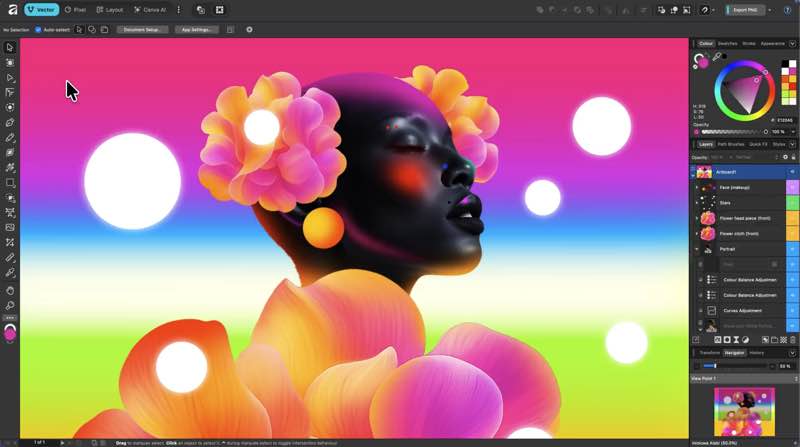
An app that adapts to you, not the other way around. Affinity comes with built-in Vector, Pixel, and Layout studios, but you’re not locked in. Rearrange panels and mix and match your favorite tools to build custom studios. You can save multiple setups, switch between them in a click, and even share with others or download theirs.
It’s customization that flexes to your workflow.
Powerful tools. Easy to learn.
Learn by doing with step-by-step lessons, templates, and real-world examples.
Enrich your designs with tailored content
Make your designs stand out with world-class photos, graphics, videos, audio, fonts, charts, and more. Explore our vast content libraries featuring top brands like Disney, Artlist, and pocstock.
Design with others
Canva makes collaboration easy. Tag teammates in comments and assign tasks on Docs, Presentations, Whiteboards, and more. Canva empowers businesses of all
size
s to stay organized and reach your goals faster.
Design and print in one place
Turn your memories into photo albums, your designs into T-shirts, and your branding into business cards, flyers or invites. Get all your printing done right here with free delivery to your doorstep.
Plans that get down to business
Empower your whole team or business to design together with one of our workplace plans
AI-powered efficiency
Leverage AI to create on-brand copy, templates and video-editing.
Bring your brand in house
Set up Brand Kits and templates for your team to design with.
Beautiful approval flows
Easily control individual permissions, assign tasks and share your work.
WHAT’S NEW
Version 3.2.2:
• Release notes were unavailable when this listing was updated.
REQUIREMENTS
• Intel, 64-bit processor
• macOS 10.15 or later
ScreenShots
If you are using Adblocker!! Please support this website by adding us to your whitelist. Ads are what helps us bring you premium content! Or read this to know how you can support us. Thank you!
•
Size
– 1.01GB
Editor-checked details
Recommended for freelancers, students and small teams needing photo, vector and print layout without multiple subscriptions. Compare Photoshop, Illustrator and InDesign when exact PSD/AI/INDD interchange, mature plug-ins or large-team standards are mandatory; compare GIMP for open-source raster work. Test real client files, fonts, smart objects, PDFs and prepress output before migrating. Verified from Canva/Affinity announcements, privacy statements, support material and release notes
Pros
- Free, with professional vector, photo and layout tools in one document/workspace; local files, non-destructive editing, GPU acceleration and customizable Studios; legacy Affinity support plus Canva, Capture One and DaVinci Resolve workflows.
Cons
- A Canva account is required for activation; optional AI needs a paid Canva plan and uploads; V3-saved files should not be assumed to reopen fully in V1/V2; Adobe plug-ins, scripts, team standards and interchange still differ; large-file stability should be tested.
Installation steps
- Affinity 3 combines the former Designer, Photo and Publisher vector, image and layout tools in one free app for macOS 10.15+, Intel and Apple silicon. A free Canva account is required for download/initial activation; local work can then be offline, while optional Canva AI features require a paid plan and internet.
- Duplicate V1/V2 documents before first opening and save the V3 copy under a new name. For print work, verify fonts, linked images, color profiles and bleed with a test PDF.
Uninstallation steps
- Before uninstalling, back up .af documents, custom Studios, brushes, macros, assets, presets, fonts and linked media, and finish Canva/cloud exports. Quit Affinity and move it from Applications to Trash.
- Export resources before resetting settings; never remove the only old-version document or project asset. Keep V1/V2 apps and untouched copies if legacy collaboration is still required.
Common errors and fixes
- Canva activation fails: verify system time, network, firewall and browser callback; if login succeeds but the app does not continue, quit both and retry.
- Old file crashes: update Affinity, duplicate the file and isolate fonts, links and embedded objects. 3.2.2 fixes several legacy-file crashes, but preserve the original.
- Canvas lag/crashes: test with Metal acceleration off, reduce live filters/history, split complex documents and keep ample temporary disk space.
- PDF/EPUB export issues: inspect missing fonts, transparency, color space, pinned objects and pages; export smaller ranges to isolate. Review privacy before cloud/AI uploads. Canva states local Affinity work is not used to train AI.
What changed in this version
- Affinity 3.2.2 (build 4557, June 2026) is a stability release fixing crashes during EPUB export, Add Pages from File, conversion of text frames with pinned objects, opening pre-2.6 files and closing documents with image bullets, plus export-preset, caption shortcut, chromatic-aberration, brush, macro and UI issues.






Alternatives

Screenshots