Virtual Driving School

Virtual Driving School

· v2026.06.09 Free

Stop wasting paid lesson time on the basics. Virtual Driving School is a serious, skills-first simulator that teaches real-world...

 System Requirements
  • Intel, 64-bit processor
  • macOS 12.0 or later

Description

Stop wasting paid lesson time on the basics. Virtual Driving School is a serious, skills-first simulator that teaches real-world manoeuvres and traffic systems, so you show up to your first lesson already road-ready.

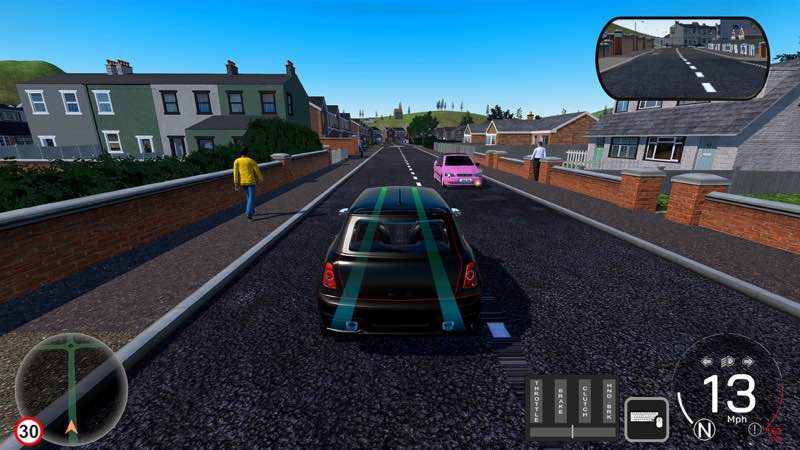
Drill fundamentals in quick 1–3 minute scenarios, then put them to use in practice drives, quizzes, and career modes like delivery driver, and repeat until it sticks. Then test your skills on city streets, rural roads, and motorways, in sun, rain, or fog.


VDS is built to get you ahead fast: fewer hours on fundamentals, more time perfecting your driving.


Why you’ll learn faster (and spend less)

• Targeted lessons cover the fundamentals in short bursts (1–3 mins): Gears, clutch control, moving off, lane choice, merges, roundabouts, parking, emergency stops, and more.

• Practice Drives: Tackle set routes packed with live hazards — pedestrians, parked obstacles, unpredictable traffic — with one goal: get to the end cleanly.

• Quizzes: Drive and think. Routes pause to test your road knowledge with progressively harder questions and a final score at the end.

• Career Modes: Step into the shoes of a delivery driver (points-based) or taxi driver (5-star rating). Hit your destinations on time, drive cleanly, and watch your score climb — or tank.

• Unlimited retries: Master tricky manoeuvres without a meter running.

• Realistic traffic & signage: Pedestrians, temporary roadworks, box junctions, crossings, level crossings, lane control, motorway incidents, different times of day.

• Hazard Avoidance: Train for the unexpected — cars pulling out from behind lorries, reckless overtakes, sudden stops, dangerous drivers, and more.

• Right‑ and Left‑Hand Drive options (mirrors, lane flow, junction priority, etc.).


Wheel & control support

• Steering wheels & pedals: Logitech, Fanatec, Moza, and many more.

• Drive your way: Pick from preset modes – Arcade, Intermediate and Expert – or fully customise the controls to match exactly how you want to drive. Toggle autom


✓ Checked against source material

Editor-checked details

Editor: macv.net Editorial Team · Last reviewed: 2026-08-07
macOSOfficial: OSX 10.8+, dual-core 2.0 GHz, 4 GB RAM, any GPU, 2 GB; recommended 8 GB/good 3D card. Site channel requires Intel 64-bit/macOS 12+, so use macOS 12.
Apple SiliconUnknown. Neither the checked official Mac processor line nor the site channel explicitly supports Apple Silicon.
Intel MacCompatible
Why we recommend it

Recommended before real lessons for learning UK/US-style traffic logic or repeatedly practicing clutch, roundabouts, parking and hazard perception. Begin on keyboard/controller with Arcade automatic and finish fundamentals; only then connect wheel/pedals and move one step at a time through Intermediate, manual and Expert. Classify test penalties as observation, signals, speed, position or control, then repeat the matching micro-lesson. Save separate left/right-hand profiles, and add rain/fog only after stable dry driving. Safe order: dual backup; date/SHA-256; keyboard lessons; mapping/calibration; Practice Drive; quiz; Career; Cloud; old save.

Pros

  • Lessons split moving off, gears, clutch, hills, junctions, roundabouts, parking and emergency stops into one-to-three-minute units with unlimited retries, making weak skills easier to isolate than immediate open-road play. Practice Drives combine pedestrians, parked obstacles and unpredictable traffic, while quizzes test rule knowledge during driving. Point-based delivery, five-star taxi and bus routes provide longer goals. Left/right-hand modes adjust mirrors, traffic flow and priority for different regions. Weather, time, wet/icy grip change stopping distance, with hazards such as hidden pull-outs, reckless overtakes and sudden stops. Keyboard, controller, wheels/pedals, manual shifting, VR and multiple cameras offer broad control options.

Cons

  • This supplements driver training; it does not replace local schools, instructors or legal tests, and signs, priority and standards must follow local law. A simulator cannot reproduce real-car visibility pressure, body acceleration, road feel or public-road risk. Wheel brand support does not mean every model has macOS drivers, firmware tools or force feedback, so verify exact hardware before purchase. VR and up-to-five displays need specific hardware, with NVIDIA Surround generally not a Mac path. The official Mac table is broad (“Any/Good 3D Card”) while the channel raises the floor to macOS 12, so compatibility data is inconsistent. Rule-focused training may feel serious/repetitive to players wanting racing speed, tuning or open-world entertainment.

Installation steps

  1. This page covers Virtual Driving School 2026.06.09. The official Mac table lists OSX 10.8+, dual-core 2.0 GHz, 4 GB RAM, any graphics and 2 GB, recommending 8 GB and a good 3D card. The site channel requires Intel 64-bit and macOS 12+, so use the stricter macOS 12 floor. Back up lessons, quizzes, driving tests, delivery/taxi/bus careers, vehicles, scores, 18 achievements and wheel/pedal mappings, then record the dated build/SHA-256. Calibrate keyboard/controller or wheel first, then complete short lessons for moving off, gears/clutch, junctions, roundabouts, parking and emergency stops, followed by one Practice Drive and save/load.

Uninstallation steps

  1. Before uninstalling, finish the active route, return to lessons/garage and wait for score/Steam Cloud saving. Do not force-quit during quiz results, driving-test judgment, wheel calibration or career delivery. Back up local/cloud separately, retaining 30+ lesson progress, quiz scores, career ratings, vehicles, left/right-hand drive, Arcade/Intermediate/Expert profiles and the date/SHA-256. Reinstall with cloud and peripherals off, complete/reload moving-off on keyboard, then reconnect wheel, pedals, shifter and VR one at a time. Calibrate before restoring old saves. Compare lesson count, last route, stars/points and control maps before enabling cloud.

Common errors and fixes

  1. If wheel/pedals are not detected, first prove the game works on keyboard, connect only one device set, confirm macOS sees its inputs, then recalibrate axes, dead zones, clutch and steering angle in game. A listed brand does not guarantee every Mac model’s firmware or force feedback. If the car will not move, check handbrake, clutch, gear and stall; start with Arcade/automatic and add manual controls gradually. For test penalties, separate lane, yielding, speed, observation and signal errors, then repeat the matching 1–3 minute lesson. Increase stopping distance in rain/fog/ice. After left/right-hand switching, recheck mirrors, lane flow and junction priority. Reduce traffic, weather, mirrors and resolution for stutter. VR/multi-display needs individual hardware checks; five-display NVIDIA Surround is generally not a Mac path.

What changed in this version

  1. The site’s dated build is 2026.06.09. A public build record confirms an update and changed files on June 9, 2026, but exposes no verifiable itemized release notes. Vehicle, lesson, peripheral, physics or performance fixes are therefore not invented, and higher versions are not disclosed. Verifiable scope includes 30+ one-to-three-minute lessons, Practice Drives, progressive quizzes, driving tests, delivery/taxi/bus Careers, city/rural/motorway driving, day/night/rain/fog and wet/icy grip, left/right-hand drive, Logitech/Fanatec/Moza wheels, Arcade/Intermediate/Expert, VR, Steam Cloud and 18 achievements. Acceptance covers date display, lessons, route, quiz, control mappings and saves.

File verification

Security scanBack up lessons, quiz/test scores, Careers and control profiles; record 2026.06.09/SHA-256; validate keyboard first, then reconnect peripherals individually. View report

Alternatives

Screenshots

Virtual Driving School 截图