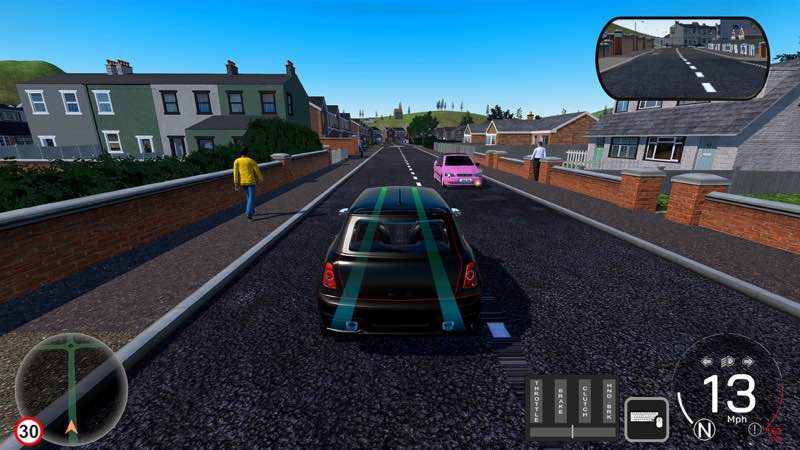
Virtual Driving School
Stop wasting paid lesson time on the basics. Virtual Driving School is a serious, skills-first simulator that teaches real-world...
- Intel, 64-bit processor
- macOS 12.0 or later
軟體介紹
Stop wasting paid lesson time on the basics. Virtual Driving School is a serious, skills-first simulator that teaches real-world manoeuvres and traffic systems, so you show up to your first lesson already road-ready.
Drill fundamentals in quick 1–3 minute scenarios, then put them to use in practice drives, quizzes, and career modes like delivery driver, and repeat until it sticks. Then test your skills on city streets, rural roads, and motorways, in sun, rain, or fog.
VDS is built to get you ahead fast: fewer hours on fundamentals, more time perfecting your driving.
Why you’ll learn faster (and spend less)
• Targeted lessons cover the fundamentals in short bursts (1–3 mins): Gears, clutch control, moving off, lane choice, merges, roundabouts, parking, emergency stops, and more.
• Practice Drives: Tackle set routes packed with live hazards — pedestrians, parked obstacles, unpredictable traffic — with one goal: get to the end cleanly.
• Quizzes: Drive and think. Routes pause to test your road knowledge with progressively harder questions and a final score at the end.
• Career Modes: Step into the shoes of a delivery driver (points-based) or taxi driver (5-star rating). Hit your destinations on time, drive cleanly, and watch your score climb — or tank.
• Unlimited retries: Master tricky manoeuvres without a meter running.
• Realistic traffic & signage: Pedestrians, temporary roadworks, box junctions, crossings, level crossings, lane control, motorway incidents, different times of day.
• Hazard Avoidance: Train for the unexpected — cars pulling out from behind lorries, reckless overtakes, sudden stops, dangerous drivers, and more.
• Right‑ and Left‑Hand Drive options (mirrors, lane flow, junction priority, etc.).
Wheel & control support
• Steering wheels & pedals: Logitech, Fanatec, Moza, and many more.
• Drive your way: Pick from preset modes – Arcade, Intermediate and Expert – or fully customise the controls to match exactly how you want to drive. Toggle autom




截圖預覽