Virtual Driving School
Stop wasting paid lesson time on the basics. Virtual Driving School is a serious, skills-first simulator that teaches real-world...
- Intel, 64-bit processor
- macOS 12.0 or later
概要
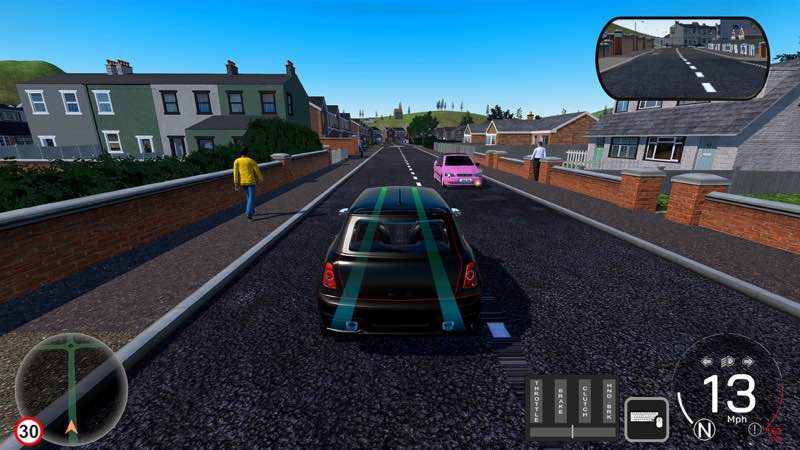
Stop wasting paid lesson time on the basics. Virtual Driving School is a serious, skills-first simulator that teaches real-world manoeuvres and traffic systems, so you show up to your first lesson already road-ready.
Drill fundamentals in quick 1–3 minute scenarios, then put them to use in practice drives, quizzes, and career modes like delivery driver, and repeat until it sticks. Then test your skills on city streets, rural roads, and motorways, in sun, rain, or fog.
VDS is built to get you ahead fast: fewer hours on fundamentals, more time perfecting your driving.
Why you’ll learn faster (and spend less)
• Targeted lessons cover the fundamentals in short bursts (1–3 mins): Gears, clutch control, moving off, lane choice, merges, roundabouts, parking, emergency stops, and more.
• Practice Drives: Tackle set routes packed with live hazards — pedestrians, parked obstacles, unpredictable traffic — with one goal: get to the end cleanly.
• Quizzes: Drive and think. Routes pause to test your road knowledge with progressively harder questions and a final score at the end.
• Career Modes: Step into the shoes of a delivery driver (points-based) or taxi driver (5-star rating). Hit your destinations on time, drive cleanly, and watch your score climb — or tank.
• Unlimited retries: Master tricky manoeuvres without a meter running.
• Realistic traffic & signage: Pedestrians, temporary roadworks, box junctions, crossings, level crossings, lane control, motorway incidents, different times of day.
• Hazard Avoidance: Train for the unexpected — cars pulling out from behind lorries, reckless overtakes, sudden stops, dangerous drivers, and more.
• Right‑ and Left‑Hand Drive options (mirrors, lane flow, junction priority, etc.).
Wheel & control support
• Steering wheels & pedals: Logitech, Fanatec, Moza, and many more.
• Drive your way: Pick from preset modes – Arcade, Intermediate and Expert – or fully customise the controls to match exactly how you want to drive. Toggle autom
編集部確認情報
Real Lesson 前の UK/US Traffic Logic、Clutch、Roundabout、Parking、Hazard Perception 反復に推奨。最初は Keyboard/Controller と Arcade Automatic で Basics を完了後、Wheel/Pedal を接続し Intermediate→Manual→Expert を 1 段階ずつ追加。Test Penalty を Observation、Signal、Speed、Position、Control に分類し該当 Micro Lesson を再試行。Left/Right Profile を別保存し Rain/Fog は Dry 安定後。安全順序は Backup→Date/SHA-256→Keyboard Lesson→Calibration→Practice→Quiz→Career→Cloud→Old Save です。
長所
- Moving Off、Gear、Clutch、Hill、Junction、Roundabout、Parking、Emergency Stop を 1–3 Minute Unit と Unlimited Retry に分け弱点を特定できます。Practice Drive は Pedestrian、Parked Obstacle、Unpredictable Traffic、Quiz は走行中の Rule を扱います。Delivery Point、Taxi 5-star、Bus Route が長期 Goal。Left/Right Drive は Mirror/Lane/Priority を変更。Weather、Time、Wet/Ice Grip が Stopping Distance を変え、Hidden Pull-out、Overtake、Sudden Stop も練習。Keyboard、Controller、Wheel/Pedal、Manual、VR、Multiple Camera に対応します。
短所
- Local Driving School/Instructor/Legal Test の代替ではなく Signs/Priority/Standard は現地法に従います。Simulator は Real-car Visibility Pressure、Body Acceleration、Road Feel、Public Risk を再現できません。Wheel Brand 対応でも全 Model の macOS Driver/Firmware/Force Feedback は保証されません。VR/5 Display は特定 Hardware が必要で NVIDIA Surround は通常 Mac 向けではありません。公式 Mac 表は Any/Good 3D Card と広く Channel は macOS 12 に引き上げ、情報が不一致。Racing Speed/Tuning/Open World を求める人には Serious/Repetitive です。
インストール手順
- このページは Virtual Driving School 2026.06.09 用です。公式 Mac 最小は OSX 10.8+、Dual Core 2.0 GHz、RAM 4 GB、Any Graphics、2 GB、推奨は RAM 8 GB/Good 3D Card。Site Channel は Intel 64-bit/macOS 12+ のため、より厳しい macOS 12 を採用します。Lesson、Quiz、Driving Test、Delivery/Taxi/Bus Career、Vehicle、Score、18 Achievement、Wheel/Pedal Mapping を保存し Date/SHA-256 を記録。Control を Calibration 後、Moving Off、Gear/Clutch、Junction、Roundabout、Parking、Emergency Stop と Practice Drive を確認します。
アンインストール手順
- 削除前に Active Route を終え Lesson/Garage に戻り Score/Steam Cloud Save を待ちます。Quiz Result、Driving Test、Wheel Calibration、Career Delivery 中は強制終了しません。Local/Cloud を別保存し、30+ Lesson、Quiz、Career Rating、Vehicle、Left/Right Drive、Arcade/Intermediate/Expert、Date/SHA-256 を残します。Cloud/Peripheral を切り Keyboard で Moving-off→Reload 後、Wheel/Pedal/Shifter/VR を 1 台ずつ接続・Calibration。旧 Save 復帰後 Lesson、Route、Star/Point、Mapping を比較します。
よくあるエラーと解決策
- Wheel/Pedal 未検出は Keyboard で起動確認後、1 Set だけ接続し macOS Input と Axis/Dead Zone/Clutch/Steering Angle を再 Calibration。Brand 記載は全 Mac Model の Firmware/Force Feedback 保証ではありません。Car が動かない時は Handbrake、Clutch、Gear、Stall を確認し Arcade/Automatic から開始。Test Penalty は Lane、Yield、Speed、Observation、Signal を分けて 1–3 Minute Lesson を再試行。Rain/Fog/Ice は Stopping Distance を増加。Left/Right Drive 後は Mirror/Lane/Priority を再確認。Stutter は Traffic/Weather/Mirror/Resolution を下げます。
今回の更新内容
- Site Date Build は 2026.06.09。公開 Build Record は 2026-06-09 Update/Changed Files を確認できますが Itemized Notes はありません。Vehicle、Lesson、Peripheral、Physics、Performance Fix を創作せず上位版も掲載しません。確認範囲は 30+ の 1–3 Minute Lesson、Practice Drive、Quiz、Driving Test、Delivery/Taxi/Bus Career、City/Rural/Motorway、Day/Night/Rain/Fog/Wet/Ice、Left/Right Drive、Logitech/Fanatec/Moza、Arcade/Intermediate/Expert、VR、Cloud、18 Achievement。Date、Lesson、Route、Quiz、Mapping、Save を検収します。
ファイル検証






代替ソフト
スクリーンショット