Swift Publisher
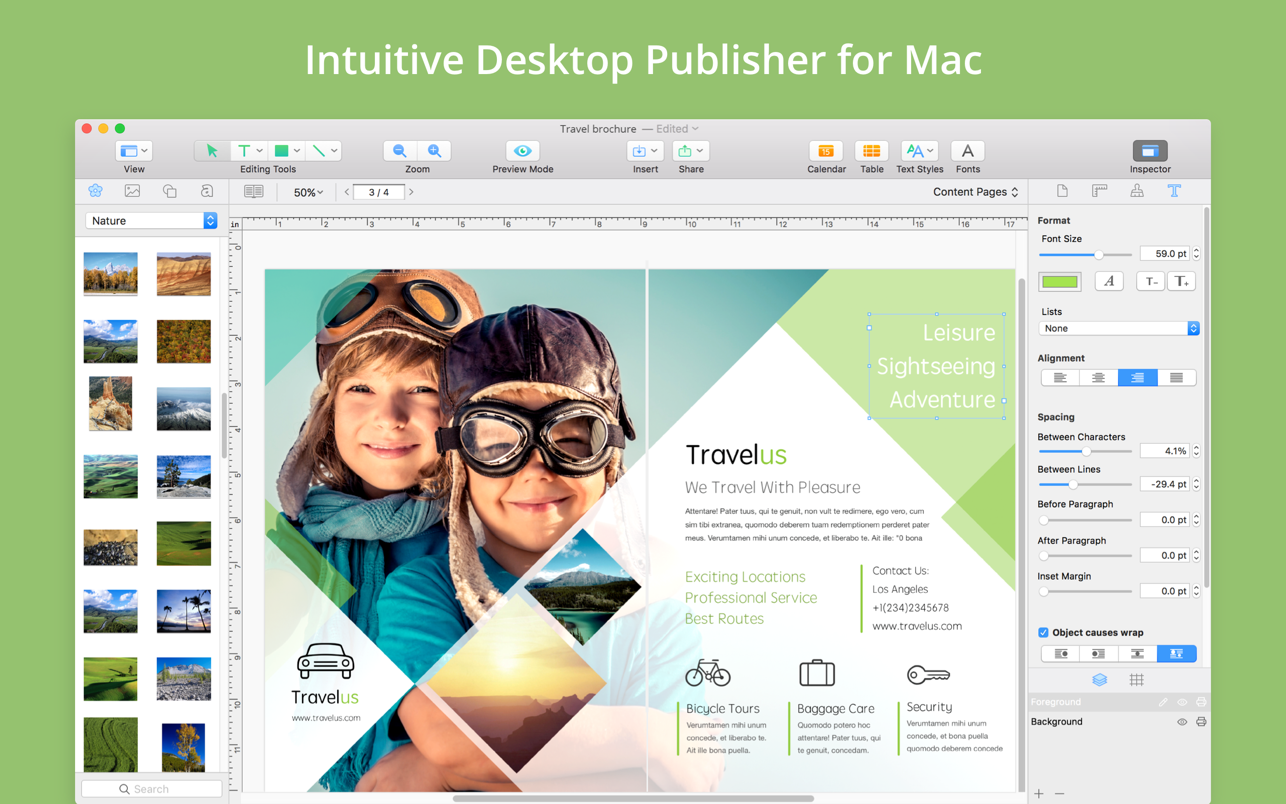
Swift Publisher takes the headache out of desktop publishing: print colorful flyers, newsletters, brochures, letterheads, and more...
- Intel, 64-bit processor
- macOS 10.12 or later
Description
Swift Publisher takes the headache out of desktop publishing: print colorful flyers, newsletters, brochures, letterheads, and more.
Features
• An easy-to-learn alternative. Ditch those massive, daunting design apps aimed at professional publishers — with its accommodating interface, Desktop Publisher is a digital drawing board for the rest of us.
• Text toolkit. Customize text styles, link text boxes, and create visually pleasing wrap-around effects. With Swift Publisher, manipulating your content is never a chore.
• Inspiring options. Spark your creativity. Swift Publisher includes images, designs, and unique masks, giving you the templates and resources you need to jump-start the design process.
• Perfect personalization. When your publication has to be personalized, turn to Swift Publisher. Whether you need to tint, tile, group, rotate, or adjust the opacity of an object, you’ll find the tool you need.
WHAT’S NEW
Version 5.7.8:
Fixes and Improvements :
• Added an alternative way to open documents saved in older versions of the app.
REQUIREMENTS
• Intel, 64-bit processor
• macOS 10.12 or later
ScreenShots
If you are using Adblocker!! Please support this website by adding us to your whitelist. Ads are what helps us bring you premium content! Or read this to know how you can support us. Thank you!
•
Size
– 498.6MB
Previous Versions
Editor-checked details
Recommended for small businesses, schools, churches, clubs and freelancers regularly making flyers, menus, event posters, newsletters, booklets, cards and labels on Mac, especially those wanting a one-time purchase without an enterprise publishing system. Use: lock finished/paper size; build left/right masters; name styles/layers; use licensed local assets; place 300-ppi imagery; test merge on longest text, blanks and first/last contacts; export PDF Original/Best; Preview plus independent preflight; fold a 100% duplex plain-paper proof; make a short stock run; archive source, PDF, assets and manifest. Duplicate every legacy project before opening; 5.7.8 compatibility opening is a recovery aid, not a replacement for archival PDFs. Compare Labels and Databases for data-driven labels, Art Text for typography effects, Amadine/Affinity Designer for vector illustration, Pages for simple text-led documents, and professional DTP for long documents, strict PDF/X or teams.
Pros
- It is easier than a professional publishing suite while retaining genuine layout concepts: multipage/spreads, master pages, linked text, layers, grids and exact coordinates. It suits flyers, menus, posters, newsletters, cards, labels and two-fold booklets. Templates, Smart Shapes, clipart, tables, calendars, barcodes and Photos import accelerate drafts; background/foreground and nonprinting layers help proofing. Apple Contacts address fields, File Data, Counter and dynamic barcodes bring lightweight data merge directly to print, with Copies versus Quantity controlling exact duplicates versus advancing variables. Automatic booklet imposition, duplex options and PDF bleed/cut marks, text-to-curves and image-quality choices cover common desktop/print-shop delivery. Low-cost one-time licensing, native Intel/Apple-silicon support and broad macOS coverage offer strong value to small businesses, clubs and schools without enterprise collaboration, publishing automation or subscription needs.
Cons
- It is lightweight DTP, not an InDesign-class system for long documents, footnotes/indexes, complex styles, advanced variable data, preflight, PDF/X, separations or team publishing; professional prepress still needs independent PDF checks and printer coordination. Booklet imposition is two-fold, left/right mirroring is not automatic, and complex folds, signature blanks and creep need specialist tools. Templates/clipart are convenient but commercial, trademark, identifiable-person/product and redistribution uses are license-limited; built-in does not mean unrestricted. Direct and App Store editions differ in iCloud, updates, purchase restoration and storage, making cross-channel My Templates/add-on migration fragile. Merge centers on Apple Contacts, with limited complex CSV cleaning, conditional logic or database connections; dynamic fields can mass-produce mistakes when Quantity is wrong. Low/Screen may downsample/convert RGB, while outlining text destroys editability. Language support, cross-platform collaboration and interchange ecosystem are smaller than mainstream DTP.
Installation steps
- Swift Publisher 5.7.8 requires macOS 10.12+ and runs natively on Intel and Apple silicon. Move it to Applications and identify whether the license is from BeLight or the Mac App Store; updates, iCloud, add-on assets and template locations differ, so do not mix channels. Before layout, lock finished size, stock, single/spread mode, bleed and binding; create separate left/right master pages plus background, image and text layers. Build a proof containing long CJK/Latin text, missing links, transparent PNG, 300-ppi imagery, barcodes, Apple Contacts address fields and Counter/File Data. For booklets, distinguish document page size from print paper size and manually mirror left/right masters. Export PDF first and inspect fonts, effective resolution, transparency, bleed, cut marks and page order in Preview/preflight. Print on plain paper at 100%, checking duplex flip, margins and binding before using production stock.
Uninstallation steps
- Before removal, duplicate every production document and export print PDF, screen PDF and critical-page PNG; graphic exports do not replace editable sources. Record document version, page/paper size, master pages, layer visibility/printability, bleed, font names/licenses, linked/placed images, barcode symbology/data rules, Contacts/File Data/Counter sources, printer/driver/duplex flip and export settings. Archive My Templates, purchased clipart, logos, photos and Art Text assets separately. App Store and direct editions store data differently, so follow the official same-channel migration rules. Open an offline copy with networking disabled to prove essential assets remain, then regenerate a PDF under another account. Only then remove the app. For full cleanup, delete confirmed Swift Publisher containers, Application Support, preferences and caches only after backing up custom templates and add-on assets.
Common errors and fixes
- Old document will not open: 5.7.8 adds an alternative path for older documents. Work on a copy, open and immediately Save As; never overwrite the only source. If assets are missing, return to the old environment to export PDF and package images/fonts. Wrong booklet order or upside-down backs: document size is the finished page while paper is usually twice it; enable Format as booklet, verify horizontal/vertical and long-/short-edge, then fold a plain-paper proof. Left/right margins are not automatically mirrored, so use separate master pages. For PDF font/shadow problems, prefer Inspector shadows; outline text only in a duplicate and retain editable type. Blurry images require checking effective ppi and choosing Original/Best; Low/Screen downsamples and may convert to RGB. For merge overflow, use Open PDF in Preview on all contacts and distinguish Copies from Quantity—the latter advances Counter/File Data/dynamic barcodes. Keep barcode quiet zones, contrast and size; customizable color does not make pale codes reliable. Missing templates after store-channel changes require the official same-channel/manual migration procedure, not wholesale container moves.
What changed in this version
- The sole itemized 5.7.8 change is an alternative way to open documents saved by older app versions, focusing on legacy recovery; no undocumented design feature is invented. Nearby changes already in this branch include new flyer/menu/poster/business-card templates, Avery and Brother label stock, customizable QR/other barcode color, improved audio/video track-list import, and fixes for Touch Bar hangs, export of text with Fill/Stroke, and an unresponsive built-in image editor on a specific system. Swift Publisher 5 runs natively on Apple silicon and supports Intel, with macOS 10.12 as the official minimum. Core features include multipage/spread documents, master pages/layers, linked text boxes, tables/calendars/barcodes, Apple Contacts merge printing, Counter/File Data, automatic two-fold booklet imposition, and PDF export with bleed/cut marks, text-to-curves and image-quality choices.






Alternatives





Screenshots